ICMP and Ping
Imagine you're a network engineer and a user calls saying they can't reach a critical server. Your first instinct? Ping it. The Internet Control Message Protocol (ICMP) and its Ping tool are the universal 'Are you alive?' check of IP networks. For the CCNA 200-301 exam (Objective 1.5), you must understand ICMP's role in error reporting and connectivity testing—it's not just about 'ping works' but about interpreting ICMP message types, handling unreachables, and knowing when a lack of response doesn't mean a dead host.
Jump to a section
The Post Office's Return-to-Sender Service
Think of ICMP as the postal service's automated 'Return to Sender' system. When you mail a letter, you don't expect a receipt—you just hope it arrives. But if the address doesn't exist, the recipient moved, or the mailbox is full, the post office generates a standard pink slip explaining why delivery failed and sends it back to you. That pink slip is ICMP. It's not a letter you asked for—it's an automated notification about the status of your original mail. Ping is like sending a letter that says 'Please reply immediately if you get this.' You send a special Echo Request letter (Type 8), and if the destination exists and the mailbox is open, it automatically sends back an Echo Reply letter (Type 0). If the address is wrong, you get a 'Destination Unreachable' pink slip (Type 3) with a code that says 'Host Unreachable' or 'Network Unreachable.' If the mailbox is too full, you get 'Source Quench' (rare today). If the letter's Time-to-Live (TTL) expires because it looped around too many post offices, you get 'Time Exceeded' (Type 11)—this is how traceroute works. The post office never delivers your ping letter to the recipient's hands; it only cares that the mailbox itself exists and can send back a reply. ICMP is the same: it operates at the network layer (Layer 3), encapsulated directly in IP packets, and is not a transport protocol like TCP or UDP. It has no ports, no connection setup, and no guaranteed delivery. It's the network's way of saying 'I tried, but here's why it failed.'
How It Actually Works
What Is ICMP and Why Does It Exist?
ICMP (Internet Control Message Protocol) is a supporting protocol in the Internet Protocol Suite, defined by RFC 792. Its primary job is to provide error reporting and diagnostic functions for IP networks. Unlike TCP or UDP, ICMP does not transport user data; it carries messages about the status of IP packets. When a router cannot forward a packet, it sends an ICMP message back to the source explaining the problem. This feedback is essential for the source to adapt (e.g., reduce packet size if 'Fragmentation Needed' is received). Ping and Traceroute are the two most famous ICMP-based tools. On the CCNA exam, you'll need to know ICMP message types, how to interpret ping output, and when ICMP is generated or suppressed.
How ICMP Works at the Packet Level
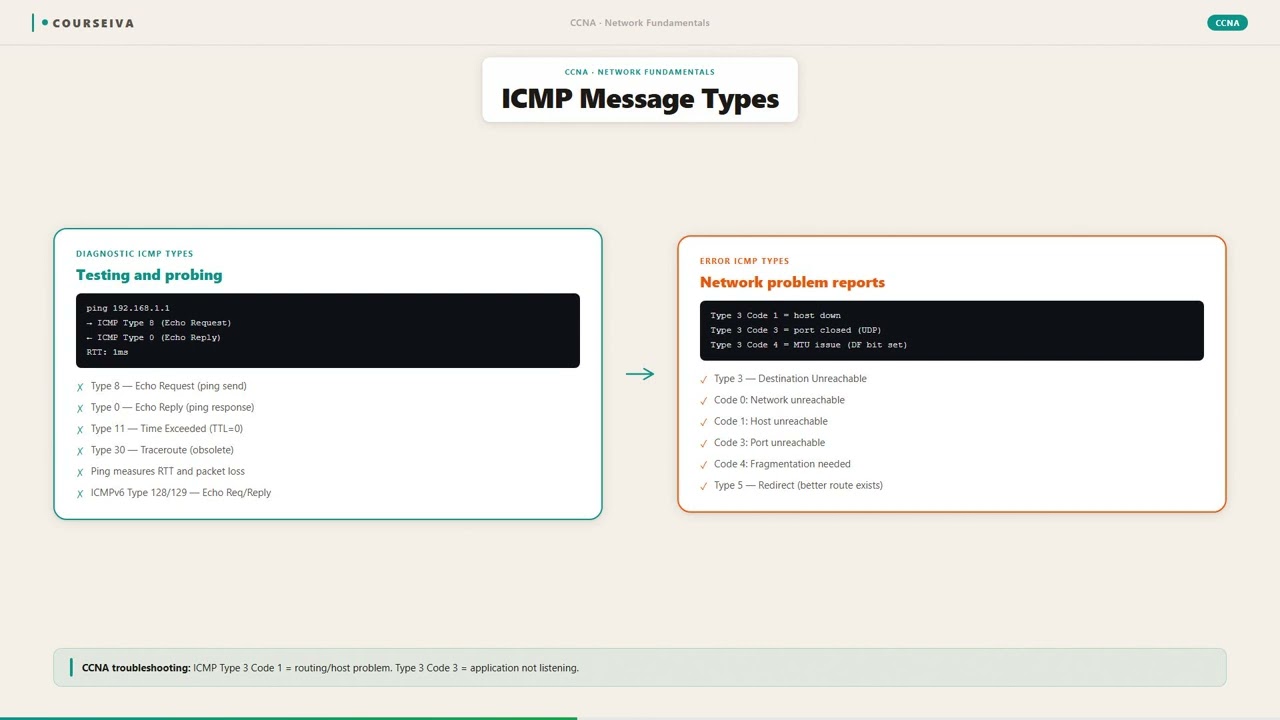
ICMP messages are encapsulated directly inside IP packets. The IP header contains Protocol number 1 to indicate ICMP payload. Each ICMP message has a Type field, a Code field, a Checksum, and a variable data section that typically includes a portion of the original packet that triggered the error. The Type identifies the message category (e.g., 0=Echo Reply, 3=Destination Unreachable, 8=Echo Request, 11=Time Exceeded). The Code provides finer granularity (e.g., Type 3 Code 0=Network Unreachable, Code 1=Host Unreachable, Code 4=Fragmentation Needed but DF set).
For Ping, the process is: 1. Source sends an ICMP Echo Request (Type 8) to destination IP. 2. The request carries an Identifier and Sequence Number to match replies. 3. Destination receives the request; if reachable and not filtered, it sends back an ICMP Echo Reply (Type 0) with the same Identifier and Sequence Number. 4. Source calculates Round Trip Time (RTT) from send to receive. 5. If no reply within a timeout (default 2 seconds on Cisco IOS), source declares 'Request timed out.'
Key States, Timers, and Defaults
ICMP Echo Request Type: 8
ICMP Echo Reply Type: 0
ICMP Destination Unreachable Type: 3, Codes: 0=Net Unreachable, 1=Host Unreachable, 2=Protocol Unreachable, 3=Port Unreachable, 4=Fragmentation Needed and DF set
ICMP Time Exceeded Type: 11, Codes: 0=TTL Exceeded in Transit, 1=Fragment Reassembly Time Exceeded
Ping default count on IOS: 5 packets
Ping default size: 100 bytes (payload) / 72 bytes (payload on some older IOS? Actually default is 100 bytes data, total IP packet size = 20 IP header + 8 ICMP header + 100 data = 128 bytes)
Ping default timeout: 2 seconds (on IOS, adjustable with 'timeout' keyword)
Extended ping: Allows setting source IP, size, repeat count, timeout, etc.
IOS CLI Verification Commands
Basic ping from CLI:
Router# ping 10.1.1.1
Type escape sequence to abort.
Sending 5, 100-byte ICMP Echos to 10.1.1.1, timeout is 2 seconds:
!!!!!
Success rate is 100 percent (5/5), round-trip min/avg/max = 1/2/4 ms
Extended ping:
Router# ping
Protocol [ip]:
Target IP address: 10.1.1.1
Repeat count [5]: 10
Datagram size [100]: 1500
Timeout in seconds [2]: 5
Extended commands [n]: y
Source address or interface: 10.1.1.2
Type of service [0]:
Set DF bit in IP header? [no]: yes
...
!!!!!!...
Traceroute uses ICMP Time Exceeded (Type 11) and UDP probes (on Cisco IOS by default, but can use ICMP).
Router# traceroute 10.1.1.1
Type escape sequence to abort.
Tracing the route to 10.1.1.1
  1 10.0.0.1 4 msec 4 msec 4 msec
  2 10.1.1.1 8 msec 8 msec 8 msec
To see ICMP statistics:
Router# show ip traffic
IP statistics:
  Rcvd:  ... ICMP messages: 100
  Sent:  ... ICMP messages: 50
How ICMP Interacts with Related Protocols
ICMP and ARP: Before sending an ICMP Echo Request, the source must know the destination MAC address. If not in ARP cache, it sends an ARP request. If ARP fails (no reply), the ping fails with 'Destination Host Unreachable' immediately—no ICMP error is sent because the packet never left the source.
ICMP and Fragmentation: If a router needs to fragment a packet but the DF bit is set, it sends ICMP Type 3 Code 4 (Fragmentation Needed but DF set). This is used by Path MTU Discovery (PMTUD).
ICMP and Firewalls/ACLs: Many firewalls block ICMP Echo Requests for security, which can break Ping but not necessarily TCP connectivity. The CCNA exam tests that a successful ping implies IP reachability, but a failed ping does not prove lack of connectivity—ACLs may be filtering ICMP.
ICMP and TTL: Routers decrement TTL. When TTL reaches 0, the router drops the packet and sends ICMP Time Exceeded (Type 11) to the source. This is the basis of traceroute.
Common ICMP Messages Relevant to CCNA
| Type | Code | Description | Use Case | |------|------|-------------|----------| | 0 | 0 | Echo Reply | Ping reply | | 3 | 0 | Network Unreachable | Router has no route to destination network | | 3 | 1 | Host Unreachable | Destination host not reachable (e.g., ARP failure) | | 3 | 3 | Port Unreachable | Destination port not listening (used by traceroute) | | 3 | 4 | Fragmentation Needed but DF set | Path MTU Discovery | | 8 | 0 | Echo Request | Ping request | | 11 | 0 | TTL Exceeded | Traceroute hop detection |
Important Exam Note
Cisco IOS routers generate ICMP unreachables by default, but you can disable them with 'no ip unreachables' on an interface. This is sometimes done for security or to reduce CPU load. On the exam, know that ICMP redirects (Type 5) are used when a router knows a better next-hop for a destination, but they are often disabled for security.
Walk-Through
Verify IP Connectivity with Ping
Use 'ping' from a router or PC to test basic reachability to a destination IP. On Cisco IOS, the standard ping sends five 100-byte ICMP Echo Requests with a 2-second timeout. Each exclamation mark (!) indicates a successful reply; a period (.) indicates a timeout. If you get 'U' (Destination Unreachable), it means an intermediate router sent an ICMP Type 3 message. 'M' means 'Could not fragment' (Type 3 Code 4). '?' means unknown ICMP type. Extended ping allows tuning parameters like source IP, datagram size, repeat count, and timeout—useful for stress testing or simulating different traffic patterns.
Interpret Ping Output Symbols
The symbols in Cisco ping output are critical for troubleshooting. '!' = Echo Reply received. '.' = Request timed out (no reply within timeout). 'U' = Destination Unreachable (ICMP Type 3). 'N' = Network Unreachable (rare, more specific codes). 'P' = Protocol Unreachable. 'Q' = Source Quench (deprecated). 'M' = Fragmentation Needed but DF set. '?' = Unknown ICMP type. 'A' = Administratively prohibited (ACL blocking). On the exam, you might see a scenario where a ping returns 'U' at the first hop, indicating the router has no route to the destination. If you see '!.!.!', intermittent failures could be due to congestion, flapping routes, or asymmetric routing.
Use Extended Ping for Advanced Testing
Extended ping (just type 'ping' and press Enter without destination) allows you to set source IP, datagram size, repeat count, timeout, and DF bit. Common use: test MTU by setting DF bit and increasing datagram size until you get 'M' (Fragmentation needed). For example, if you want to test if a path supports 1500-byte packets, set size to 1500 and enable DF. If you get 'M', the path MTU is smaller. Also, you can specify source interface to test outbound routing from a specific interface—useful for verifying policy-based routing or NAT.
Troubleshoot with Traceroute
Traceroute (tracert on Windows, traceroute on IOS) identifies the path packets take to a destination. Cisco IOS traceroute sends UDP probes to high ports (33434+) with increasing TTL (1, 2, 3...). Each router that decrements TTL to 0 sends back ICMP Time Exceeded (Type 11). When the probe reaches the destination, it responds with ICMP Port Unreachable (Type 3 Code 3) because no service listens on that port. The output shows each hop's IP and RTT. If you get asterisks (* * *), the router may not respond (e.g., ICMP rate-limited or firewalled). Use extended traceroute to change source IP, protocol (ICMP instead of UDP), or timeout.
Analyze ICMP Error Messages for Root Cause
When ping returns 'U' or 'N', the router that generated the ICMP Unreachable is usually the one directly connected to the unreachable destination. To find that router, check the TTL of the ICMP error packet (though ping doesn't show that). Instead, use traceroute to see where the path stops. For example, if traceroute shows hops 1, 2, 3 and then times out, the problem is at hop 3 or beyond. If you get 'U' on the first hop of ping, the source router itself has no route. Also, 'A' (administratively prohibited) means an ACL on the path is blocking ICMP or the destination. On the exam, know that a 'Port Unreachable' from the destination during traceroute indicates successful reachability.
Verify ICMP Generation on Routers
By default, Cisco routers generate ICMP unreachables and time-exceeded messages. You can verify with 'show ip interface [interface]' which shows 'ICMP unreachables are always sent' or 'never sent'. To disable: 'no ip unreachables' under interface config. To re-enable: 'ip unreachables'. Similarly, 'ip redirects' controls ICMP redirects. On the exam, be aware that disabling ICMP unreachables can break PMTUD and traceroute. Also, routers can rate-limit ICMP generation to prevent CPU overload—use 'show ip icmp rate-limit' to see settings.
What This Looks Like on the Job
In a large enterprise with thousands of devices, Ping is the first tool used to verify Layer 3 connectivity. For example, when deploying a new branch office, the network engineer will ping the branch router's WAN IP from the head-end to confirm the link is up. If ping fails, the engineer checks routing protocols, ACLs, and firewall rules. A common scenario: after configuring a new VLAN on a switch, the engineer pings the SVI from a host to verify inter-VLAN routing. If the ping succeeds, basic connectivity is confirmed; if it fails, the engineer checks the switch's VLAN configuration and the router's subinterface or SVI.
Another scenario: Path MTU Discovery issues. A remote user cannot access a web server, but ping with default size works. The engineer uses extended ping with DF bit set and varying packet sizes to find the path MTU. If a router returns 'Fragmentation Needed' (ICMP Type 3 Code 4), the engineer knows the path MTU is smaller than the packet size. This often happens with VPN tunnels (e.g., IPSec adds overhead). The engineer then adjusts the MSS on the TCP connection or configures the router to clear DF bit for certain traffic.
In production, ICMP is often rate-limited or filtered. For example, a security policy might block all ICMP to external interfaces except from monitoring servers. This means ping from the internet will fail, but TCP traffic may still work. Network engineers must understand that 'ping failed' does not always mean 'host down.' They use tools like 'telnet' to test specific ports or 'traceroute' to see where ICMP is blocked. When misconfigured, such as disabling 'ip unreachables' on a router, PMTUD fails, leading to TCP black holes where connections hang after the initial handshake. Engineers must balance security with operational needs—they often allow ICMP Echo and Unreachable from trusted sources only.
Scale considerations: On a busy router, generating ICMP for every dropped packet can overwhelm the CPU. Cisco routers have built-in rate-limiting for ICMP (default 100 packets per second for unreachables). Engineers can adjust with 'ip icmp rate-limit unreachable [time]'. In data centers, excessive ICMP can also consume bandwidth—though ICMP is low-volume, a flood of ping requests (ICMP flood attack) can saturate links. Modern networks use ACLs to permit only necessary ICMP types (e.g., permit icmp any any echo-reply, permit icmp any any time-exceeded).
How CCNA 200-301 Actually Tests This
On the CCNA 200-301 exam, Objective 1.5 specifically covers 'Use of ICMP and Ping.' You'll be tested on interpreting ping output, understanding ICMP message types, and troubleshooting connectivity. Expect 2-3 questions on this topic. The most common wrong answers:
'Ping uses TCP or UDP.' Many candidates assume ping uses a transport protocol because it has a request/reply pattern. Wrong: ICMP is Layer 3, directly over IP (Protocol 1). There are no ports.
'A successful ping means the application is working.' Wrong: Ping tests IP reachability and the host's network stack. A host can respond to ping even if the web server is down. Conversely, a firewall may block ping but allow HTTP.
'If ping fails, there is no connectivity.' Wrong: ICMP may be blocked by ACLs or firewalls. Always confirm with other methods (telnet to a known open port, traceroute).
'Traceroute uses ICMP Echo Requests on Cisco IOS.' Wrong: By default, Cisco IOS traceroute uses UDP probes with high destination ports. Windows tracert uses ICMP Echo Requests. On IOS you can use 'traceroute ip' with protocol option to use ICMP.
Specific values to memorize:
ICMP Echo Request Type = 8, Code = 0
ICMP Echo Reply Type = 0, Code = 0
ICMP Destination Unreachable Type = 3, Codes: 0=Net, 1=Host, 4=Frag Needed
ICMP Time Exceeded Type = 11, Code = 0
Default ping count on IOS = 5
Default ping timeout = 2 seconds
Calculation traps: None directly, but you might need to interpret TTL values. For example, if a ping reply shows TTL=120, the original TTL was likely 128 (common for Windows) or 255 (common for Cisco). The number of hops = original TTL - received TTL.
Decision rule: For scenario questions asking 'Why did ping return U?', check if the source router has a route to the destination. If yes, the next-hop router may have no route. For 'Why did ping return M?', check if DF bit is set and packet size exceeds path MTU. For 'Why did ping return A?', look for ACLs blocking ICMP.
Elimination strategy: If an answer says 'ping uses TCP port 7' or 'ICMP is a transport protocol,' eliminate it immediately. If an answer says 'ICMP guarantees delivery,' eliminate it—ICMP is unreliable.
Key Takeaways
ICMP is Layer 3 protocol, directly over IP (Protocol 1), no ports.
Ping uses ICMP Type 8 (Echo Request) and Type 0 (Echo Reply).
Default Cisco IOS ping: 5 packets, 100 bytes payload, 2-second timeout.
ICMP Destination Unreachable Type 3 Code 4 = Fragmentation Needed but DF set.
ICMP Time Exceeded Type 11 Code 0 = TTL expired in transit (used by traceroute).
Cisco IOS traceroute uses UDP probes by default, not ICMP.
A failed ping does not prove lack of connectivity—ICMP may be filtered.
Easy to Mix Up
These come up on the exam all the time. Here's how to tell them apart.
ICMP Echo Request/Reply (Ping)
Type 8 (Request) and Type 0 (Reply)
Used to test basic reachability
Generated by destination host (or intermediate device if proxy)
Often permitted in firewalls for monitoring
Does not indicate why a failure occurred
ICMP Destination Unreachable
Type 3 with various codes (0-15)
Used to report why a packet could not be delivered
Generated by routers or destination hosts
Often blocked by firewalls for security
Provides specific reason (net unreachable, host unreachable, etc.)
Watch Out for These
Mistake
Ping uses TCP or UDP for its request/reply mechanism.
Correct
Ping uses ICMP, which is encapsulated directly in IP (Protocol 1). There are no transport layer ports involved.
Because ping has a request/reply pattern similar to TCP, candidates incorrectly assume it uses a transport protocol.
Mistake
If a host responds to ping, its applications are working.
Correct
Ping only tests IP reachability and the host's network stack. A host can be pingable but have a downed web server or firewall blocking application ports.
Ping is often used as a quick check, but it only verifies Layer 3 connectivity, not application health.
Mistake
Traceroute on Cisco IOS uses ICMP Echo Requests by default.
Correct
Cisco IOS traceroute uses UDP probes to high ports (33434+). Windows tracert uses ICMP Echo Requests. IOS can be configured to use ICMP with 'traceroute ip' and protocol option.
Because Windows and many online examples use ICMP, candidates assume IOS does the same.
Mistake
ICMP guarantees delivery of error messages.
Correct
ICMP is an unreliable protocol—error messages are sent best-effort. A router may not generate an ICMP error if it is rate-limited or if the original packet had errors.
The term 'message' implies reliability to some, but ICMP has no delivery guarantees.
Do You Actually Know This?
Reveal each answer, then mark whether you got it right. Score 60%+ to unlock the next chapter.
Frequently Asked Questions
Why does ping sometimes show 'Destination Host Unreachable' immediately without sending any packets?
This happens when the source device has no ARP entry for the destination and the ARP request fails. The device cannot build a Layer 2 frame, so it never sends the ICMP Echo Request. The error message comes from the local IP stack, not from an ICMP message. On Cisco IOS, the output shows '.....' with 'Destination Host Unreachable' printed before the summary. This is different from 'U' which comes from a remote router.
Can a router be configured to not respond to ping?
Yes. You can disable ICMP Echo Reply generation by configuring an access list that blocks ICMP Echo Request (Type 8) on the input of the interface, or by using 'no ip icmp echo-reply' (though this is not a standard command on IOS—actually you block with ACL). Alternatively, you can disable all ICMP unreachables with 'no ip unreachables', but that does not affect Echo Reply. To prevent the router from responding to ping, use an ACL: 'access-list 100 deny icmp any any echo' applied inbound on the interface.
What is the difference between 'ping' and 'extended ping' on Cisco IOS?
Basic ping sends five 100-byte ICMP Echo Requests with a 2-second timeout using the source IP of the egress interface. Extended ping allows you to specify the source IP or interface, packet size, repeat count, timeout, DF bit, and other options. Extended ping is entered by typing 'ping' without a destination and then answering prompts. It is essential for advanced troubleshooting like MTU discovery.
Why does traceroute on Cisco IOS use UDP instead of ICMP?
Historically, traceroute was designed to use UDP probes because ICMP Echo Requests might be handled differently by routers (some routers might respond to ICMP Echo themselves rather than forwarding). Using UDP to a high port ensures that the destination will respond with ICMP Port Unreachable, confirming end-to-end reachability. However, many firewalls block UDP high ports, so modern IOS supports ICMP-based traceroute as well.
What does it mean when a ping returns 'Request timed out' vs 'Destination Unreachable'?
'Request timed out' (shown as a period '.') means no ICMP Echo Reply was received within the timeout period. This could be due to the destination being down, a firewall blocking ICMP, or network congestion. 'Destination Unreachable' (shown as 'U') means a router along the path sent an ICMP Type 3 message explicitly stating the destination is unreachable. The latter gives more information: the router knows the destination is not reachable.
How does ICMP interact with NAT?
When a router performs NAT, it translates the source IP of the ICMP Echo Request. The destination sees the public IP. The ICMP Echo Reply is sent back to that public IP, and NAT translates it back to the private IP. However, ICMP errors (like Unreachable) are sent to the source IP of the original packet, which after NAT is the public IP. The NAT router must also translate those ICMP errors back to the private IP. If the NAT router does not have a translation entry for the ICMP error's embedded IP, it may drop the error. This can cause black holes.
What is the purpose of the Identifier and Sequence Number fields in ICMP Echo messages?
The Identifier field is used to match Echo Requests with Echo Replies—it is typically set to the process ID of the pinging program. The Sequence Number increments with each request, allowing the source to detect packet loss and calculate RTT per packet. On Cisco IOS, the sequence numbers start at 1 and increment. These fields are essential for ping to work correctly when multiple ping instances run simultaneously.
Terms Worth Knowing
Ready to put this to the test?
You've just covered ICMP and Ping — now see how well it sticks with free CCNA 200-301 practice questions. Full explanations included, no account needed.
Done with this chapter?