Traceroute and Path Discovery
Imagine sending a letter and wanting to know every post office it passes through. In networking, traceroute does exactly that: it reveals the path packets take from source to destination, hop by hop. For the CCNA 200-301 exam (Objective 1.5), you must understand how traceroute works at the packet level, interpret its output, and troubleshoot path issues. This skill is essential for real-world network engineering, as it helps isolate routing loops, firewall blocks, and latency problems.
Jump to a section
Traceroute: The Postcard Trail
Think of traceroute as sending a series of postcards to a friend in a distant city, each with a different 'time-to-live' (TTL) stamp. The first postcard has a TTL of 1, meaning it can only reach the first post office before expiring. That post office stamps the postcard with its name and sends it back to you, saying 'I can't deliver this further.' You now know the first hop. Next, you send a postcard with TTL 2. It reaches the first post office, which decrements the TTL to 1 and forwards it to the second post office. The second post office sees TTL 0, stamps the postcard with its name, and returns it. You learn the second hop. You repeat this, incrementing the TTL each time, until a postcard reaches your friend. Your friend sends back a 'delivered' response. Now you have a list of all post offices along the route, plus the round-trip time for each leg. This is exactly how traceroute works: it sends packets with increasing TTL values, and each router that decrements TTL to 0 sends back an ICMP Time Exceeded message, revealing its IP address. The destination responds with an ICMP Echo Reply (or a port unreachable) to signal the end of the path.
How It Actually Works
What is Traceroute and Why Does It Exist?
Traceroute is a network diagnostic tool used to trace the path packets take from a source to a destination across an IP network. It was originally implemented on Unix systems and is now available on virtually all operating systems and network devices. The primary purpose of traceroute is to identify the sequence of routers (hops) along the path, measure the round-trip time (RTT) to each hop, and detect routing issues such as loops, black holes, or high latency.
How Traceroute Works Step by Step at the Packet/Frame Level
Traceroute exploits the Time-to-Live (TTL) field in the IP header. Each router that forwards a packet decrements the TTL by 1. When TTL reaches 0, the router discards the packet and sends an ICMP Time Exceeded (Type 11, Code 0) message back to the source. Traceroute sends a series of packets, starting with TTL=1 and incrementing by 1 for each subsequent packet, until the destination is reached.
Step 1: Source sends a packet with TTL=1 to the destination. The first router decrements TTL to 0, drops the packet, and replies with ICMP Time Exceeded. The source records the router's IP address and RTT.
Step 2: Source sends a packet with TTL=2. The first router decrements to 1, forwards; the second router decrements to 0, drops, and sends ICMP Time Exceeded. Source records second hop.
Step 3: Continue incrementing TTL until the destination responds. The destination's response depends on the transport protocol used:
On Unix/Linux, traceroute typically uses UDP packets to a high port (e.g., 33434+). The destination sends an ICMP Port Unreachable (Type 3, Code 3) because no service listens on that port.
On Windows, tracert uses ICMP Echo Request packets. The destination sends an ICMP Echo Reply.
Cisco IOS traceroute uses UDP packets with destination port 33434 and increments for each probe.
Key States, Timers, and Defaults
TTL Values: Start at 1, increment by 1 per hop, up to a maximum of 30 (default on most implementations).
Probes per Hop: Typically 3 probes per TTL value. The RTT for each probe is displayed; an asterisk (*) indicates no response (timeout).
Timeout: Default timeout for each probe is 5 seconds (on Cisco IOS, it's 3 seconds).
Maximum Hops: 30 by default, configurable.
UDP Destination Port: On Cisco IOS, starts at 33434 and increments by 1 for each probe (to avoid confusion with previous responses).
IOS CLI Verification Commands with Real Example Output
To run traceroute from a Cisco router:
Router# traceroute 192.168.1.1Example output:
Type escape sequence to abort.
Tracing the route to 192.168.1.1
VRF info: (vrf in name/id, vrf out name/id)
  1 10.0.0.1 1 msec 1 msec 1 msec
  2 172.16.0.1 2 msec 2 msec 2 msec
  3 192.168.1.1 3 msec 3 msec 3 msec
To display the IP routing table and verify next hops:
Router# show ip routeTo verify the path with a specific source interface:
Router# traceroute 192.168.1.1 source 10.0.0.2How Traceroute Interacts with Related Protocols
ICMP: Traceroute relies on ICMP Time Exceeded messages from intermediate routers and ICMP Port Unreachable (or Echo Reply) from the destination.
UDP: Cisco IOS traceroute uses UDP probes; the destination port is high (33434+).
Routing Protocols: Traceroute follows the current routing table; routing changes can affect the path.
Firewalls: Firewalls may block ICMP or UDP probes, causing asterisks (*) in output. Some firewalls rate-limit ICMP, leading to partial responses.
Load Balancing: If equal-cost multipath (ECMP) is in use, successive probes may take different paths, showing multiple IPs for the same hop.
Walk-Through
Initiate Traceroute from Source
On a Cisco router, enter the command `traceroute <destination-ip>` or `tracert <destination-ip>` on Windows. The source sends the first probe packet with TTL=1. The destination IP is resolved via DNS if a hostname is used. The command begins sending UDP packets (on Cisco) to port 33434. The first probe's TTL is 1, so the first router in the path will decrement it to 0 and generate an ICMP Time Exceeded message.
First Hop Responds with ICMP Time Exceeded
The first router (next-hop) receives the packet, decrements TTL from 1 to 0, discards it, and sends an ICMP Time Exceeded (Type 11, Code 0) back to the source. The source records the source IP of that ICMP message as hop 1. It also measures the round-trip time (RTT) for that probe. This process repeats for three probes to the same TTL (default). The output shows the IP address of hop 1 and three RTT values (e.g., 1 msec 1 msec 1 msec).
Increment TTL and Probe Next Hops
After the three probes for TTL=1, the source increments TTL to 2 and sends three new probes. The first router decrements TTL to 1 and forwards; the second router decrements to 0 and sends ICMP Time Exceeded. This continues until TTL reaches the destination. Each hop's IP and RTT are displayed. If a probe times out (no ICMP response within 3 seconds on Cisco), an asterisk (*) is shown for that probe.
Destination Responds with ICMP Port Unreachable
When a probe reaches the destination with TTL >= 1, the destination receives the UDP packet on a high port (e.g., 33434). Since no service listens on that port, the destination sends an ICMP Port Unreachable (Type 3, Code 3) back to the source. This response indicates the trace is complete. The source displays the destination's IP and the RTT. On Windows tracert using ICMP Echo, the destination sends an ICMP Echo Reply.
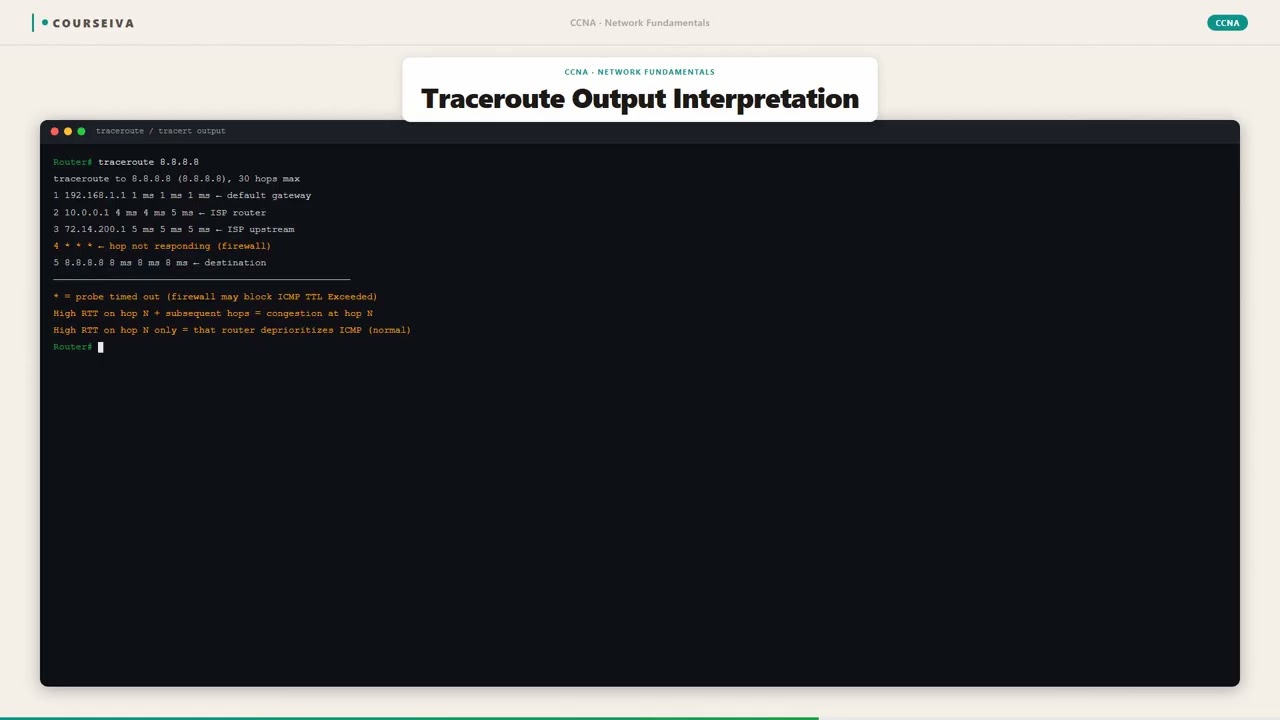
Interpret Traceroute Output
The output shows each hop number, the IP address (or hostname if reverse DNS resolves), and three RTT values in milliseconds. For example: `1 10.0.0.1 1 msec 1 msec 2 msec`. An asterisk (*) means no response was received within the timeout. A line like `!H` indicates a host unreachable, `!N` network unreachable, `!P` protocol unreachable, `!A` administratively prohibited (ACL). If all three probes are asterisks, the hop is likely blocked by a firewall or the router does not send ICMP Time Exceeded.
Troubleshoot with Extended Traceroute
Cisco IOS supports an extended traceroute for advanced options. Enter `traceroute` without a destination and answer prompts: destination IP, source IP, numeric display, timeout, probes, minimum/maximum TTL, port, and verify. For example, to use a specific source interface: `traceroute 192.168.1.1 source 10.0.0.2`. Extended traceroute helps when the default path is asymmetric or when you need to test from a specific source. Use `show ip route` to verify the routing table and `show access-lists` to check for filters.
What This Looks Like on the Job
In enterprise networks, traceroute is indispensable for diagnosing path issues. For example, consider a branch office unable to reach a corporate application hosted at headquarters. The network engineer runs traceroute from the branch router to the application server's IP. The output shows a hop with consistently high latency (e.g., 300 ms) or packet loss (asterisks). This identifies a congested WAN link or a misconfigured router. The engineer can then investigate that specific hop, check interface statistics with show interfaces, and possibly adjust QoS or routing.
Another scenario: a network engineer suspects a routing loop between two routers. Traceroute from a source to a destination shows the same IP address repeating across multiple hops (e.g., Hop 3: 10.0.0.1, Hop 4: 10.0.0.1, Hop 5: 10.0.0.1). This is a classic routing loop. The engineer can then check the routing tables on those routers using show ip route and verify that they are not advertising conflicting routes. In production, traceroute is often run from multiple vantage points to map the network topology.
Performance considerations: Traceroute itself generates little traffic (three small packets per hop), but in large networks with many hops, it can be run frequently. Some organizations disable ICMP Time Exceeded messages on edge routers to prevent reconnaissance, which causes traceroute to show asterisks. In such cases, engineers may use alternative tools like tcptraceroute (which uses TCP SYN packets) or rely on router logs.
Misconfiguration example: If a router has an access-list blocking ICMP unreachable messages, traceroute will show asterisks for that hop. The engineer must check the ACL with show access-lists and ensure that ICMP Type 11 (Time Exceeded) is permitted. Additionally, if the router's control-plane policing drops ICMP packets, traceroute may be unreliable. Understanding these real-world nuances is critical for effective troubleshooting.
How CCNA 200-301 Actually Tests This
The CCNA 200-301 exam tests traceroute under Objective 1.5 (Network Access – IP Connectivity). You must know how traceroute works, interpret its output, and identify path issues. Specifically:
How Traceroute Works: Understand that it uses TTL expiration to elicit ICMP Time Exceeded messages. Know that Cisco IOS uses UDP probes (not ICMP). The destination responds with ICMP Port Unreachable. Windows tracert uses ICMP Echo.
2. Common Wrong Answers: - *Traceroute uses ICMP Echo Requests by default on Cisco.* WRONG. It uses UDP. Windows uses ICMP. Candidates often confuse the two. - *An asterisk (*) always means the router is down.* WRONG. It could mean the router does not send ICMP Time Exceeded (e.g., due to ACL or rate-limiting) or the response was lost. - *Traceroute can only go 30 hops because of the TTL field's maximum value.* WRONG. The TTL field is 8 bits (max 255), but traceroute defaults to 30 hops; it can be configured higher. - *Traceroute measures one-way latency.* WRONG. It measures round-trip time (RTT) from source to hop and back.
3. Specific Values and Commands:
- Default max hops: 30
- Default probes per hop: 3
- Default timeout: 3 seconds (Cisco) / 5 seconds (Windows)
- Default UDP start port: 33434 (incremented per probe)
- Command: traceroute <ip> on Cisco, tracert <ip> on Windows
- Output interpretation: !H = host unreachable, !N = network unreachable, !P = protocol unreachable, !A = administratively prohibited, * = timeout
4. Decision Rule for Scenario Questions: - If a traceroute shows asterisks at a hop but later hops are reachable, the router at that hop is likely blocking ICMP Time Exceeded (e.g., ACL or rate-limit). - If the same IP appears in multiple consecutive hops, suspect a routing loop. - If the destination is not reached and all hops show asterisks after a certain point, a firewall is likely dropping probes.
Elimination Strategy: When given multiple choice, eliminate options that confuse UDP vs ICMP, misinterpret asterisks, or suggest traceroute uses TCP by default. Focus on the TTL mechanism.
Key Takeaways
Traceroute uses TTL expiration to discover each hop; Cisco IOS uses UDP probes, Windows uses ICMP Echo.
Default max hops = 30, default probes per hop = 3, default timeout = 3 seconds (Cisco).
An asterisk (*) indicates no response within timeout; possible causes: ACL blocking ICMP, rate-limiting, or packet loss.
ICMP Time Exceeded (Type 11, Code 0) is sent by routers when TTL expires; destination sends ICMP Port Unreachable (Type 3, Code 3) for UDP probes.
Extended traceroute allows specifying source IP, port, timeout, and TTL range.
Output symbols: !H = host unreachable, !N = network unreachable, !P = protocol unreachable, !A = administratively prohibited.
Traceroute measures round-trip time (RTT), not one-way delay.
Easy to Mix Up
These come up on the exam all the time. Here's how to tell them apart.
Cisco IOS Traceroute
Uses UDP probes (destination port 33434+)
Destination responds with ICMP Port Unreachable
Default timeout: 3 seconds
Supports extended traceroute with prompts
Output format: hop IP RTT RTT RTT
Windows Tracert
Uses ICMP Echo Request probes
Destination responds with ICMP Echo Reply
Default timeout: 5 seconds
Limited options (can specify max hops)
Output format: hop IP RTT RTT RTT
Watch Out for These
Mistake
Traceroute always uses ICMP Echo Request packets.
Correct
On Cisco IOS, traceroute uses UDP packets to high ports (33434+). Windows tracert uses ICMP Echo. Unix/Linux uses UDP by default.
Candidates often assume all implementations use ICMP because of the name 'ping' or because Windows uses ICMP.
Mistake
An asterisk (*) in traceroute output means the router is down.
Correct
An asterisk means no response was received within the timeout. The router may be up but configured to not send ICMP Time Exceeded (e.g., ACL or rate-limit).
It is intuitive to think no response equals failure, but routers can be configured to suppress ICMP for security.
Mistake
Traceroute can trace up to 255 hops because TTL is an 8-bit field.
Correct
The default maximum hops is 30, but it can be configured up to 255. The TTL field itself can hold up to 255, but traceroute defaults to 30.
Candidates confuse the protocol limit (255) with the application default (30).
Mistake
Traceroute shows the one-way latency to each hop.
Correct
Traceroute displays round-trip time (RTT) – the time for the probe to reach the hop and the ICMP response to return.
The term 'time' is ambiguous; candidates may not realize it includes the return path.
Do You Actually Know This?
Reveal each answer, then mark whether you got it right. Score 60%+ to unlock the next chapter.
Frequently Asked Questions
What is the difference between traceroute and tracert?
Traceroute is the command on Unix/Linux and Cisco IOS, while tracert is the Windows version. Both trace the path, but they use different transport protocols: traceroute typically uses UDP, while tracert uses ICMP Echo Requests. The output format is similar, but Windows tracert has fewer options. On the CCNA exam, focus on the Cisco IOS implementation (UDP).
Why does traceroute show asterisks for some hops?
Asterisks (*) indicate that no ICMP response was received within the timeout period. Common reasons: the router is configured to not send ICMP Time Exceeded (e.g., due to an access-list or rate-limiting), the response was lost due to network congestion, or the router is down. If later hops are displayed, the router is likely up but blocking ICMP.
Can traceroute be used to measure latency?
Yes, traceroute displays the round-trip time (RTT) for each probe to each hop. However, note that it measures the time for the probe to reach the hop and the ICMP response to return, not the one-way delay. For accurate one-way delay, you need specialized tools. On the exam, remember that traceroute gives RTT.
What is extended traceroute on Cisco IOS?
Extended traceroute allows you to specify additional parameters such as source IP, timeout, probes per hop, TTL range, port number, and whether to use numeric display. To use it, enter `traceroute` without a destination and answer the prompts. It is useful for testing specific source interfaces or avoiding default paths.
How does traceroute handle load-balanced paths?
If equal-cost multipath (ECMP) is used, successive probes may take different paths, resulting in different IP addresses for the same hop number. Traceroute may show multiple IPs for a single hop, indicating that traffic is being load-balanced. The output might look like: `1 10.0.0.1 1 msec 10.0.0.2 1 msec 10.0.0.1 1 msec`.
What does the '!' symbol mean in traceroute output on Cisco?
The exclamation mark (!) indicates that the probe reached the destination and received a response (ICMP Port Unreachable). It is used in some older IOS versions. In modern IOS, the output shows the destination IP and RTT. Other symbols: !H (host unreachable), !N (network unreachable), !P (protocol unreachable), !A (administratively prohibited), * (timeout).
Why does traceroute use UDP instead of ICMP on Cisco?
Using UDP distinguishes the destination response (ICMP Port Unreachable) from intermediate router responses (ICMP Time Exceeded). If ICMP Echo were used, both intermediate routers and the destination would send ICMP Echo Replies, making it harder to differentiate. UDP to a high port ensures that only the destination will respond with Port Unreachable, while routers still send Time Exceeded.
Terms Worth Knowing
Ready to put this to the test?
You've just covered Traceroute and Path Discovery — now see how well it sticks with free CCNA 200-301 practice questions. Full explanations included, no account needed.
Done with this chapter?