DNS Resolution Process
Every time a user types a domain name like 'www.cisco.com' into a browser, a silent, lightning-fast process translates that human-friendly name into a machine-readable IP address. This is DNS resolution, and it's one of the most critical services on any IP network. For the CCNA 200-301 exam, objective 1.5 requires you to understand how DNS operates, how to configure it on Cisco devices, and how to troubleshoot resolution failures. In real network engineering, DNS issues are among the most common causes of user complaints, so mastering this topic is essential.
Jump to a section
A simple way to picture DNS Resolution Process
The Phone Book of the Internet
Say you're trying to call a friend named 'Alice' but you only have her name, not her phone number. You grab a physical phone book that lists names and their corresponding numbers. You look up 'Alice' and find her number: 555-1234. That's exactly how DNS works: your computer (the client) knows the name (like www.google.com) but not the IP address. The DNS resolver (like the phone book) provides the IP address (like 142.250.190.4).
But there's more: what if the phone book is huge and you don't have it at home? You call a directory assistance operator (the recursive resolver). The operator doesn't have every number memorized, so they call a regional office (the root server) that tells them which city's phone book to look in (the TLD server). The operator then calls that city's office (the authoritative nameserver) which has the exact number for 'Alice'. The operator gives you the number, and you make the call.
In DNS, the recursive resolver does all the legwork, querying root, TLD, and authoritative servers in order. It then caches the result so the next time you ask for 'Alice', it can answer immediately from memory. This caching is what makes the Internet fast — without it, every request would require multiple round trips across the globe.
How It Actually Works
What is DNS and Why Does It Exist?
DNS (Domain Name System) is a hierarchical, distributed database that maps domain names to IP addresses. It was created because humans find it easier to remember names than numbers. Without DNS, you'd have to type something like '142.250.190.4' to visit Google. DNS also supports other record types like MX (mail exchange), CNAME (canonical name), and NS (nameserver).
The DNS Hierarchy
The DNS namespace is a tree structure. At the top is the root (represented by a dot '.'). Below that are top-level domains (TLDs) like .com, .org, .net, and country codes like .uk. Below TLDs are second-level domains (e.g., 'cisco.com'), and further subdomains (e.g., 'www.cisco.com'). Each level has authoritative nameservers that hold the records for that zone.
The Resolution Process Step by Step
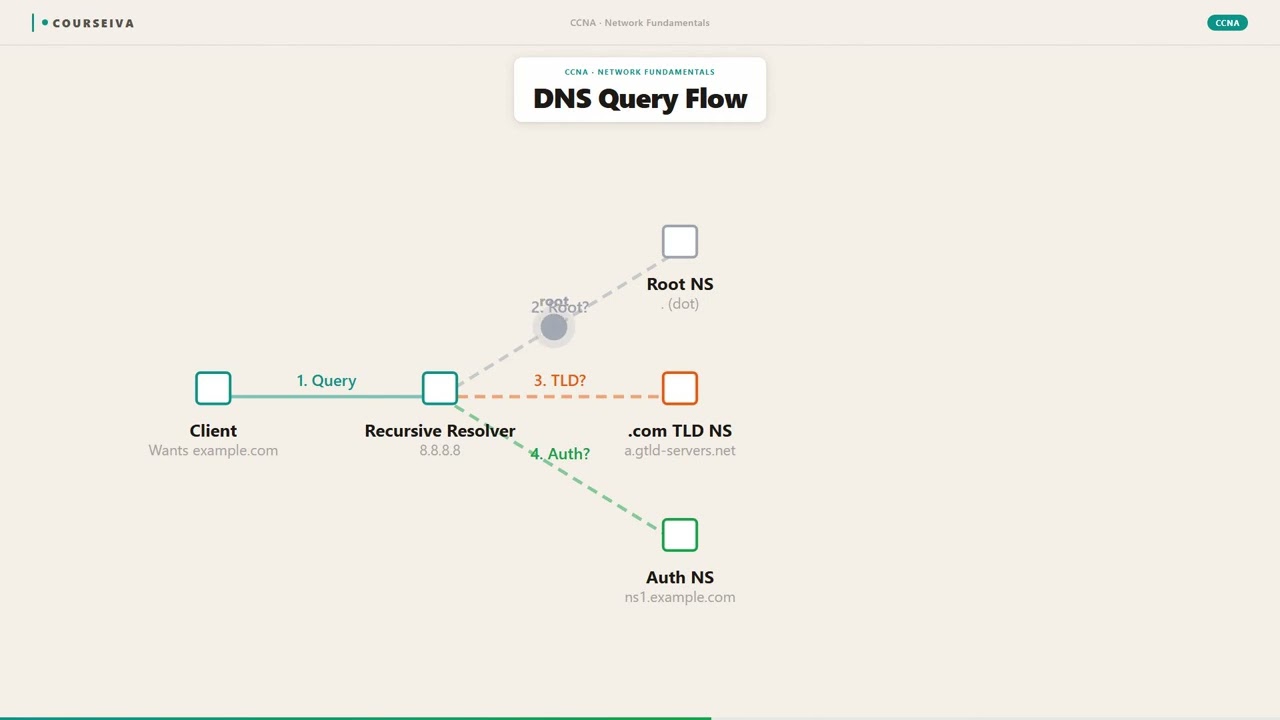
When a client needs to resolve a name, it follows these steps:
The client's DNS resolver (often the operating system's stub resolver) checks its local cache. If the record is there and not expired, it returns the IP immediately.
If not cached, the resolver sends a recursive query to a configured DNS server (usually provided via DHCP). This server is the recursive resolver (often operated by the ISP or a public resolver like 8.8.8.8).
The recursive resolver checks its own cache. If found, it replies.
If not cached, the resolver starts an iterative process: it queries a root server (there are 13 logical root servers worldwide). The root server doesn't know the IP for 'www.example.com', but it knows the addresses of the .com TLD servers.
The resolver then queries a .com TLD server. The TLD server doesn't know the IP for 'www.example.com' but knows the authoritative nameservers for 'example.com'.
The resolver queries the authoritative nameserver for 'example.com'. That server holds the actual A record for 'www.example.com' and returns the IP address.
The recursive resolver caches the result (with a TTL) and sends the answer back to the client.
The client caches the result locally and uses the IP to initiate communication.
Key Timers and Defaults
TTL (Time to Live): Each DNS record has a TTL in seconds, set by the zone administrator. Common values: 300 (5 minutes) to 86400 (24 hours). The TTL tells resolvers how long to cache the record.
Negative caching: If a name doesn't exist, the resolver may cache the negative response (NXDOMAIN) for a shorter period, typically 300 seconds (5 minutes) per RFC 2308.
Default DNS server on Cisco devices: If not configured, the router uses the DNS server learned via DHCP on the WAN interface, or 255.255.255.255 (broadcast) if none.
IOS CLI Verification Commands
To verify DNS resolution on a Cisco router:
Router# show hosts
Default domain is not set
Name/address lookup uses domain service
Name servers are: 8.8.8.8

Host                      Type          Age(address)   Addresses
cisco.com                 IP            0              72.163.4.161
www.cisco.com             IP            0              72.163.4.161
To test resolution manually:
Router# ping cisco.com
Translating "cisco.com"...domain server (8.8.8.8) [OK]
Type escape sequence to abort.
Sending 5, 100-byte ICMP Echos to 72.163.4.161, timeout is 2 seconds:
!!!!!
Success rate is 100 percent (5/5), round-trip min/avg/max = 20/22/24 ms
To configure DNS on a router:
Router(config)# ip domain-lookup
Router(config)# ip name-server 8.8.8.8
Router(config)# ip domain-name example.com
Interaction with Related Protocols
DHCP: Often provides DNS server addresses to clients. A misconfigured DHCP scope can break DNS resolution.
ARP: Before sending a DNS query to a local server, the client must resolve the server's MAC address via ARP.
TCP/UDP: DNS uses UDP port 53 for queries and responses (max 512 bytes). If the response is larger (e.g., DNSSEC), it falls back to TCP port 53.
HTTP/HTTPS: Browsers use DNS to resolve the server's IP before establishing a TCP connection.
Walk-Through
Check Local Cache
The client's operating system (or browser) first checks its local DNS cache. On Windows, you can view the cache with `ipconfig /displaydns`. On Cisco routers, the cache is shown with `show hosts`. If the record exists and its TTL hasn't expired, the client uses the cached IP. This step happens in microseconds and avoids network traffic. On the CCNA exam, remember that a router can cache DNS entries from previous lookups. The default timeout for DNS entries in the router's cache is based on the TTL from the DNS response, but if no TTL is provided, the router uses a default of 0 (no caching) or 3600 seconds (1 hour) depending on IOS version.
Send Recursive Query to Resolver
If the local cache misses, the client sends a recursive query to its configured DNS resolver (e.g., 8.8.8.8). The client expects the resolver to return either the final answer or an error. The query is a UDP packet to port 53. The source port is ephemeral (e.g., 12345). The resolver's IP is typically obtained via DHCP. On a Cisco router acting as a client, you can configure the resolver with `ip name-server <ip>`. If no name-server is configured, the router will send a broadcast (255.255.255.255:53) to discover a DNS server, which may fail if no server responds.
Resolver Checks Its Cache
The recursive resolver checks its own cache. If it has a valid (non-expired) record for the queried name, it returns the IP immediately to the client. This is why public resolvers like Google's 8.8.8.8 are fast — they cache popular domains. On the exam, know that caching reduces resolution time and network load. The TTL field in the DNS response dictates how long the resolver keeps the record. If the resolver's cache has the record but it's expired, it must re-query from the authoritative source.
Query Root Server Iteratively
If the resolver doesn't have the answer cached, it begins an iterative query process. It first contacts a root server (e.g., 198.41.0.4 for a.root-servers.net). The root server does not know the specific IP, but it replies with a referral to the TLD servers (e.g., for .com, it returns the IPs of the .com TLD servers). The root servers are critical; there are 13 logical root server identities (e.g., A through M), each with multiple physical instances. The resolver sends a query to the root server asking for the A record of 'www.example.com'. The root responds with NS records for .com.
Query TLD Server
The resolver then queries a TLD server (e.g., one of the .com servers). The TLD server also doesn't know the exact IP for 'www.example.com', but it knows the authoritative nameservers for 'example.com' (e.g., ns1.example.com, ns2.example.com). The TLD server responds with the NS records and their IP addresses (glue records). This step is iterative; the resolver does not ask the TLD to recurse further. The TLD servers are managed by registries like Verisign for .com.
Query Authoritative Nameserver
Finally, the resolver queries the authoritative nameserver for 'example.com'. This server holds the actual DNS records for the domain. It responds with the A record (or CNAME, etc.) for 'www.example.com', including the IP address and the TTL. The authoritative nameserver is the final authority; if it says the IP is 93.184.216.34, that's the answer. The resolver then caches this response and sends it back to the client. On the exam, know that the authoritative server is the only one that can provide the definitive answer.
What This Looks Like on the Job
In enterprise networks, DNS is a foundational service. Consider a company with 5,000 employees accessing internal applications like email, CRM, and file shares. The network team runs internal DNS servers (e.g., Windows Server with Active Directory) that resolve internal hostnames (e.g., 'mail.company.local') and forward external queries to public resolvers like 8.8.8.8. This split-brain DNS setup ensures internal resources are resolved quickly without leaking internal names to the internet.
A common problem: a user reports 'cannot access the internet'. The network engineer first checks if DNS is working by pinging a known IP (e.g., 8.8.8.8). If that succeeds but pinging a domain name fails, the issue is DNS. The engineer then checks the DNS server configuration using nslookup or dig. On Cisco routers, show hosts and debug ip domain are useful. If the router is configured as a DNS client, a missing ip name-server statement will cause resolution failures.
Another scenario: a company migrates its web server from one IP to another. The administrator updates the A record on the authoritative DNS server with a low TTL (e.g., 300 seconds) before the migration. After the change, users may still reach the old IP until their local resolvers' caches expire. This is why TTL management is critical during migrations. Misconfigurations like a missing glue record or a stale NS record can cause resolution failures that are hard to troubleshoot.
Performance considerations: DNS queries are lightweight but numerous. A busy recursive resolver may handle millions of queries per day. Caching reduces load, but cache poisoning (e.g., Kaminsky attack) is a security risk. DNSSEC mitigates this by signing records. In enterprise, DNS servers are often redundant (primary and secondary) to ensure availability.
How CCNA 200-301 Actually Tests This
The CCNA 200-301 exam objective 1.5 is 'Explain the DNS resolution process.' You need to know the sequence of queries, the roles of different servers (root, TLD, authoritative, recursive), and the difference between recursive and iterative queries. You will see scenario questions where a client cannot resolve a name, and you must identify the failing step.
Common wrong answers: 1. 'The client queries the root server directly.' — Wrong. The client sends a recursive query to its configured resolver; the resolver queries the root iteratively. 2. 'DNS uses TCP port 53 exclusively.' — Wrong. DNS uses UDP by default; TCP is used for zone transfers or large responses (>512 bytes). 3. 'The TTL is set by the resolver.' — Wrong. TTL is set by the authoritative server and honored by caches. 4. 'The root server returns the IP for www.google.com.' — Wrong. Root servers only refer to TLD servers.
Specific values to memorize:
DNS UDP port 53, TCP port 53 (fallback)
Default TTL: varies, but exam may use 86400 (24 hours) or 300 (5 minutes)
Root servers: 13 logical (A-M)
Negative caching TTL: 300 seconds (RFC 2308)
Calculation traps: None directly, but you may need to calculate how long a record will be cached based on TTL and time of query.
Decision rule for scenario questions: If a client can ping by IP but not by name, the problem is DNS. Check the client's DNS server configuration, then the server's ability to resolve, then the chain of referrals.
Key Takeaways
DNS resolves domain names to IP addresses using a hierarchical system of root, TLD, and authoritative servers.
Recursive queries are sent from client to resolver; iterative queries are sent from resolver to other servers.
DNS uses UDP port 53 by default; TCP port 53 is used for zone transfers and responses over 512 bytes.
TTL (Time to Live) is set by the authoritative server and determines how long resolvers cache the record.
The 'ip domain-lookup' and 'ip name-server' commands enable DNS resolution on Cisco routers.
Negative caching (NXDOMAIN) typically lasts 300 seconds per RFC 2308.
The 13 logical root servers are the starting point for iterative resolution.
Easy to Mix Up
These come up on the exam all the time. Here's how to tell them apart.
Recursive Query
Client asks resolver to return the final answer or error.
Resolver does all the work; client waits for a single response.
Used between client and recursive resolver.
The resolver may query multiple servers on behalf of the client.
Simpler for the client; more load on the resolver.
Iterative Query
Server responds with the best answer it has, often a referral to another server.
Client (or resolver) must follow referrals by sending new queries.
Used between recursive resolver and root/TLD/authoritative servers.
The responding server does not query others; it just refers.
Distributes load; each server only handles its own zone.
Watch Out for These
Mistake
The client always queries the root server directly.
Correct
The client sends a recursive query to its configured DNS resolver. The resolver then performs iterative queries to root, TLD, and authoritative servers on behalf of the client.
Candidates assume the client does everything because they hear 'DNS query' and think the client sends all packets.
Mistake
DNS only uses UDP port 53.
Correct
DNS primarily uses UDP port 53, but switches to TCP port 53 when the response exceeds 512 bytes (e.g., with DNSSEC) or for zone transfers between authoritative servers.
Many CCNA resources emphasize UDP for DNS, but the TCP fallback is often overlooked.
Mistake
The TTL is set by the resolver that caches the record.
Correct
The TTL is set by the authoritative server for each record. Resolvers must honor the TTL and not cache longer than specified.
Candidates confuse who controls caching duration; they think the resolver decides how long to keep the record.
Mistake
A recursive query means the server queries other servers and returns the final answer to the client.
Correct
That is exactly correct! But many candidates think recursive queries are only used between resolvers and authoritative servers, when in fact the client-to-resolver query is recursive.
The term 'recursive' is misapplied; some think it's only for server-to-server communication.
Do You Actually Know This?
Reveal each answer, then mark whether you got it right. Score 60%+ to unlock the next chapter.
Frequently Asked Questions
What is the difference between a recursive and an iterative DNS query?
A recursive query is one where the DNS server (recursive resolver) takes full responsibility for resolving the name and returns either the final IP address or an error. The client sends a single query and gets a single response. In contrast, an iterative query is one where the server responds with the best answer it currently has, which may be a referral to another server. The client (or resolver) must then send a new query to the referred server. In the DNS hierarchy, clients send recursive queries to their configured resolver, and the resolver sends iterative queries to root, TLD, and authoritative servers. Exam tip: Remember that the client-resolver relationship is recursive; resolver-to-other-servers is iterative.
Why does DNS use UDP instead of TCP for most queries?
DNS uses UDP because it is connectionless and faster. A typical DNS query and response fits in a single UDP packet (usually under 512 bytes). UDP avoids the overhead of TCP's three-way handshake and acknowledgments, making resolution very quick. However, if the response is larger than 512 bytes (e.g., due to DNSSEC records), DNS falls back to TCP port 53. Also, zone transfers between authoritative servers always use TCP because they involve bulk data transfer. Exam tip: Know that the default is UDP, and TCP is used only for large responses or zone transfers.
What is a DNS root server and how many are there?
Root servers are the top-level servers in the DNS hierarchy. They do not store specific domain-to-IP mappings for all domains; instead, they maintain a list of all TLD (top-level domain) servers (e.g., for .com, .org, .net). There are 13 logical root server identities, labeled A through M, operated by various organizations. Each logical root has multiple physical instances distributed globally via anycast. When a recursive resolver queries a root server for a domain like 'www.example.com', the root server responds with a referral to the .com TLD servers. Exam tip: Remember the number 13 and that they serve as the starting point for iterative resolution.
How does a Cisco router perform DNS resolution and how do you configure it?
By default, a Cisco router has DNS lookup enabled (`ip domain-lookup`). To resolve names, the router needs to know which DNS server to query. You configure this with `ip name-server <ip-address>`. You can specify multiple servers. The router will also use the domain name you set with `ip domain-name <name>` to append to unqualified hostnames. For example, if you ping 'server1' and the domain name is 'example.com', the router will try to resolve 'server1.example.com'. To verify, use `show hosts` to see cached entries and configured servers. Exam tip: Know that `ip domain-lookup` is enabled by default; if you disable it with `no ip domain-lookup`, the router will not attempt to resolve names.
What is DNS caching and how does TTL affect it?
DNS caching is the temporary storage of DNS query results on a client or resolver to speed up subsequent requests. The TTL (Time to Live) value in a DNS record tells the resolver how long it can cache that record before it must discard it and query the authoritative server again. For example, if a record has a TTL of 3600 seconds (1 hour), the resolver can use the cached IP for up to one hour. After that, it must re-query. Caching reduces network traffic and latency. However, if you change a server's IP, you must wait for the TTL to expire before all clients see the change. Exam tip: TTL is set by the authoritative server, not the resolver.
What is a DNS forwarder and when would you use one?
A DNS forwarder is a DNS server that forwards queries it cannot resolve locally to another DNS server, typically an external resolver. In an enterprise, internal DNS servers may be configured to forward queries for external domains (e.g., *.com) to a public resolver like 8.8.8.8, rather than performing iterative resolution from the root. This reduces the load on internal servers and can enforce security policies. For example, an internal DNS server might forward all queries except those for the company's internal domain. Exam tip: Forwarders are a configuration option on DNS servers, not a separate protocol.
How do you troubleshoot DNS resolution issues on a Cisco router?
First, verify that DNS lookup is enabled: `show run | include domain-lookup`. If it's disabled, enable it with `ip domain-lookup`. Next, check the configured name servers: `show hosts` or `show run | include name-server`. If none are configured, add one with `ip name-server 8.8.8.8`. Then test resolution with `ping cisco.com` or `nslookup` (if available). If the router fails to resolve, use `debug ip domain` to see the query process. Also check connectivity to the DNS server: `ping 8.8.8.8`. If the DNS server is reachable but resolution fails, the issue may be on the server side or the query may be blocked by a firewall. Exam tip: `debug ip domain` is a powerful tool, but use it cautiously in production.
Terms Worth Knowing
Ready to put this to the test?
You've just covered DNS Resolution Process — now see how well it sticks with free CCNA 200-301 practice questions. Full explanations included, no account needed.
Done with this chapter?