Collision Domains and Broadcast Domains
Imagine a network where every device hears every other device's transmission, even if it's not the intended recipient. That's the reality in a shared collision domain, and it's why Ethernet hubs are relics of the past. The CCNA 200-301 exam tests your ability to identify and differentiate collision domains from broadcast domains (Exam Objective 1.3), a fundamental skill for designing efficient, scalable networks. Understanding these concepts is critical for troubleshooting performance issues and selecting the right switching and routing gear.
Jump to a section
Office Cubicles vs. Open Floor Plan
An open-plan office is one large room with no internal walls. Everyone sits in one big room with no walls. When one person speaks (transmits), everyone hears them. If two people speak at the same time, their voices collide, and nobody understands anything—they have to stop, wait a random amount of time, and try again. This is a collision domain: a shared medium where simultaneous transmissions cause collisions. The entire open office is one collision domain. Now, imagine the office manager assigns each team a private cubicle with walls. In each cubicle, team members can talk freely without being heard by other teams. Each cubicle is a separate collision domain. However, the manager can still make an announcement over the PA system that reaches every cubicle—that's a broadcast domain. The PA system reaches all employees, just as a broadcast frame reaches all devices in a Layer 2 broadcast domain. By adding cubicles (switches), we break up collision domains, but the PA system (broadcast domain) remains until we add a router or VLAN to isolate broadcasts. The key takeaway: switches create separate collision domains per port, but by default, all ports on a switch belong to one broadcast domain. To break broadcast domains, you need a Layer 3 device like a router or a VLAN with a Layer 3 interface.
How It Actually Works
What Are Collision and Broadcast Domains?
Collision and broadcast domains are fundamental concepts in Ethernet networking that define how devices share the network medium and how traffic is propagated. A collision domain is a network segment where data frames can collide with one another if two devices transmit simultaneously. Collisions occur in half-duplex Ethernet environments, such as when using hubs or older bus topologies. In a modern switched network, each switch port creates its own collision domain, effectively eliminating collisions because the switch provides dedicated bandwidth to each connected device.
A broadcast domain is a logical division of a computer network where all devices can reach each other by broadcast at the data link layer (Layer 2). A broadcast frame is sent to the special MAC address FF:FF:FF:FF:FF:FF, and all devices within the same broadcast domain receive and process it. Routers and Layer 3 switches break broadcast domains, while switches and hubs extend them.
Why They Matter
Collisions degrade network performance because they require retransmissions, wasting bandwidth. Broadcasts, while necessary for protocols like ARP and DHCP, can become excessive in large networks, consuming CPU cycles on every device in the broadcast domain. Therefore, network designers must balance the size of collision and broadcast domains to optimize performance.
How They Work at the Frame Level
When a device sends an Ethernet frame, it first listens to the medium (Carrier Sense Multiple Access with Collision Detection – CSMA/CD). If the medium is idle, it transmits. If two devices transmit at the same time, a collision occurs. The devices detect the collision, send a jam signal, and then each waits a random backoff time before retransmitting. This process is only relevant in half-duplex environments. In full-duplex switched links, collisions are impossible because each device has a dedicated transmit and receive path.
Broadcasts work differently. A device constructs an Ethernet frame with a destination MAC address of FF:FF:FF:FF:FF:FF. The switch forwards this frame out all ports except the receiving port. Every device in the broadcast domain receives the frame and passes it up the protocol stack. A router, by default, does not forward broadcasts across subnets, thus terminating the broadcast domain.
Key Defaults and Values
Collision domain per hub port: One hub creates a single collision domain for all its ports.
Collision domain per switch port: Each switch port is a separate collision domain.
Broadcast domain per router interface: Each router interface defines a separate broadcast domain.
Default switch behavior: All ports on a switch belong to the same broadcast domain unless VLANs are configured.
Maximum collision domain size for 10BASE-T: 100 meters (using UTP).
Maximum number of devices in a collision domain: The CSMA/CD algorithm can handle up to 1024 collision domains in a network, but practical limits are much lower due to timing.
IOS CLI Verification
To see the collision domains on a switch, you can check the interface status. Collisions are counted on half-duplex interfaces. Use the following commands:
Switch# show interfaces gigabitethernet 0/1
GigabitEthernet0/1 is up, line protocol is up
  Hardware is Gigabit Ethernet, address is 0011.2233.4455 (bia 0011.2233.4455)
  MTU 1500 bytes, BW 1000000 Kbit/sec, DLY 10 usec,
     reliability 255/255, txload 1/255, rxload 1/255
  Encapsulation ARPA, loopback not set
  Keepalive set (10 sec)
  Full-duplex, 1000Mb/s, media type is 10/100/1000BaseTX
  input flow-control is off, output flow-control is unsupported
  ARP type: ARPA, ARP Timeout 04:00:00
  Last input 00:00:00, output 00:00:00, output hang never
  Last clearing of "show interface" counters never
  Input queue: 0/75/0/0 (size/max/drops/flushes); Total output drops: 0
  Queueing strategy: fifo
  Output queue: 0/40 (size/max)
  5 minute input rate 0 bits/sec, 0 packets/sec
  5 minute output rate 0 bits/sec, 0 packets/sec
     0 packets input, 0 bytes, 0 no buffer
     Received 0 broadcasts (0 IP multicasts)
     0 runts, 0 giants, 0 throttles
     0 input errors, 0 CRC, 0 frame, 0 overrun, 0 ignored
     0 watchdog, 0 multicast, 0 pause input
     0 input packets with dribble condition detected
     0 packets output, 0 bytes, 0 underruns
     0 output errors, 0 collisions, 0 interface resets
     0 unknown protocol drops
     0 babbles, 0 late collision, 0 deferred
     0 lost carrier, 0 no carrier, 0 pause output
     0 output buffer failures, 0 output buffers swapped out
Notice the line "0 collisions" – in full-duplex, collisions are zero. On a half-duplex interface, you might see non-zero collision counts.
To see broadcast traffic, use:
Switch# show interfaces gigabitethernet 0/1 | include broadcasts
     Received 0 broadcasts (0 IP multicasts)
For a broader view of broadcast domains, you can examine VLANs:
Switch# show vlan brief

VLAN Name                             Status    Ports
---- -------------------------------- --------- -------------------------------
1    default                          active    Gi0/1, Gi0/2, Gi0/3, Gi0/4
100  Engineering                      active    Gi0/5, Gi0/6
Each VLAN is a separate broadcast domain.
Interaction with Related Protocols
ARP: Uses broadcasts to resolve IP addresses to MAC addresses. ARP requests are confined to the local broadcast domain.
DHCP: Uses broadcasts (or unicast with relay) for initial IP address assignment. DHCP discover messages are broadcasts.
STP: Spanning Tree Protocol operates within a broadcast domain to prevent loops. It uses BPDUs, which are multicast frames, but they are confined to the VLAN.
VLANs: Logically segment a switch into multiple broadcast domains. Trunks carry multiple VLANs between switches.
Summary
Collision domains are physical segments where collisions can occur; switches eliminate them per port. Broadcast domains are logical segments where broadcasts propagate; routers and VLANs break them. Understanding these concepts is essential for network design and troubleshooting.
Walk-Through
Identify Collision Domain Boundaries
Count the number of collision domains in a network. Each hub port belongs to the same collision domain. Each switch port is a separate collision domain. For example, a 24-port switch creates 24 collision domains, one per port. If a hub is connected to a switch port, the hub and all its connected devices are in the same collision domain as that switch port. So, if you have a 4-port hub with 4 PCs, that hub creates one collision domain for those 4 PCs plus the link to the switch. The switch port itself is the boundary of that collision domain. To verify, check the duplex setting: half-duplex indicates a potential collision domain; full-duplex means no collisions.
Identify Broadcast Domain Boundaries
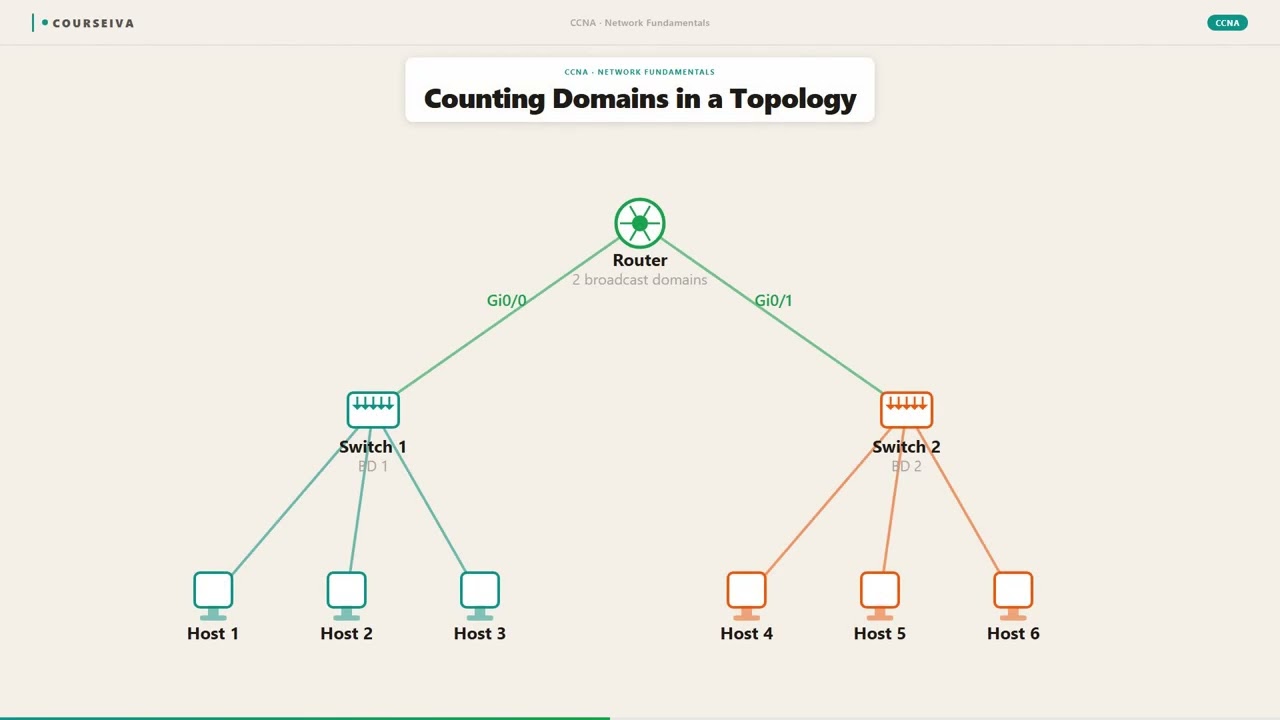
Count the number of broadcast domains. Each router interface (or VLAN interface on a Layer 3 switch) defines a separate broadcast domain. By default, all ports on a switch belong to VLAN 1, which is one broadcast domain. If you create VLAN 10 and VLAN 20, you have two broadcast domains on that switch. A router with two interfaces connected to two different switches (or VLANs) creates two broadcast domains. Use the command 'show vlan brief' to see VLANs and their member ports. Also, 'show ip interface brief' on a router shows interfaces with IP addresses; each interface is a separate broadcast domain.
Calculate Collision and Broadcast Domains in a Topology
Given a network diagram, count collision domains and broadcast domains. For collision domains: each switch port is one, each hub (as a whole) is one, and each router interface is one (though routers typically operate at Layer 3, but the physical interface is a collision domain if half-duplex). For broadcast domains: each router interface is one, and each VLAN is one. For example, a network with one router (two interfaces), two switches (each with 4 ports), and one hub connected to a switch port: collision domains = router interfaces (2) + switch ports (8) + hub (1) = 11. Broadcast domains = router interfaces (2) = 2 (assuming no VLANs). If VLANs are used, each VLAN adds a broadcast domain.
Verify Using Show Commands
Use Cisco IOS commands to verify your calculations. On a switch, 'show interfaces status' displays duplex and speed. Full-duplex ports are not in a collision domain. On a router, 'show ip interface brief' shows interfaces with IP addresses; each such interface terminates a broadcast domain. To see broadcast traffic, use 'show interfaces Gi0/1 | include broadcast'. For VLANs, 'show vlan' shows which ports belong to which VLAN, indicating broadcast domains. Example: 'Switch# show vlan' will list VLANs and ports. If all ports are in VLAN 1, there is one broadcast domain. If ports are split across VLANs, each VLAN is a separate broadcast domain.
Troubleshoot High Collision or Broadcast Rates
If a network experiences performance issues, check for excessive collisions or broadcasts. Use 'show interfaces' to see collision counters. High collision counts on a half-duplex interface suggest a saturated collision domain. Consider upgrading to full-duplex or replacing hubs with switches. For broadcasts, high broadcast rates can overwhelm devices. Use 'show interfaces Gi0/1 | include broadcast' to see received broadcasts. If broadcasts are high, identify the source using a protocol analyzer or by checking for broadcast storms. Implement VLANs to segment the broadcast domain or use storm control: 'interface Gi0/1; storm-control broadcast level 20' limits broadcast traffic to 20% of bandwidth.
Design Network to Optimize Domains
In network design, minimize collision domains by using switches instead of hubs. Use full-duplex links to eliminate collisions entirely. For broadcast domains, segment them using VLANs and routing. A common design is to place each department in its own VLAN (broadcast domain) and route between them using a Layer 3 switch or router. For example, create VLAN 10 for Engineering, VLAN 20 for Sales, and configure a switch virtual interface (SVI) for each VLAN on the Layer 3 switch. This reduces broadcast traffic to each department. Additionally, use private VLANs or port security to further isolate traffic. Always consider the impact on protocols like ARP and DHCP that rely on broadcasts.
What This Looks Like on the Job
In a typical enterprise campus network, you'll find hundreds to thousands of devices spread across multiple floors and buildings. Without proper segmentation, broadcast storms can cripple the network. For example, a company with 1000 PCs in a single VLAN would see each ARP request (broadcast) processed by all 1000 devices, consuming CPU cycles and bandwidth. To solve this, network engineers create VLANs per floor or department, each being a separate broadcast domain. A Layer 3 switch routes between VLANs, allowing inter-department communication while containing broadcasts. This design also improves security by isolating sensitive departments like Finance from general traffic.
Another scenario: a legacy network using hubs in a conference room for guest access. Each hub creates a collision domain, so if multiple guests connect and transmit simultaneously, collisions degrade performance. The solution is to replace the hub with a small switch, giving each guest a dedicated collision domain. Even better, place the switch port in a separate VLAN (e.g., Guest VLAN) to isolate broadcast traffic from the corporate network.
Misconfiguration can lead to problems. For instance, if an engineer accidentally connects two switch ports with a cable without configuring a trunk, and both ports are in the same VLAN, a loop occurs. STP will block one port, but if STP fails, a broadcast storm can take down the network. Also, if a router interface is configured with an IP address but the switch port is in the wrong VLAN, the broadcast domain may be incorrectly extended, causing routing issues. Proper planning and verification using 'show vlan' and 'show interfaces' prevent such issues.
At scale, performance considerations include the size of the broadcast domain. A general rule of thumb is to keep broadcast domains under 500 devices, but this varies based on application behavior. Storm control features on Cisco switches can limit broadcast traffic to a percentage of bandwidth, protecting against accidental storms. Additionally, using private VLANs can further isolate devices within the same broadcast domain, such as in a hotel network where guests should not see each other's traffic.
How CCNA 200-301 Actually Tests This
The CCNA 200-301 exam tests your understanding of collision and broadcast domains under Objective 1.3: 'Compare and contrast collision domains and broadcast domains.' You must be able to identify how many of each exist in a given topology. Common exam scenarios include diagrams with hubs, switches, and routers. You will be asked to count collision domains and broadcast domains, or to identify which device breaks which domain.
Common Wrong Answers and Why: 1. Counting a switch as one collision domain: Many candidates think a switch is like a hub. Wrong! Each switch port is a separate collision domain. The exam may show a 24-port switch and ask how many collision domains; the answer is 24, not 1. 2. Counting a router as one broadcast domain: A router's interface defines a broadcast domain, but the router itself may have multiple interfaces, each a separate broadcast domain. If a router has two interfaces, it creates two broadcast domains, not one. 3. Assuming VLANs break collision domains: VLANs break broadcast domains, not collision domains. Collision domains are physical; VLANs are logical. A switch port in a VLAN still has its own collision domain. 4. Forgetting that hubs do not break domains: A hub extends both collision and broadcast domains. All ports on a hub share the same collision domain and the same broadcast domain.
Specific Values and Commands: - Default VLAN on all ports: VLAN 1. - Command to see VLANs: 'show vlan brief'. - Command to see duplex/collisions: 'show interfaces'. - Maximum collision domain size for 10BASE-T: 100 meters.
Calculation Traps: - When counting collision domains, include the router interfaces that are connected to switches (each router interface is also a collision domain if in half-duplex, but typically full-duplex). However, for exam purposes, treat router interfaces as separate collision domains because they are separate Layer 1 segments. - If a switch is connected to a hub, the hub and its devices are in one collision domain, but the switch port is the boundary. So that switch port plus the hub form one collision domain.
Decision Rule: For scenario questions, first identify all devices that operate at Layer 1 (hubs, repeaters) – they extend collision domains. Switches break collision domains per port. Routers break broadcast domains per interface. VLANs break broadcast domains on switches. Count systematically: list all interfaces, then group by hub segments.
Key Takeaways
A collision domain is a network segment where frame collisions can occur; hubs create one collision domain for all ports, switches create one per port.
A broadcast domain is a logical segment where a broadcast frame reaches all devices; routers and VLANs break broadcast domains.
By default, all ports on a switch belong to VLAN 1, forming one broadcast domain.
Full-duplex links eliminate collisions because transmit and receive paths are separate.
Use 'show interfaces' to see collision counters and duplex settings; use 'show vlan brief' to see broadcast domains.
Common exam trap: counting a switch as one collision domain instead of per port.
Maximum collision domain size for 10BASE-T is 100 meters due to CSMA/CD timing.
Storm control can limit broadcast traffic to prevent storms: 'storm-control broadcast level 20'.
Easy to Mix Up
These come up on the exam all the time. Here's how to tell them apart.
Collision Domain
Defined by Layer 1 (physical) connectivity.
Broken by switches (per port) and routers (per interface).
Hubs extend collision domains.
Affects half-duplex performance.
Counted by number of segments where collisions can occur.
Broadcast Domain
Defined by Layer 2 (logical) connectivity.
Broken by routers and VLANs.
Hubs and switches extend broadcast domains (within same VLAN).
Affects device CPU and bandwidth due to broadcast traffic.
Counted by number of router interfaces or VLANs.
Watch Out for These
Mistake
A switch creates one collision domain for all its ports.
Correct
Each switch port is a separate collision domain because the switch buffers frames and forwards them only to the destination port, preventing collisions between ports.
Candidates confuse switches with hubs because both connect multiple devices, but switches operate at Layer 2 with dedicated bandwidth per port.
Mistake
VLANs break collision domains.
Correct
VLANs break broadcast domains, not collision domains. Collision domains are physical Layer 1 segments; VLANs are logical Layer 2 segments. A switch port in a VLAN still has its own collision domain.
The term 'domain' causes confusion; candidates think any segmentation applies to both types.
Mistake
A router breaks both collision and broadcast domains.
Correct
A router breaks broadcast domains because it does not forward broadcasts by default. However, each router interface is itself a collision domain if connected to a half-duplex segment. In full-duplex, no collisions occur, but the interface is still a separate collision domain concept.
Candidates overgeneralize the router's role; they forget that collision domains are Layer 1 concepts.
Mistake
All devices in a broadcast domain can send frames without collisions.
Correct
Devices in the same broadcast domain can still have collisions if they are in the same collision domain (e.g., connected to a hub). Broadcast domain and collision domain are independent; a broadcast domain can contain multiple collision domains (e.g., a switch with multiple ports in the same VLAN).
Candidates think 'broadcast' implies no collisions, but collisions depend on the physical medium.
Do You Actually Know This?
Reveal each answer, then mark whether you got it right. Score 60%+ to unlock the next chapter.
Frequently Asked Questions
What is the difference between a collision domain and a broadcast domain?
A collision domain is a physical network segment where data frames can collide if two devices transmit simultaneously. It is determined by Layer 1 devices like hubs. A broadcast domain is a logical segment where a broadcast frame (destination MAC FF:FF:FF:FF:FF:FF) is received by all devices. It is determined by Layer 2/3 devices like switches (within a VLAN) and routers. Switches break collision domains per port, but extend broadcast domains within a VLAN. Routers break broadcast domains per interface. For the exam, remember: hubs extend both, switches break collision domains, routers break broadcast domains.
How many collision domains does a 48-port switch create?
48 collision domains. Each switch port is a separate collision domain because the switch uses store-and-forward or cut-through switching to isolate each port. Even if a port is connected to a hub, that port and the hub form one collision domain, but the other ports remain separate. The key is that a switch does not share the medium among its ports like a hub does.
Does a VLAN break collision domains?
No, VLANs break broadcast domains, not collision domains. A VLAN is a logical grouping of ports that share the same broadcast domain. However, each port in a VLAN still has its own collision domain (assuming it's a switch port). For example, if you have two PCs in the same VLAN but connected to different switch ports, they are in different collision domains but the same broadcast domain.
What command shows the number of collisions on a Cisco switch interface?
Use the 'show interfaces <interface>' command. Look for the line '0 collisions' or similar. For example: 'show interfaces gigabitethernet 0/1 | include collisions'. This will show the collision count. If the interface is full-duplex, collisions should be zero. If there are many collisions, it indicates a half-duplex link or a problem.
Can a router have multiple broadcast domains?
Yes, each router interface is a separate broadcast domain because routers do not forward broadcast traffic between interfaces. For example, a router with two Ethernet interfaces creates two broadcast domains. If the router has subinterfaces (for VLANs), each subinterface can also be a separate broadcast domain if configured with an IP address in a different subnet.
What is the maximum size of a collision domain for 10BASE-T?
The maximum collision domain diameter for 10BASE-T is 100 meters (using UTP cabling). This is due to the timing constraints of CSMA/CD: the round-trip time must be less than the slot time (512 bit times) to detect collisions. For faster Ethernet standards like 100BASE-TX, the maximum distance is also 100 meters, but the timing is different. For exam purposes, remember 100 meters for 10BASE-T.
How do I reduce broadcast domains without buying a router?
You can use VLANs on a Layer 2 switch to segment broadcast domains. Each VLAN is a separate broadcast domain. However, to communicate between VLANs, you need a Layer 3 device (router or Layer 3 switch). If you only need to isolate broadcast traffic and don't need inter-VLAN communication, VLANs alone suffice. Alternatively, use private VLANs to isolate ports within the same VLAN.
Terms Worth Knowing
Ready to put this to the test?
You've just covered Collision Domains and Broadcast Domains — now see how well it sticks with free CCNA 200-301 practice questions. Full explanations included, no account needed.
Done with this chapter?