ARP — Address Resolution Protocol
Imagine sending a letter in an office building but only knowing the person's name, not their office number. That's the problem ARP solves on a local network: it maps IP addresses (the 'name') to MAC addresses (the 'office number') so frames can be delivered to the correct device. On the CCNA 200-301 exam, ARP falls under Exam Objective 1.5 'Describe how a network works' and is a recurring topic in troubleshooting questions. Mastering ARP will help you understand how devices communicate within a VLAN and how misconfigurations can break connectivity.
Jump to a section
A simple way to picture ARP — Address Resolution Protocol
The Office Directory Analogy
What is a local network but a large office building? Each employee has a unique name (IP address) and a specific office number (MAC address). The building has no central directory; instead, each employee has a personal notebook where they jot down the office numbers of people they frequently contact. When Bob wants to send a document (a frame) to Alice, he knows Alice's name (IP 192.168.1.5) but not her office number (MAC). Bob first shouts loudly down the hallway: 'Who has office number for Alice? Please reply with your office number!' This shout is an ARP Request, broadcast to everyone in the building. Alice hears the shout and, because she knows her own name, responds directly to Bob: 'I am Alice, my office number is 0A:BB:CC:DD:EE:FF' (ARP Reply). Bob writes this mapping in his notebook (ARP cache) for future use, so next time he can go straight to Alice's office without shouting. If Bob doesn't get a reply, he assumes Alice isn't in the building (host unreachable). The notebook entries expire after a few minutes (ARP timeout) to keep up with possible office changes. This is exactly how ARP works: the IP address is the logical name, the MAC address is the physical location, and the ARP cache is the local directory that prevents constant shouting.
How It Actually Works
What Is ARP and Why Does It Exist?
ARP stands for Address Resolution Protocol. Its sole purpose is to resolve a known Layer 3 IP address to an unknown Layer 2 MAC address on a local Ethernet network. Why is this necessary? Because IP packets are encapsulated inside Ethernet frames. The Ethernet frame header requires a destination MAC address to deliver the frame to the correct network interface card. Without ARP, a device would have no way to know the MAC address of another device on the same subnet.
ARP operates only within a single broadcast domain (subnet/VLAN). When a host wants to send an IP packet to another host on the same subnet, it uses ARP to find the destination MAC. If the destination is on a different subnet, the host sends the packet to its default gateway and uses ARP to resolve the gateway's IP address instead.
ARP Packet Structure
An ARP message is encapsulated directly inside an Ethernet frame (EtherType 0x0806). The key fields are:
Hardware Type: 1 for Ethernet
Protocol Type: 0x0800 for IPv4
Hardware Size: 6 (MAC address length)
Protocol Size: 4 (IPv4 address length)
Opcode: 1 for Request, 2 for Reply
Sender MAC Address
Sender IP Address
Target MAC Address (zeroed in request)
Target IP Address
How ARP Works Step by Step
ARP Cache Check: Host A wants to send an IP packet to Host B (on the same subnet). It first checks its local ARP cache for an entry matching B's IP address.
Cache Miss: If no entry exists, Host A must resolve B's MAC address. It creates an ARP Request with:
- Sender MAC: A's MAC - Sender IP: A's IP - Target MAC: 00:00:00:00:00:00 (unknown) - Target IP: B's IP - Opcode: 1
Broadcast: The ARP Request is encapsulated in an Ethernet frame with destination MAC FF:FF:FF:FF:FF:FF (broadcast). The frame is sent to all devices on the local broadcast domain.
Processing by Receivers: Every host on the subnet receives the frame. Each host checks the Target IP Address field. If it does not match its own IP, the host discards the request. If it matches, the host processes it.
ARP Reply: Host B sends an ARP Reply directly to Host A (unicast). The reply contains:
- Sender MAC: B's MAC - Sender IP: B's IP - Target MAC: A's MAC - Target IP: A's IP - Opcode: 2
Cache Update: Host A receives the reply, updates its ARP cache with B's MAC address, and then forwards the original IP packet to B using the newly learned MAC.
ARP Cache and Timers
Each entry in the ARP cache has a timer. Cisco IOS default ARP timeout is 14400 seconds (4 hours). When the timer expires, the entry is removed and must be re-learned. You can view the ARP cache with:
R1# show ip arp
Protocol  Address          Age (min)  Hardware Addr   Type   Interface
Internet  192.168.1.1             -   aabb.cc00.0100  ARPA   GigabitEthernet0/0
Internet  192.168.1.2            10   aabb.cc00.0200  ARPA   GigabitEthernet0/0
The '-' indicates a static entry (no age). Dynamic entries show minutes since last use.
Gratuitous ARP
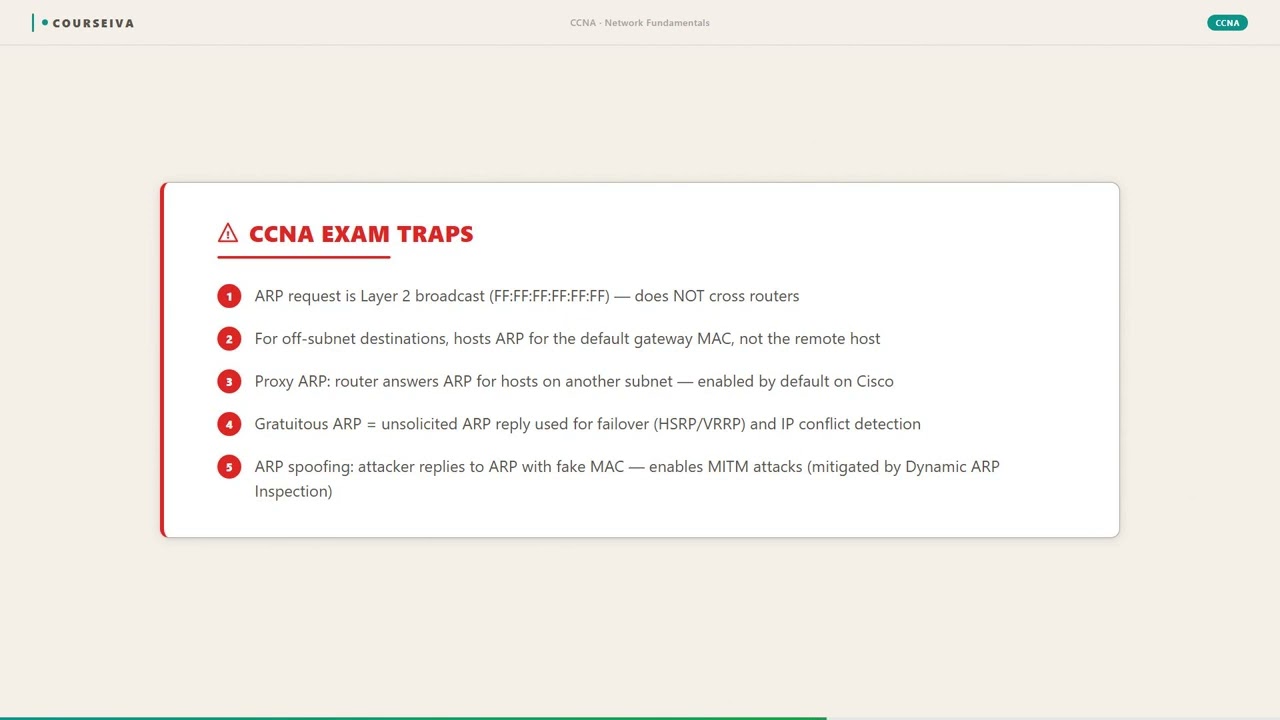
A Gratuitous ARP is an ARP Reply sent without a corresponding request. It is used for:
Duplicate IP address detection: A host sends a gratuitous ARP request for its own IP. If it receives a reply, another host has the same IP.
Updating ARP caches: When a NIC changes MAC address (e.g., after replacement), the host sends a gratuitous ARP to inform other devices.
Proxy ARP
Proxy ARP is a feature where a router responds to ARP requests on behalf of another device. For example, if a host thinks a destination is on the same subnet but is actually on a different subnet (due to a misconfigured subnet mask), the router can reply with its own MAC address, then forward the packet. This is disabled by default on Cisco routers and is not commonly used in modern networks. The 200-301 exam tests that you know Proxy ARP exists and its basic purpose.
ARP and VLANs
ARP broadcasts are confined to a VLAN. A switch forwards ARP broadcasts out all ports in the same VLAN (except the ingress port). This is why VLANs segment broadcast domains. If two devices are in different VLANs, they cannot communicate via ARP directly; they must go through a router or Layer 3 switch.
Security Concerns: ARP Spoofing
ARP has no authentication. An attacker can send fake ARP Replies, mapping their own MAC to the IP of a legitimate host (like the default gateway). This is called ARP spoofing or ARP poisoning. On the exam, you should know that dynamic ARP inspection (DAI) can mitigate this by validating ARP packets against a trusted database (DHCP snooping binding).
Walk-Through
Check ARP Cache
When a host needs to send an IP packet to another host on the same subnet, the first step is to check its local ARP cache. The cache is a table that maps IP addresses to MAC addresses. On a Cisco router, use the command `show ip arp` to display the ARP cache. If the destination IP address is found in the cache, the host uses the associated MAC address to build the Ethernet frame. If not, the host proceeds to the next step: sending an ARP Request.
Broadcast ARP Request
The host creates an ARP Request packet with the target IP address set to the destination IP and the target MAC address set to all zeros (00:00:00:00:00:00). This packet is encapsulated in an Ethernet frame with a destination MAC of FF:FF:FF:FF:FF:FF, the broadcast address. The frame is sent out of the host's network interface. All devices in the same broadcast domain (VLAN) receive this frame.
Process ARP Request on Receiver
Every device that receives the ARP Request checks the Target IP Address field. If the Target IP matches the device's own IP address, the device processes the request. Otherwise, the device discards the frame. The matching device then prepares an ARP Reply. It also updates its own ARP cache with the sender's IP and MAC address from the request, allowing future communication with the requesting host.
Send Unicast ARP Reply
The device that matches the target IP address sends an ARP Reply directly to the requester. The reply is a unicast Ethernet frame with the destination MAC equal to the requester's MAC address (obtained from the ARP Request). The ARP Reply contains the sender's (the replying device's) MAC address in the Sender MAC field. The opcode is set to 2 (Reply).
Update ARP Cache and Send Packet
The original requester receives the ARP Reply and updates its ARP cache with the new IP-to-MAC mapping. The ARP cache entry includes the IP address, MAC address, and a timer (default 14400 seconds on Cisco IOS). The host now has the destination MAC address and can construct the original IP packet's Ethernet frame with the correct destination MAC. The packet is then transmitted.
Verify Connectivity with Ping
After the ARP process completes, you can verify successful communication using `ping`. For example, on a Cisco router, `ping 192.168.1.2` will send ICMP Echo Requests. If ARP resolution was successful, the ping will receive replies. You can also check the ARP cache again with `show ip arp` to confirm the entry now has an age (minutes since last use). If the cache entry is static (no age), it means it was configured manually.
What This Looks Like on the Job
In a typical enterprise network, ARP operates silently in the background, but misconfigurations can cause significant issues. One common scenario is a user who cannot access the internet. The network engineer checks the ARP cache on the user's default gateway router. If the ARP entry for the user's IP address is incomplete (e.g., the MAC address shows as 'Incomplete'), it indicates that the router sent an ARP Request but never received a reply. This could be due to a faulty cable, a misconfigured switch port (e.g., port security blocking the MAC), or the user's device being powered off. The engineer then uses show arp and debug arp to pinpoint the issue.
Another scenario involves a server migration. When a server is moved to a new NIC with a different MAC address, all devices that have an ARP cache entry for the server's IP will still try to reach the old MAC. The engineer can send a gratuitous ARP from the new server to update the caches, or clear the ARP cache on critical devices with clear arp-cache. In large networks, waiting for ARP timeout (4 hours) is not acceptable, so manual intervention is required.
Scale considerations: In a large broadcast domain, ARP broadcasts can consume bandwidth. For example, if a subnet has 1000 hosts, every ARP request is sent to all 1000 hosts. This is why VLANs are used to reduce broadcast domain size. Additionally, ARP spoofing attacks are a real threat. Network engineers deploy Dynamic ARP Inspection (DAI) on switches to validate ARP packets against DHCP snooping bindings, preventing an attacker from impersonating the default gateway. Misconfigured DAI can lead to legitimate traffic being dropped, so careful planning is needed.
Finally, Proxy ARP can cause routing issues if enabled unintentionally. For instance, if a host has a /16 subnet mask but the network is actually /24, the host may send ARP requests for addresses outside its local subnet. The router (if Proxy ARP is enabled) will reply with its own MAC, causing the host to send packets directly to the router instead of the correct destination. This can lead to asymmetric routing and connectivity problems. In modern networks, Proxy ARP is typically disabled.
How CCNA 200-301 Actually Tests This
The CCNA 200-301 exam tests ARP under Objective 1.5 'Describe how a network works' and in troubleshooting scenarios. You must understand the complete ARP process, including the packet structure, the difference between ARP Request (broadcast) and ARP Reply (unicast), and the default ARP cache timeout (14400 seconds on Cisco IOS). The exam often presents a scenario where a host cannot communicate with another host on the same subnet, and you need to identify that ARP resolution is failing. Common wrong answers include: 'The destination MAC address is incorrect' (but if ARP fails, no frame is sent), 'The IP address is wrong' (but IP addresses are correct), or 'The router is not responding' (but for same-subnet communication, no router is involved).
Another trap: Candidates often confuse ARP with DNS. ARP resolves IP to MAC on the local link; DNS resolves hostname to IP globally. The exam may ask what happens first when a user types a URL: DNS resolution, then ARP for the default gateway (if the web server is off-subnet).
Specific values to memorize: ARP Request uses broadcast MAC FF:FF:FF:FF:FF:FF; ARP Reply uses unicast. Ethernet Type for ARP is 0x0806. The default ARP timeout on Cisco IOS is 14400 seconds (4 hours). The command to view the ARP cache is show ip arp (or show arp). To clear the cache, use clear arp-cache.
For scenario questions, use this decision rule: If two hosts are on the same subnet and one cannot ping the other, first check if ARP resolution is complete. Use show ip arp on the source host. If the destination IP shows as 'Incomplete' or is missing, the ARP request failed. Then check for Layer 1/2 issues (cables, VLAN membership, port security). If ARP is complete but ping fails, check firewall, ACLs, or IP routing.
Finally, be aware of Gratuitous ARP and Proxy ARP. Gratuitous ARP is used for duplicate IP detection and updating caches. Proxy ARP is a feature that allows a router to answer ARP requests on behalf of another device; it is disabled by default and rarely used. The exam may ask about the purpose of Gratuitous ARP or when Proxy ARP might be needed.
Key Takeaways
ARP resolves an IPv4 address to a MAC address on a local Ethernet network.
ARP Request is a Layer 2 broadcast (destination MAC FF:FF:FF:FF:FF:FF).
ARP Reply is a unicast sent directly to the requester.
EtherType for ARP is 0x0806.
Default ARP cache timeout on Cisco IOS is 14400 seconds (4 hours).
Use 'show ip arp' to view the ARP cache; 'clear arp-cache' to flush it.
Gratuitous ARP announces a MAC change or checks for duplicate IPs.
Easy to Mix Up
These come up on the exam all the time. Here's how to tell them apart.
ARP (IPv4)
Uses broadcast frames (FF:FF:FF:FF:FF:FF).
EtherType 0x0806.
Operates at Layer 2/3 boundary.
No built-in security (vulnerable to spoofing).
Default timeout 14400 seconds.
Neighbor Discovery Protocol (IPv6)
Uses multicast solicited-node address (FF02::1:FFxx:xxxx).
Uses ICMPv6 messages (Type 135/136).
Operates at Layer 3 (ICMPv6).
Includes Neighbor Unreachability Detection (NUD).
Has Secure Neighbor Discovery (SEND) option.
Watch Out for These
Mistake
ARP resolves IP addresses to MAC addresses across routers.
Correct
ARP only operates within a single broadcast domain (subnet/VLAN). It never crosses a router.
Candidates think ARP works like routing because both involve IP addresses.
Mistake
ARP Reply is a broadcast like the Request.
Correct
ARP Reply is a unicast sent directly to the requester's MAC address.
Because the Request is a broadcast, some assume the Reply is also broadcast.
Mistake
ARP cache entries last forever.
Correct
Dynamic ARP entries have a timeout (default 14400 seconds on Cisco). After timeout, the entry is removed.
In small labs, entries may persist long enough to seem permanent.
Mistake
ARP is used for IPv6 as well.
Correct
IPv6 uses Neighbor Discovery Protocol (NDP) instead of ARP. ARP is only for IPv4.
Both resolve addresses, so candidates assume ARP works for both.
Do You Actually Know This?
Reveal each answer, then mark whether you got it right. Score 60%+ to unlock the next chapter.
Frequently Asked Questions
What is the difference between ARP Request and ARP Reply?
An ARP Request is a broadcast frame sent to all devices on the local subnet asking 'Who has this IP address?'. The target MAC field is set to all zeros. An ARP Reply is a unicast frame sent directly to the requester, containing the requested MAC address. The opcode field distinguishes them: 1 for Request, 2 for Reply.
How do I clear the ARP cache on a Cisco router?
Use the privileged EXEC command 'clear arp-cache'. This removes all dynamic entries from the ARP cache. Static entries are not affected. After clearing, the router will need to re-learn MAC addresses via ARP requests.
What does an 'Incomplete' ARP entry mean?
An 'Incomplete' entry indicates that the device sent an ARP Request but has not yet received a reply. The entry is created when the request is sent and remains until a reply is received or the request times out. If it persists, the target host is likely unreachable.
Why does ARP use a broadcast instead of a multicast?
ARP was designed before multicast was widely used. Since the requester does not know the target's MAC address, it must send to all devices. A broadcast ensures every host receives the request. IPv6's NDP uses multicast to be more efficient.
Can ARP work across a router?
No, ARP is strictly local to a subnet. A router will not forward ARP broadcasts. If a host needs to communicate with a device on another subnet, it sends the packet to its default gateway and uses ARP to resolve the gateway's MAC, not the remote host's MAC.
What is the default ARP timeout on Cisco IOS?
The default ARP timeout is 14400 seconds (4 hours). This means an entry will be removed from the cache if not used for 4 hours. You can verify it with 'show ip arp' and see the age in minutes. The timeout can be changed with the 'arp timeout' interface command.
How does ARP spoofing work and how can it be prevented?
ARP spoofing occurs when an attacker sends forged ARP Replies, mapping their MAC address to the IP of a legitimate host (e.g., the default gateway). This allows the attacker to intercept traffic. Prevention methods include using static ARP entries, Dynamic ARP Inspection (DAI) on switches, and IPsec for encrypted communication.
Terms Worth Knowing
Ready to put this to the test?
You've just covered ARP — Address Resolution Protocol — now see how well it sticks with free CCNA 200-301 practice questions. Full explanations included, no account needed.
Done with this chapter?