Half-Duplex vs Full-Duplex
Imagine two people trying to have a conversation: one is polite and waits for the other to finish before speaking, while the other is rude and talks over them. In networking, this is the difference between half-duplex and full-duplex communication. Understanding this distinction is critical for the CCNA 200-301 exam (Exam Objective 1.3) because it directly impacts network performance, collision domains, and troubleshooting. Misconfiguring duplex can lead to slow network speeds, packet loss, and mysterious connectivity issues that plague real-world networks.
Jump to a section
A simple way to picture Half-Duplex vs Full-Duplex
Walkie-Talkie vs. Telephone
Suppose you are using a walkie-talkie for half-duplex communication. When you press the button to talk, you cannot hear the other person. You must release the button and say 'over' to signal that you are done. If both people press the button at the same time, neither hears anything — a collision. This is exactly how half-duplex Ethernet works: a device can either send or receive, but not both simultaneously. The medium (cable) is shared, and collisions are a normal part of operation. The carrier sense multiple access with collision detection (CSMA/CD) protocol acts like the 'over' protocol — devices listen before talking, and if they detect a collision, they back off and retry after a random time.
Full-duplex, on the other hand, is like a telephone conversation. Both people can speak and listen at the same time because there are two separate channels (your voice goes out on one wire pair, and you hear on another). No one says 'over' because simultaneous talk is possible. In Ethernet, full-duplex requires a point-to-point link (only two devices) and uses separate transmit and receive pairs. There is no contention, no collisions, and no need for CSMA/CD. The result is double the potential throughput because the link can send and receive simultaneously. This is why modern switches and routers almost always operate in full-duplex mode — it's efficient and collision-free.
How It Actually Works
What Are Half-Duplex and Full-Duplex?
Half-duplex and full-duplex describe the directionality of data transmission on a communication link. In half-duplex, a device can either send or receive data at any given time, but not both. In full-duplex, a device can send and receive simultaneously. This seemingly simple distinction has profound implications for network design, performance, and troubleshooting.
Why Duplex Matters
Ethernet originally operated over coaxial cable (10BASE5, 10BASE2), which was a shared medium. All devices on the same segment shared the same wire, and only one device could transmit at a time. This was half-duplex by necessity. The introduction of twisted-pair cabling and switches changed everything. With dedicated cable pairs for transmit and receive, simultaneous communication became possible. However, legacy hubs (repeaters) still forced half-duplex because they electrically repeated signals on all ports, creating a shared collision domain.
How Half-Duplex Works
In half-duplex Ethernet, the device uses Carrier Sense Multiple Access with Collision Detection (CSMA/CD). Here is the step-by-step mechanism: 1. Carrier Sense: Before transmitting, the device listens to the medium to see if it is idle. 2. Multiple Access: If the medium is idle, the device begins transmitting. 3. Collision Detection: While transmitting, the device listens for a collision. A collision occurs when two devices transmit simultaneously. The voltage on the wire exceeds a threshold, indicating a collision. 4. Jam Signal: Upon detecting a collision, the device sends a 32-bit jam signal to ensure all other devices know a collision occurred. 5. Backoff: The device stops transmitting and waits a random amount of time (calculated using the truncated binary exponential backoff algorithm) before attempting again. 6. Retry: After the backoff timer expires, the device goes back to step 1.
Key Timer: The slot time is 512 bit times for 10/100 Mbps Ethernet. This is the time needed to detect a collision from the farthest end of the network. For 10 Mbps, that's 51.2 microseconds; for 100 Mbps, it's 5.12 microseconds.
Interframe Gap (IFG): After each frame, the device must wait 96 bit times (9.6 microseconds for 10 Mbps) before sending the next frame.
Half-duplex is inefficient because collisions waste bandwidth. As utilization increases, collision probability rises, leading to performance degradation.
How Full-Duplex Works
Full-duplex Ethernet eliminates collisions entirely. It requires:
A point-to-point link (only two devices)
A switch or router at each end (no hubs)
Separate transmit and receive wire pairs (or separate fibers)
In a full-duplex link, both devices can send and receive simultaneously. There is no CSMA/CD; the collision detection circuitry is disabled. The device simply transmits whenever it has data, without listening first. The only constraint is the interframe gap (IFG) of 96 bit times between frames, but this is not a contention mechanism — it's just a recovery time for the receiver.
No Collisions: Because there is no shared medium, collisions cannot occur. This means the link can operate at 100% utilization in both directions simultaneously.
Flow Control: To prevent buffer overflow, full-duplex links can use IEEE 802.3x flow control (pause frames). The receiver sends a pause frame to the sender, asking it to stop transmitting for a specified time.
Autonegotiation and Duplex Mismatch
Most modern Ethernet interfaces use autonegotiation to automatically select the best speed and duplex mode. Autonegotiation works by exchanging Fast Link Pulses (FLPs) during link establishment. The devices advertise their capabilities, and the highest common denominator is selected. For example, if both devices support 1000BASE-T full-duplex, they will negotiate to that mode.
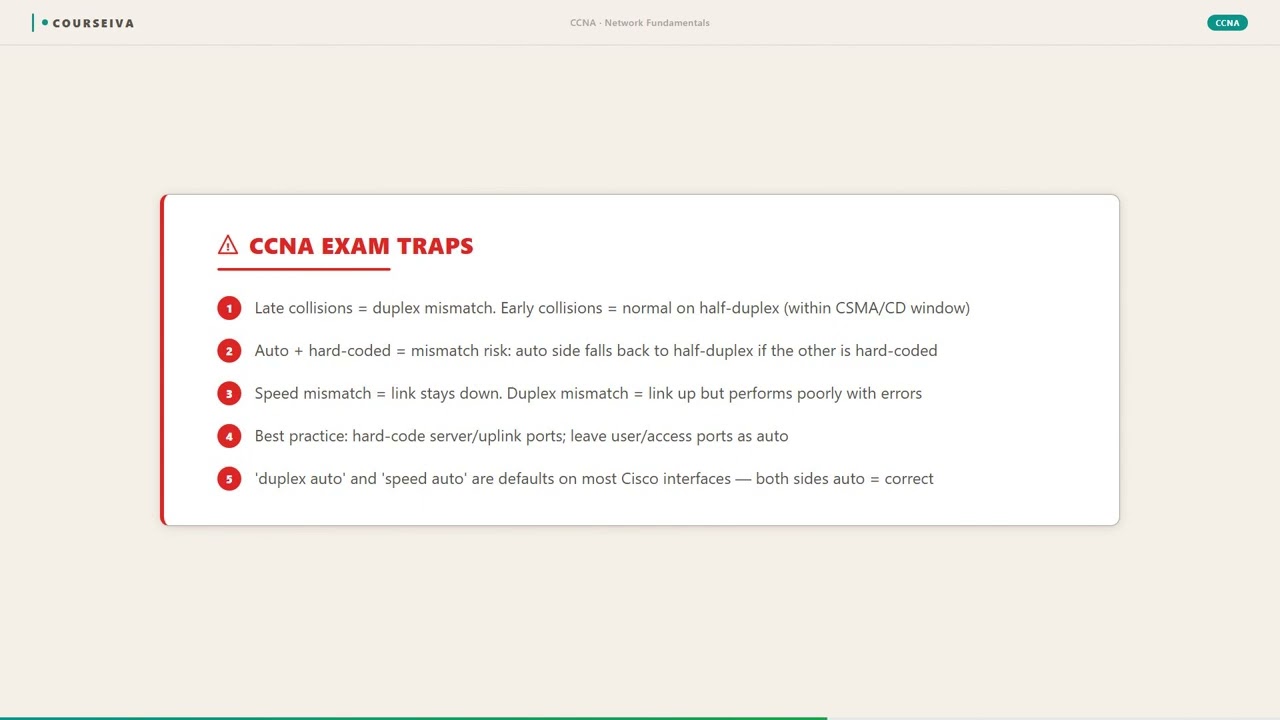
Critical Exam Point: Autonegotiation is required for correct duplex setting on 10/100/1000 Mbps twisted-pair links. If one side has autonegotiation enabled and the other has it disabled (hardcoded), a duplex mismatch can occur. The side with autonegotiation enabled will detect the link but will default to half-duplex if it doesn't receive FLPs. The side with hardcoded settings will stay at its configured duplex, often full-duplex. This results in one side transmitting full-duplex and the other half-duplex, causing collisions, CRC errors, and poor performance.
Default Duplex Settings on Cisco IOS
10/100 Mbps ports on switches: Default is autonegotiation (both speed and duplex). If autonegotiation fails, the switch defaults to half-duplex.
1000 Mbps ports: Gigabit Ethernet requires autonegotiation for correct operation. There is no 'half-duplex' option for 1000BASE-T (it is not defined in the standard).
Router interfaces: Typically default to autonegotiation, but some serial interfaces use different defaults.
IOS CLI Verification Commands
To check duplex settings on a Cisco switch or router, use the following commands:
show interfaces – Displays duplex and speed for each interface.
Switch# show interfaces gigabitethernet0/1
GigabitEthernet0/1 is up, line protocol is up
  Hardware is Gigabit Ethernet, address is 0011.2233.4455 (bia 0011.2233.4455)
  MTU 1500 bytes, BW 1000000 Kbit/sec, DLY 10 usec,
     reliability 255/255, txload 1/255, rxload 1/255
  Encapsulation ARPA, loopback not set
  Keepalive set (10 sec)
  Full-duplex, 1000Mb/s, media type is 10/100/1000BaseTX
  input flow-control is off, output flow-control is unsupported
  ARP type: ARPA, ARP Timeout 04:00:00
  Last input 00:00:00, output 00:00:00, output hang never
  Last clearing of "show interface" counters never
  Input queue: 0/75/0/0 (size/max/drops/flushes); Total output drops: 0
  Queueing strategy: fifo
  Output queue: 0/40 (size/max)
  5 minute input rate 0 bits/sec, 0 packets/sec
  5 minute output rate 0 bits/sec, 0 packets/sec
     0 packets input, 0 bytes, 0 no buffer
     Received 0 broadcasts (0 IP multicasts)
     0 runts, 0 giants, 0 throttles
     0 input errors, 0 CRC, 0 frame, 0 overrun, 0 ignored
     0 watchdog, 0 multicast, 0 pause input
     0 input packets with dribble condition detected
     0 packets output, 0 bytes, 0 underruns
     0 output errors, 0 collisions, 0 interface resets
     0 unknown protocol drops
     0 babbles, 0 late collision, 0 deferred
     0 lost carrier, 0 no carrier, 0 pause output
     0 output buffer failures, 0 output buffers swapped out
Look for "Full-duplex" or "Half-duplex" in the output. Also note "collisions" – in half-duplex, collisions are normal; in full-duplex, they should be zero.
show interfaces status – Provides a concise table of interface status, speed, and duplex.
Switch# show interfaces status
Port      Name   Status       Vlan       Duplex  Speed Type
Gi0/1            notconnect   1            auto   auto 10/100/1000BaseTX
Gi0/2            connected    1          a-full   a-100 10/100/1000BaseTX
Gi0/3            connected    1          a-half   a-100 10/100/1000BaseTX
The 'a' prefix indicates autonegotiated. 'a-full' means autonegotiated full-duplex.
show interfaces trunk – For trunk ports, verify duplex on the trunk.
Interaction with Related Protocols
STP (Spanning Tree Protocol): STP operates regardless of duplex, but duplex mismatch can cause STP issues. For example, a half-duplex link may experience late collisions, causing BPDU corruption and potential loops.
EtherChannel: All links in an EtherChannel must have the same duplex setting. Mixing half and full-duplex is not allowed.
QoS: Full-duplex links can handle bidirectional traffic, but QoS policies must account for potential congestion in both directions.
Exam Traps
Trap 1: "A hub forces half-duplex." Correct. A hub repeats signals electrically, creating a shared collision domain. All devices connected to a hub must operate in half-duplex.
Trap 2: "A switch always uses full-duplex." Incorrect. Switches can operate in half-duplex if connected to a hub or if autonegotiation fails.
Trap 3: "Full-duplex doubles throughput." It doubles the potential throughput (e.g., 100 Mbps full-duplex can send 100 Mbps and receive 100 Mbps simultaneously, totaling 200 Mbps), but actual throughput depends on traffic patterns.
Trap 4: "Autonegotiation always works." It can fail if one side is hardcoded. The result is often a duplex mismatch, which is a common exam scenario.
Walk-Through
Identify Duplex Mismatch Symptoms
A duplex mismatch occurs when one device operates in full-duplex and the other in half-duplex. Symptoms include slow network performance, high error rates, and intermittent connectivity. On the half-duplex side, you will see collisions, late collisions, and CRC errors. On the full-duplex side, you will see runts, giants, and frame errors because the half-duplex side is sending frames that collide and are corrupted. Use the 'show interfaces' command to check for these errors. Look for 'collisions' and 'late collisions' on the half-duplex side. On the full-duplex side, check for 'input errors' and 'CRC errors'. If you see these patterns, suspect a duplex mismatch.
Check Duplex Settings on Both Ends
Use 'show interfaces' on both devices. On a Cisco switch, run 'show interfaces gigabitethernet0/1' or 'show interfaces fastethernet0/1'. Look for the line that says 'Half-duplex' or 'Full-duplex'. Also note the speed. If one side says 'Half-duplex' and the other says 'Full-duplex', you have a mismatch. Also check if the settings are autonegotiated or hardcoded. If the output shows 'auto' for duplex, it was negotiated. If it shows a specific value like 'Full-duplex' without 'auto', it was hardcoded. Document the settings on both ends.
Determine the Root Cause of Mismatch
A duplex mismatch typically occurs when one device has autonegotiation enabled and the other has it disabled (hardcoded). For example, a switch port set to 'speed 100 duplex full' (hardcoded) connected to a switch port set to 'speed auto duplex auto' will result in the autonegotiating side defaulting to half-duplex. Why? Because autonegotiation uses Fast Link Pulses (FLPs) to exchange capabilities. If one side doesn't send FLPs (hardcoded), the other side fails to negotiate and falls back to half-duplex (the default for 10/100 Mbps). The hardcoded side stays at full-duplex, causing the mismatch.
Correct the Duplex Mismatch
To fix a duplex mismatch, you have two options: (1) Enable autonegotiation on both sides, or (2) Hardcode both sides to the same settings (speed and duplex). Cisco recommends using autonegotiation on all 10/100/1000 Mbps twisted-pair interfaces. To enable autonegotiation, use the 'speed auto' and 'duplex auto' interface configuration commands. To hardcode, use 'speed 100' and 'duplex full' for a 100 Mbps full-duplex link. Example: ``` Switch(config)# interface gigabitethernet0/1 Switch(config-if)# speed 100 Switch(config-if)# duplex full ``` After changing settings, verify with 'show interfaces'.
Verify the Fix and Monitor
After correcting the duplex settings, verify that both sides now show the same duplex. Use 'show interfaces' on both devices. Also check that error counters stop increasing. If the mismatch was causing errors, you should see no new collisions or CRC errors. Use 'show interfaces' again after a few minutes to confirm. Also test connectivity with ping and check for packet loss. If the problem persists, there may be other issues such as faulty cabling or hardware. Remember that on a full-duplex link, collisions should be zero. If you see any collisions, something is wrong.
Document and Prevent Future Issues
Document the correct duplex settings for all interfaces in your network. Use a consistent configuration standard: either all autonegotiate or all hardcoded. For new deployments, enable autonegotiation as it simplifies management and reduces human error. For critical links where you want deterministic behavior, you can hardcode, but ensure both ends match. Also, use SNMP monitoring to alert on high error rates that might indicate a duplex mismatch. Finally, train your team to always check duplex when troubleshooting slow links.
What This Looks Like on the Job
In a typical enterprise network, you'll find switches connecting to end devices (PCs, printers, servers) and to other switches. Almost all modern devices support autonegotiation, and most networks run full-duplex. However, legacy equipment or misconfigurations can cause issues.
Scenario 1: Server Connection A server is connected to a switch at 1 Gbps. The server NIC is configured for autonegotiation, and the switch port is also set to auto. They negotiate to 1000BASE-T full-duplex. This works perfectly. However, if the server NIC is hardcoded to 1000 full (common in some Linux configurations), and the switch is set to auto, the switch will fail to autonegotiate and default to half-duplex. The result: the server sends at full speed, but the switch expects half-duplex, causing collisions and poor performance. The fix is to either set the switch port to hardcoded 1000 full or enable autonegotiation on the server.
Scenario 2: Connecting to a Hub Even today, some legacy hubs exist in small offices. If you connect a switch port to a hub, the switch port must operate in half-duplex because the hub creates a shared collision domain. If the switch port is set to full-duplex, it will not detect collisions properly, leading to late collisions and errors. The correct configuration is to force the switch port to half-duplex (or let autonegotiation handle it, but hubs often don't support autonegotiation). In practice, you should replace hubs with switches, but if you must use a hub, configure the switch port as 'duplex half'.
Scenario 3: Inter-Switch Link Connecting two switches together is a common scenario. Both switches should autonegotiate to full-duplex. If one switch is misconfigured with hardcoded half-duplex, the link will be slow and error-prone. For example, a trunk link between two distribution switches running at 100 Mbps half-duplex will have collisions and limited throughput, affecting all VLANs. The network engineer must ensure both sides match. A best practice is to use autonegotiation on all switch-to-switch links for simplicity.
Performance Considerations: Full-duplex links can carry traffic in both directions simultaneously, effectively doubling the bandwidth. For example, a 100 Mbps full-duplex link can support 200 Mbps of aggregate throughput (100 Mbps send + 100 Mbps receive). Half-duplex links can only do 100 Mbps total. In high-traffic networks, full-duplex is essential.
What Happens When Misconfigured: A duplex mismatch causes the half-duplex side to detect collisions and retransmit, while the full-duplex side does not. This leads to a high number of collisions on the half-duplex side and CRC errors on the full-duplex side. Performance degrades dramatically, often to less than 1% of expected throughput. The link may appear up but be nearly unusable.
How CCNA 200-301 Actually Tests This
The CCNA 200-301 exam tests your understanding of duplex modes under Exam Objective 1.3 (Network Fundamentals). Here's exactly what you need to know:
Definition: Half-duplex allows communication in one direction at a time; full-duplex allows simultaneous two-way communication.
Collision Domains: Hubs create a single collision domain (half-duplex required), switches create separate collision domains (full-duplex possible).
Autonegotiation: Know that autonegotiation uses Fast Link Pulses (FLPs) and that a mismatch occurs when one side is hardcoded and the other is auto. The auto side will default to half-duplex.
Default Behavior: On Cisco switches, 10/100 ports default to autonegotiation; if negotiation fails, they fall back to half-duplex. 1000 Mbps ports require autonegotiation and have no half-duplex option.
Verification Commands: 'show interfaces' shows duplex; 'show interfaces status' shows a summary. Know how to interpret the output.
Common Wrong Answers and Why: - Wrong: "Full-duplex requires a switch." Actually, full-duplex requires a point-to-point link, which can be two switches, a switch and a host, or two routers. A switch is not strictly required; two PCs with crossover cables can use full-duplex if their NICs support it. - Wrong: "Half-duplex is faster than full-duplex because there are fewer collisions." This is backwards. Full-duplex eliminates collisions, so it is faster. - Wrong: "Autonegotiation always selects the best duplex." Autonegotiation can fail, leading to a mismatch. It's not foolproof. - Wrong: "A switch always uses full-duplex." A switch can use half-duplex if connected to a hub or if autonegotiation fails.
Specific Values to Remember: - Slot time for half-duplex: 512 bit times (51.2 µs at 10 Mbps, 5.12 µs at 100 Mbps). - Interframe Gap: 96 bit times (9.6 µs at 10 Mbps). - Autonegotiation default: half-duplex if negotiation fails. - 1000BASE-T: full-duplex only (no half-duplex defined).
Decision Rule for Scenario Questions: If a question describes a link that is slow and has errors, and you see one side with collisions and the other with CRC errors, suspect a duplex mismatch. The fix is to ensure both sides have the same duplex setting (both auto or both hardcoded with matching values). If the question mentions a hub, the answer is half-duplex. If it mentions a switch-to-switch link, the answer is full-duplex (assuming autonegotiation works).
Key Takeaways
Half-duplex allows one-way communication at a time; full-duplex allows simultaneous two-way communication.
Hubs force half-duplex; switches allow full-duplex on point-to-point links.
Autonegotiation uses Fast Link Pulses (FLPs); if one side is hardcoded, the auto side defaults to half-duplex.
Duplex mismatch causes collisions on the half-duplex side and CRC errors on the full-duplex side.
Use 'show interfaces' to check duplex and 'show interfaces status' for a summary.
1000BASE-T requires autonegotiation and supports full-duplex only.
Cisco recommends using autonegotiation on all 10/100/1000 twisted-pair interfaces.
Easy to Mix Up
These come up on the exam all the time. Here's how to tell them apart.
Half-Duplex
One-way communication at a time
Uses CSMA/CD for collision detection
Collisions are normal
Requires shared medium (hub) or point-to-point with half-duplex configuration
Maximum throughput equals link speed (e.g., 100 Mbps total)
Full-Duplex
Simultaneous two-way communication
No CSMA/CD (collision detection disabled)
No collisions (zero collisions expected)
Requires point-to-point link with separate Tx/Rx pairs
Maximum throughput is 2x link speed (e.g., 200 Mbps aggregate)
Autonegotiation Enabled
Exchanges capabilities via FLPs
Selects highest common speed/duplex
If partner is hardcoded, defaults to half-duplex
Recommended by Cisco for 10/100/1000 ports
Simplifies configuration and reduces human error
Hardcoded (No Autonegotiation)
No FLP exchange; uses configured settings
Must manually match speed/duplex on both ends
If partner is auto, mismatch likely
Used for legacy devices or when deterministic behavior is needed
Risk of misconfiguration if not documented
Watch Out for These
Mistake
A switch always operates in full-duplex.
Correct
A switch can operate in half-duplex if connected to a hub or if autonegotiation fails. Switches create separate collision domains, but the port must be configured appropriately.
Many candidates think switches are inherently full-duplex because they segment collision domains, but the actual duplex mode depends on the connected device.
Mistake
Full-duplex doubles the bandwidth of a link.
Correct
Full-duplex allows simultaneous send and receive, but the bandwidth in each direction remains the same. For example, a 100 Mbps full-duplex link can send 100 Mbps and receive 100 Mbps simultaneously, giving an aggregate of 200 Mbps, but the link speed is still 100 Mbps.
The term 'doubles bandwidth' is often used loosely, leading to confusion between link speed and throughput.
Mistake
Autonegotiation always selects the best duplex.
Correct
Autonegotiation can fail if one side is hardcoded. The auto side will default to half-duplex, causing a mismatch. It only works correctly when both sides enable it.
Candidates assume autonegotiation is foolproof, but it has limitations, especially with hardcoded settings.
Mistake
Half-duplex is obsolete and never used.
Correct
Half-duplex is still used in some legacy networks, with hubs, or in specific scenarios like wireless (half-duplex by nature). The CCNA exam tests both modes.
Modern networks are mostly full-duplex, but half-duplex appears in exam scenarios to test understanding of collisions and CSMA/CD.
Do You Actually Know This?
Reveal each answer, then mark whether you got it right. Score 60%+ to unlock the next chapter.
Frequently Asked Questions
What is the difference between half-duplex and full-duplex in Ethernet?
Half-duplex allows a device to either send or receive data at one time, using CSMA/CD to handle collisions. Full-duplex allows simultaneous send and receive, eliminating collisions. Full-duplex requires a point-to-point link with separate transmit and receive pairs, while half-duplex works on shared media like hubs. In modern networks, full-duplex is preferred for its higher efficiency.
How does autonegotiation determine duplex?
Autonegotiation uses Fast Link Pulses (FLPs) to exchange capabilities between two devices. Each device advertises its supported speeds and duplex modes. The devices then select the highest common speed and duplex. For example, if both support 100BASE-TX full-duplex and half-duplex, they will choose full-duplex. If one device does not support autonegotiation, the other will default to half-duplex (for 10/100 Mbps).
What is a duplex mismatch and how do I troubleshoot it?
A duplex mismatch occurs when one device operates in full-duplex and the other in half-duplex. Symptoms include slow performance, collisions on the half-duplex side, and CRC errors on the full-duplex side. To troubleshoot, check 'show interfaces' on both devices. Look for 'Half-duplex' vs 'Full-duplex' and error counters. Fix by ensuring both sides use the same duplex setting (both auto or both hardcoded with matching values).
Can a switch port be half-duplex?
Yes, a switch port can operate in half-duplex if it is connected to a hub or if autonegotiation fails. Switches create separate collision domains, but the duplex mode depends on the connected device. For example, if a switch port is connected to a hub, it must use half-duplex. Also, if autonegotiation fails on a 10/100 port, the switch defaults to half-duplex.
What is the default duplex setting on a Cisco switch?
The default duplex setting on Cisco switch ports (10/100/1000) is autonegotiation. If autonegotiation fails, the port defaults to half-duplex for 10/100 Mbps. For 1000BASE-T, autonegotiation is required, and there is no half-duplex mode. You can verify with 'show interfaces' or 'show interfaces status'.
Why does a full-duplex link show collisions?
A full-duplex link should never show collisions because there is no contention. If collisions appear, it indicates a duplex mismatch (the other end is half-duplex), or a hardware fault such as a faulty cable or NIC. Check the duplex settings on both ends and verify cable integrity.
Is half-duplex still used in modern networks?
Half-duplex is rare in modern wired Ethernet networks, but it still appears in legacy environments with hubs. Wireless networks (Wi-Fi) are inherently half-duplex because they use a shared medium with CSMA/CA. The CCNA exam covers half-duplex to test understanding of collisions and CSMA/CD.
Terms Worth Knowing
Ready to put this to the test?
You've just covered Half-Duplex vs Full-Duplex — now see how well it sticks with free CCNA 200-301 practice questions. Full explanations included, no account needed.
Done with this chapter?