802.1Q Trunking
Imagine a switch that can carry traffic for multiple VLANs over a single physical link — that's the magic of 802.1Q trunking. On the CCNA 200-301 exam, you must understand how VLAN tagging works, how to configure and verify trunks, and how to troubleshoot common trunking issues. Real-world networks rely on trunking to interconnect switches and routers, making this a foundational skill for any network engineer. This chapter covers exam objective 2.1: Configure, verify, and troubleshoot VLANs and trunking (802.1Q).
Jump to a section
Apartment Building Mailboxes
Think of an apartment building where each resident (VLAN) has their own mailbox. The mail carrier arrives with a bundle of letters for different apartments. Without any labeling, the carrier would have to open each mailbox to sort the mail — inefficient and insecure. Instead, the building uses a system where each letter has a color-coded sticker (802.1Q tag) indicating which apartment it belongs to. The carrier quickly sorts letters by color and drops them into the correct mailbox. The trunk link between the carrier's truck and the building's mailroom is like the physical cable connecting two switches. The color sticker is the 4-byte VLAN tag inserted into the Ethernet frame. The carrier never opens a mailbox; they just look at the sticker. Similarly, switches on a trunk never look inside the frame; they only read the tag to decide which VLAN the frame belongs to. If a letter has no sticker (untagged), the mailroom assumes it's for the default apartment (native VLAN). The carrier also has a special rule: if a letter is addressed to the building manager, it gets a sticker with a special color (VLAN 1), but the manager's mailbox is the same as any other. This analogy captures the key mechanism: tagging frames to identify VLAN membership across a shared link, with the native VLAN handling untagged traffic.
How It Actually Works
What is 802.1Q Trunking?
A trunk is a point-to-point link between two switches (or a switch and a router) that carries frames for multiple VLANs. Without trunking, each VLAN would require a separate physical link — an expensive and unscalable approach. 802.1Q is the IEEE standard for VLAN tagging, inserting a 4-byte tag into the Ethernet frame to identify the VLAN. This tag allows the receiving switch to forward the frame to the correct VLAN.
The 802.1Q Tag Structure
The 802.1Q tag is inserted between the Source MAC Address and the EtherType/Length fields. It consists of: - Tag Protocol Identifier (TPID) : 2 bytes, always set to 0x8100 to indicate an 802.1Q-tagged frame. - Tag Control Information (TCI) : 2 bytes, containing: - Priority Code Point (PCP) : 3 bits for Class of Service (CoS), used for QoS. - Drop Eligible Indicator (DEI) : 1 bit, indicates if the frame can be dropped during congestion. - VLAN ID (VID) : 12 bits, identifies the VLAN (0-4095). VLANs 0 and 4095 are reserved; usable VLANs are 1-4094.
The tag increases the frame size from 64-1518 bytes to 68-1522 bytes. The switch recalculates the Frame Check Sequence (FCS) after inserting the tag.
Every trunk has a native VLAN (default VLAN 1). Frames belonging to the native VLAN are sent untagged on the trunk. This is for backward compatibility with devices that do not understand 802.1Q. Both ends of the trunk must agree on the native VLAN; otherwise, frames will be misclassified, causing VLAN leakage. The native VLAN can be changed using the switchport trunk native vlan command.
Allowed VLAN List
By default, a trunk carries all VLANs (1-4094). You can restrict which VLANs are allowed using switchport trunk allowed vlan. This is a security best practice to prevent unauthorized VLANs from traversing the trunk.
DTP (Dynamic Trunking Protocol)
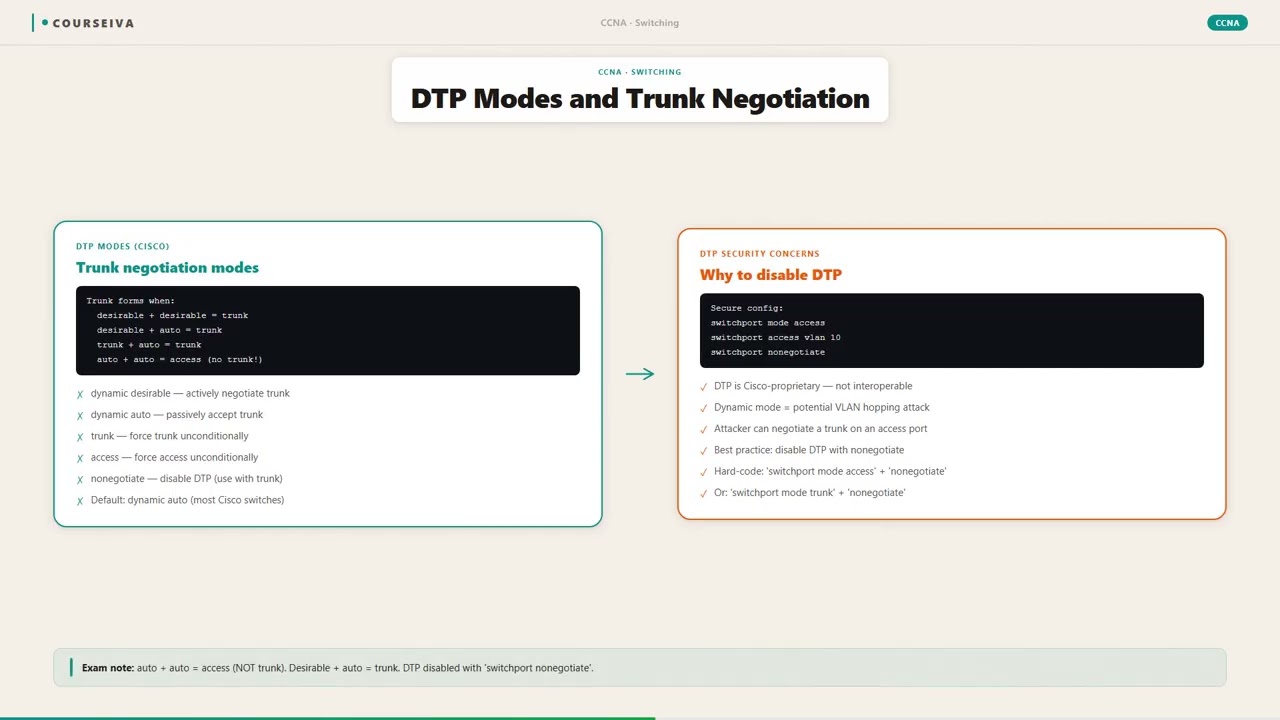
Cisco switches use DTP to negotiate trunking. DTP can be set to: - Dynamic desirable (default on some switches): Actively tries to form a trunk. - Dynamic auto: Passively waits for the other side to initiate trunking. - Trunk: Forces the link to be a trunk. - Access: Forces the link to be an access port.
For the CCNA, remember that a trunk forms only if at least one side is set to "trunk" or both sides are "dynamic desirable." If one side is "dynamic auto" and the other is "dynamic auto," no trunk forms.
Configuration Commands
To configure a trunk on a Cisco switch interface:
Switch(config)# interface gigabitethernet0/1
Switch(config-if)# switchport mode trunk
Switch(config-if)# switchport trunk native vlan 99
Switch(config-if)# switchport trunk allowed vlan 10,20,30
Verification Commands
show interfaces trunk – Displays trunk status, native VLAN, allowed VLANs, and active VLANs.
show interfaces gigabitethernet0/1 switchport – Detailed switchport configuration including operational mode.
show running-config interface gigabitethernet0/1 – Shows the running configuration.
Example output:
Switch# show interfaces trunk

Port        Mode         Encapsulation  Status        Native vlan
Gi0/1       on           802.1q         trunking      99

Port        Vlans allowed on trunk
Gi0/1       10,20,30

Port        Vlans active on trunk
Gi0/1       10,20,30

Port        STP Root Guard
Gi0/1       disabled
Interaction with Spanning Tree Protocol (STP)
Trunks carry BPDUs for all VLANs. STP runs per VLAN (PVST+ or Rapid PVST+). Each VLAN has its own root bridge and blocking state. When a trunk link goes down, STP recalculates for each VLAN separately. The native VLAN still participates in STP, but its BPDUs are untagged. A common misconfiguration is mismatched native VLANs, which can cause STP loops or VLAN hopping.
Troubleshooting Trunk Issues
Common problems:
- Mismatched native VLAN: Frames from one VLAN leak into another. Use show interfaces trunk to verify.
- DTP mismatch: One side is trunk, the other is access — link becomes an access port. Check show interfaces switchport.
- Allowed VLAN list mismatch: A VLAN not allowed on one side will be dropped. Verify with show interfaces trunk.
Walk-Through
Configure trunk mode on interface
Enter interface configuration mode for the port you want to trunk. Use `switchport mode trunk` to force the link into trunking mode. This disables DTP negotiation and sets the interface to unconditionally trunk. If you prefer DTP, you could use `switchport mode dynamic desirable` but the exam expects you to know static trunk configuration. Example: ``` Switch(config)# interface gigabitethernet0/1 Switch(config-if)# switchport mode trunk ```
Set native VLAN (optional)
By default, the native VLAN is VLAN 1. For security, change it to an unused VLAN (e.g., VLAN 99). Both ends must match. Use `switchport trunk native vlan 99`. Then verify with `show interfaces trunk`. If mismatched, the switch logs an error and may block the port (depending on configuration). Example: ``` Switch(config-if)# switchport trunk native vlan 99 ```
Restrict allowed VLANs (optional)
By default, all VLANs are allowed. To restrict, use `switchport trunk allowed vlan` followed by a list or range. For example, allow only VLANs 10, 20, 30: `switchport trunk allowed vlan 10,20,30`. To add a VLAN later, use `switchport trunk allowed vlan add 40`. To remove, use `switchport trunk allowed vlan remove 40`. Example: ``` Switch(config-if)# switchport trunk allowed vlan 10,20,30 ```
Verify trunk configuration
Use `show interfaces trunk` to see the trunk status, native VLAN, and allowed VLANs. Look for 'trunking' in the status column. If the status is 'not-trunking', check DTP mode or cabling. Also use `show interfaces gigabitethernet0/1 switchport` to see the operational mode (trunk) and administrative mode. Example: ``` Switch# show interfaces trunk ```
Test connectivity across VLANs
After trunking is up, devices in the same VLAN but on different switches should be able to ping each other. Use `ping` from a host or a switch with an SVI (interface vlan). If ping fails, check that the VLAN exists on both switches, that the trunk is up, and that the native VLAN matches. Also verify STP is not blocking the VLAN on the trunk. Use `show spanning-tree vlan <vlan-id>` to check port roles.
Troubleshoot native VLAN mismatch
If the native VLAN differs on the two ends, you'll see CDP error messages like "Native VLAN mismatch discovered on GigabitEthernet0/1." Also, frames from the native VLAN may be dropped or misdelivered. To fix, configure the same native VLAN on both ends. Use `show interfaces trunk` to see the native VLAN on each side. Also check `show interfaces gigabitethernet0/1 switchport` for the operational native VLAN.
What This Looks Like on the Job
In enterprise networks, trunking is used extensively to interconnect access switches to distribution switches, and distribution switches to core switches. For example, a campus network might have 50 access switches, each with multiple VLANs for different departments (HR, Finance, Engineering). Each access switch connects to two distribution switches via trunk links for redundancy. The trunk carries all department VLANs. The network engineer configures the trunk with a specific allowed VLAN list per access switch to prevent unauthorized VLANs from spreading. Common practice is to set the native VLAN to an unused VLAN (e.g., 999) to avoid VLAN hopping attacks. Performance is rarely an issue because trunk links are typically 1 Gbps or 10 Gbps, but oversubscription can occur if many VLANs send high traffic. To mitigate, engineers use QoS marking (PCP bits) on the trunk. If a trunk is misconfigured — say native VLAN mismatch — the result can be a broadcast storm or VLAN leakage. For instance, if switch A has native VLAN 1 and switch B has native VLAN 99, untagged frames from switch A (VLAN 1) are received by switch B as native VLAN 99 frames, effectively bridging VLAN 1 and VLAN 99. This can cause connectivity issues and security breaches. Another scenario: a router-on-a-stick configuration uses a trunk link between a router and a switch to route between VLANs. The router's subinterfaces use 802.1Q encapsulation. Misconfiguring the allowed VLAN list can break inter-VLAN routing. In data centers, trunking is used between top-of-rack switches and end-of-row switches, often with VLANs dedicated to storage, management, and VM traffic. The key takeaway: always document the native VLAN and allowed VLAN list for every trunk, and verify with show interfaces trunk after any change.
How CCNA 200-301 Actually Tests This
The CCNA 200-301 exam tests 802.1Q trunking under objective 2.1: Configure, verify, and troubleshoot VLANs and trunking. Expect multiple-choice questions, drag-and-drop, and simulation questions where you configure a trunk. The most common wrong answers come from confusing native VLAN behavior. Candidates often think the native VLAN is always VLAN 1, but it can be changed. Another trap: assuming that all frames on a trunk are tagged — but native VLAN frames are untagged. A frequent exam scenario: two switches are connected, one configured as trunk, the other as access. Candidates think the link will trunk because one side is trunk, but the link becomes an access port (because access mode overrides). The correct answer is that the trunk side will dynamically change to access or the link will not trunk. Another trap: DTP modes — "dynamic desirable" vs "dynamic auto." Candidates often forget that two "dynamic auto" ports do NOT form a trunk. Specific values to memorize: 802.1Q tag is 4 bytes; VLAN ID range 1-4094 (0 and 4095 reserved); native VLAN default is 1; the command to change native VLAN is switchport trunk native vlan <vlan>. For verification, show interfaces trunk is the go-to command. In simulation questions, you may be asked to configure a trunk with specific allowed VLANs. Remember to use switchport mode trunk first, then configure allowed VLANs. A common mistake is to put the allowed VLAN command before the mode command — order doesn't matter, but missing the mode command means the interface remains an access port. Decision rule: if a question asks about a trunk link that is not carrying traffic for a particular VLAN, check if that VLAN is in the allowed list on both ends. If the native VLAN is mismatched, expect connectivity issues for native VLAN frames but not necessarily for tagged frames. Elimination strategy: look for answers that correctly state that native VLAN frames are untagged, and that both ends must agree on native VLAN.
Key Takeaways
802.1Q inserts a 4-byte tag (TPID 0x8100 + TCI with 12-bit VLAN ID) between Source MAC and EtherType.
Native VLAN frames are sent untagged on the trunk; default native VLAN is 1.
Both ends of a trunk must have the same native VLAN; otherwise, frames leak between VLANs.
Use `switchport mode trunk` to force trunking; DTP modes: dynamic desirable, dynamic auto, trunk, access.
Two dynamic auto ports do NOT form a trunk; at least one side must be trunk or dynamic desirable.
Command `switchport trunk allowed vlan` restricts which VLANs traverse the trunk.
Verify with `show interfaces trunk` — shows status, native VLAN, allowed VLANs, active VLANs.
Easy to Mix Up
These come up on the exam all the time. Here's how to tell them apart.
802.1Q (dot1q)
IEEE standard (open)
Inserts 4-byte tag; frame size 68-1522 bytes
Native VLAN concept: untagged frames for native VLAN
Supports up to 4094 VLANs
Cisco default for modern switches
ISL (Inter-Switch Link)
Cisco proprietary (legacy)
Encapsulates entire frame with 26-byte header + 4-byte trailer; frame size up to 1548 bytes
No native VLAN; all frames are tagged
Supports up to 1000 VLANs
Not supported on most modern Cisco switches
Watch Out for These
Mistake
All frames on a trunk are tagged with a VLAN ID.
Correct
Native VLAN frames are sent untagged. Only non-native VLAN frames are tagged.
Candidates assume tagging is mandatory because the purpose of trunking is to carry multiple VLANs, but the standard intentionally leaves native VLAN untagged for backward compatibility.
Mistake
The native VLAN must be VLAN 1.
Correct
The native VLAN can be changed to any VLAN using `switchport trunk native vlan <vlan>`. Default is VLAN 1, but it is often changed for security.
Many introductory materials emphasize VLAN 1 as the default, so candidates think it is fixed.
Mistake
If one end of a link is configured as trunk and the other as access, the link becomes a trunk.
Correct
The link will operate as an access port because the access side does not send DTP frames and the trunk side may fall back to access (depending on DTP mode). The trunk configuration is overridden.
Candidates think trunk mode is dominant, but actually the port's operational mode is determined by the lower of the two modes (access is lower).
Mistake
DTP is required for trunking to work.
Correct
DTP is optional; you can statically configure trunking with `switchport mode trunk`, which disables DTP. Trunking works without DTP as long as both ends are set to trunk.
Many Cisco courses cover DTP extensively, leading candidates to believe it is necessary.
Do You Actually Know This?
Reveal each answer, then mark whether you got it right. Score 60%+ to unlock the next chapter.
Frequently Asked Questions
What is the difference between a trunk port and an access port?
An access port belongs to a single VLAN and sends frames untagged. A trunk port carries multiple VLANs and tags frames (except native VLAN). Trunk ports are used to interconnect switches or connect routers for inter-VLAN routing. On the exam, remember that access ports are for end devices, trunk ports for switch-to-switch links.
Can I change the native VLAN to an existing VLAN that is also used for data?
Technically yes, but it is not recommended for security reasons. If the native VLAN is the same as a data VLAN, untagged frames from that VLAN could be misinterpreted. Best practice is to use an unused VLAN (e.g., 999) as the native VLAN.
What happens if the native VLAN mismatches on a trunk?
The switch logs a CDP error message. Frames from the native VLAN on one side will be received as untagged frames on the other side and placed into the local native VLAN, effectively bridging the two VLANs. This can cause broadcast storms and security issues. The trunk may still operate, but connectivity for native VLAN devices will be broken or cause loops.
How do I allow only specific VLANs on a trunk?
Use `switchport trunk allowed vlan <vlan-list>`. For example, `switchport trunk allowed vlan 10,20,30`. To add a VLAN later, use `switchport trunk allowed vlan add 40`. To remove, use `switchport trunk allowed vlan remove 30`. Always verify with `show interfaces trunk`.
What is the purpose of DTP?
DTP (Dynamic Trunking Protocol) is a Cisco proprietary protocol that negotiates trunking between two switches. It can automatically set a port to trunk or access mode. However, for security, it is recommended to disable DTP with `switchport nonegotiate` and statically configure trunk mode.
Does 802.1Q support VLAN IDs 0 and 4095?
No. VLAN 0 is reserved for priority tagging (only PCP used, no VLAN ID) and VLAN 4095 is reserved. Usable VLAN IDs are 1-4094. On Cisco switches, VLAN 1 is the default, and VLANs 1002-1005 are reserved for legacy Token Ring and FDDI.
How does STP interact with trunk links?
STP runs per VLAN (PVST+ or Rapid PVST+). Each VLAN has its own BPDU and root bridge. On a trunk, BPDUs for each VLAN are sent tagged (except native VLAN BPDUs are untagged). A trunk link can be blocking for one VLAN but forwarding for another. Use `show spanning-tree vlan <vlan>` to check port states.
Terms Worth Knowing
Ready to put this to the test?
You've just covered 802.1Q Trunking — now see how well it sticks with free CCNA 200-301 practice questions. Full explanations included, no account needed.
Done with this chapter?