Spanning Tree Protocol
Spanning Tree Protocol (STP) is the unsung hero of redundant switched networks — without it, a single broadcast storm would take down your entire network in seconds. On the CCNA 200-301 exam, STP appears under exam objective 2.5 (Spanning Tree Protocol) and is tested heavily on root bridge election, port states, and the transition from blocking to forwarding. Understanding STP isn't just about passing a test; it's about preventing the Layer 2 loops that can cripple any enterprise network.
Jump to a section
A simple way to picture Spanning Tree Protocol
The Conference Room Microphone
Suppose you've entered a conference room with multiple microphones around a large table, each connected to a central sound system. If two people speak at the same time, the sound system feeds back — a horrible screech that grows louder and louder until someone unplugs everything. In networking, redundant links are like having multiple paths for the same frame; without STP, frames loop endlessly, causing a broadcast storm. STP acts like a strict moderator who ensures only one path is active at a time. The moderator selects one microphone (the root bridge) as the reference point. Each person (switch) then decides which of their own microphones is closest to the root — that's the root port. For every other person, they choose a single microphone to listen to (designated port) and mute all others (blocked ports). If the active microphone fails, the moderator quickly unmutes a backup (convergence). The moderator sends a 'test tone' every 2 seconds (BPDU) to check if the root is still speaking. If no tone is heard for 20 seconds (max age), the moderator assumes the root is gone and recalculates. The entire process takes about 30-50 seconds — slow by modern standards, but it prevents the screech of a loop. This analogy directly mirrors STP's election process, port roles (root, designated, alternate/backup), and timers (hello, max age, forward delay).
How It Actually Works
What is Spanning Tree Protocol and Why Does It Exist?
Spanning Tree Protocol (STP), defined in IEEE 802.1D, is a network protocol that ensures a loop-free topology in Ethernet networks with redundant links. Without STP, redundant paths would cause broadcast storms, MAC table instability, and multiple frame copies — all of which can bring a network to its knees. STP achieves this by placing some ports in a blocking state, effectively creating a single active path between any two network nodes.
How STP Works: Step-by-Step at the Frame Level
STP operates by exchanging Bridge Protocol Data Units (BPDUs) between switches. There are two types of BPDUs: Configuration BPDUs (used for topology maintenance) and Topology Change Notification (TCN) BPDUs (used to signal changes).
Step 1: Root Bridge Election
Every switch starts by claiming itself as the root bridge, sending BPDUs with its own bridge ID (BID). The BID is an 8-byte field: 2 bytes for bridge priority (default 32768) and 6 bytes for the MAC address. The switch with the lowest BID wins. If priorities are equal, the lowest MAC address breaks the tie. Once elected, the root bridge sends BPDUs every 2 seconds (hello time) with its BID as root.
Step 2: Root Port Selection
Every non-root switch selects exactly one root port — the port with the lowest path cost to the root bridge. Path cost is based on link speed (e.g., 10 Gbps = 2, 1 Gbps = 4, 100 Mbps = 19, 10 Mbps = 100). If costs are equal, the lowest neighbor bridge ID is used as tiebreaker, then lowest neighbor port ID.
Step 3: Designated Port Selection
On each segment (collision domain), one switch is designated to forward traffic. The switch with the lowest root path cost on that segment becomes the designated bridge, and its port on that segment becomes the designated port. The root bridge's ports are always designated.
Step 4: Blocking the Remaining Ports
All ports that are not root or designated are placed in blocking state. They listen for BPDUs but do not forward data or learn MAC addresses.
STP Port States and Timers
STP ports transition through five states:
Blocking: No data forwarding, no MAC learning, receives BPDUs only. Default timer: 20 seconds (max age).
Listening: No data forwarding, no MAC learning, receives and sends BPDUs. Default timer: 15 seconds (forward delay).
Learning: No data forwarding, learns MAC addresses, receives and sends BPDUs. Default timer: 15 seconds (forward delay).
Forwarding: Data forwarding and MAC learning fully enabled.
Disabled: Administratively down.
Total convergence time: max age (20) + forward delay (15) + forward delay (15) = 50 seconds.
Key Timers and Defaults
Hello Time: 2 seconds (interval between BPDUs from root)
Forward Delay: 15 seconds (time spent in listening and learning states)
Max Age: 20 seconds (time a switch waits without hearing a BPDU before re-evaluating)
Bridge Priority: 32768 (default, configurable in multiples of 4096)
Path Costs: 10 Gbps = 2, 1 Gbps = 4, 100 Mbps = 19, 10 Mbps = 100
IOS CLI Verification Commands
To verify STP status on a Cisco switch:
Switch# show spanning-tree

VLAN0001
  Spanning tree enabled protocol ieee
  Root ID    Priority    32769
             Address     0011.2233.4455
             Cost        4
             Port        1 (GigabitEthernet0/1)
             Hello Time  2 sec  Max Age 20 sec  Forward Delay 15 sec

  Bridge ID  Priority    32769  (priority 32768 sys-id-ext 1)
             Address     0011.2233.4466
             Hello Time  2 sec  Max Age 20 sec  Forward Delay 15 sec
             Aging Time  300 sec

Interface        Role Sts Cost      Prio.Nbr Type
---------------- ---- --- --------- -------- --------------------------------
Gi0/1            Root FWD 4         128.1    P2p
Gi0/2            Desg FWD 4         128.2    P2p
Gi0/3            Altn BLK 19        128.3    P2p
Other useful commands:
Switch# show spanning-tree vlan 10
Switch# show spanning-tree interface gigabitethernet 0/1 detail
Switch# show spanning-tree summary
How STP Interacts with Related Protocols
Rapid Spanning Tree Protocol (RSTP, 802.1w): Faster convergence (6 seconds or less) by using proposal/agreement handshake and edge ports.
Multiple Spanning Tree Protocol (MSTP, 802.1s): Maps multiple VLANs to a single spanning tree instance, reducing overhead.
Per-VLAN Spanning Tree (PVST+): Cisco proprietary, runs a separate STP instance per VLAN, allowing load balancing.
VLAN Trunking Protocol (VTP): Can propagate STP information but is generally avoided due to risk of misconfiguration.
Trap Patterns on the Exam
Root bridge election: Candidates often forget that bridge priority is combined with VLAN ID in PVST+ (e.g., priority 32768 + VLAN 1 = 32769). The default system ID extension is enabled.
Port cost: Newer switches use long path costs (32-bit) that differ from the classic short costs. For 1 Gbps, short cost = 4, long cost = 20,000. The exam typically uses short costs unless specified.
Convergence time: Many candidates think STP converges instantly; remember the 50-second default (20+15+15).
Blocking vs. disabled: A blocked port still receives BPDUs; a disabled port is administratively down and does not participate.
Walk-Through
Elect the Root Bridge
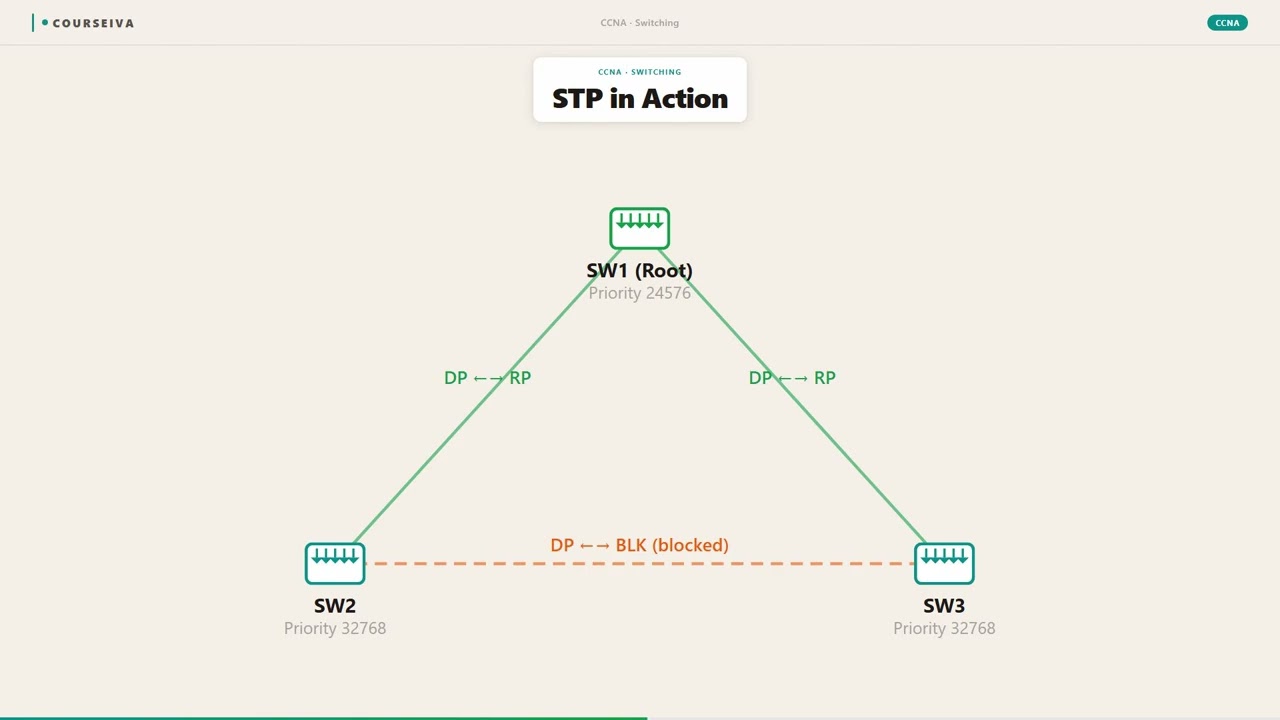
All switches initially believe they are the root. They send BPDUs with their own BID. The switch with the lowest BID (bridge priority + MAC address) becomes root. Default priority is 32768 (or 32769 with VLAN 1 in PVST+). To influence the election, set a lower priority on the desired root using the command `spanning-tree vlan <vlan-id> priority <0-61440>` in global configuration mode. For example: `Switch(config)# spanning-tree vlan 1 priority 4096`. This ensures that switch becomes root. The root bridge sends BPDUs every 2 seconds. All other switches update their root information upon receiving a superior BPDU.
Select Root Ports on Non-Root Switches
Each non-root switch selects one root port (RP) — the port with the lowest path cost to the root bridge. Path cost is calculated by adding the cost of outgoing links toward the root. For example, if a switch connects to the root via a 1 Gbps link (cost 4), the root port cost is 4. If there are multiple paths, the switch compares the cumulative cost. Tiebreakers: lowest neighbor bridge ID, then lowest neighbor port ID. The root port is the switch's best path to the root. To verify: `show spanning-tree` shows the root port in the 'Role' column as 'Root'.
Elect Designated Ports on Each Segment
On every network segment (link between two switches), one switch is designated to forward traffic. The switch with the lowest root path cost on that segment becomes the designated bridge; its port on that segment is the designated port (DP). The root bridge's ports are always designated because its root path cost is zero. If two switches have equal root path cost, the switch with the lower BID wins. All other ports on the segment become non-designated (alternate or backup) and are placed in blocking state. The designated port is the only port that forwards traffic on that segment.
Block All Other Ports
Any port that is not a root port or designated port is placed in the blocking state. Blocked ports do not forward data frames, do not learn MAC addresses, but they still listen for BPDUs. This ensures a loop-free topology. If a blocked port stops receiving BPDUs (after max age of 20 seconds), it transitions to listening, then learning, then forwarding — but only if it becomes a root or designated port in the new topology. Blocked ports are the 'safety valve' that prevents loops while maintaining redundancy.
Monitor and Verify STP Operation
Use `show spanning-tree` to view the current STP state. The output shows root ID, bridge ID, and per-interface roles (Root, Desg, Altn, Back) and states (FWD, BLK, LRN, LIS). To see detailed BPDU information on an interface: `show spanning-tree interface gigabitethernet 0/1 detail`. This shows counters for BPDUs sent/received, port priority, and cost. For troubleshooting, `debug spanning-tree events` can be used but with caution in production. Also check `show spanning-tree vlan <vlan-id>` to isolate a specific VLAN in PVST+.
Troubleshoot STP Issues
Common issues include: (1) No root bridge elected — check that all switches are running STP (enabled by default). (2) Unexpected root bridge — verify priority settings; a switch with default priority may become root if its MAC is lower. (3) Port stuck in blocking — check for BPDU reception; if a port should be forwarding but is blocking, verify that the other end is not a root or designated port. (4) Convergence too slow — consider using RSTP. Use `show spanning-tree vlan 1` to see if any ports are in blocking state unexpectedly. Also check `show spanning-tree inconsistentports` for BPDU guard or root guard issues.
What This Looks Like on the Job
In a typical enterprise campus network, STP is deployed on access, distribution, and core switches to provide redundancy without loops. For example, consider a three-tier topology: two distribution switches (Dist-1 and Dist-2) each connect to a core switch (Core-A) and to multiple access switches. The access switches have dual uplinks to both distribution switches. Without STP, the redundant uplinks would cause a loop. STP elects one distribution switch as root (often manually configured with priority 4096) and blocks one uplink on each access switch. If the active uplink fails, STP converges and unblocks the backup. In production, engineers often use Rapid PVST+ (Cisco's implementation of RSTP per VLAN) to reduce convergence time from 50 seconds to about 6 seconds. They also configure features like PortFast on access ports to bypass listening/learning, and BPDU Guard to shut down ports that receive unexpected BPDUs (preventing rogue switch attacks). Common scale considerations: a large campus with 500 VLANs using PVST+ would run 500 STP instances, consuming CPU. To reduce overhead, MSTP (802.1s) maps multiple VLANs to fewer instances. Misconfiguration can be catastrophic: if an engineer forgets to set the root bridge priority and two switches have the same priority, the one with the lower MAC becomes root — which might be an access switch with limited resources. This can cause suboptimal forwarding paths and increased latency. Another common mistake is enabling PortFast on trunk ports, which can cause temporary loops if a switch is connected. In real networks, STP is a set-it-and-forget-it protocol, but knowing how to tune timers and use advanced features is essential for high availability.
How CCNA 200-301 Actually Tests This
The CCNA 200-301 exam tests STP under objective 2.5, focusing on: (1) Root bridge election process, (2) Port roles (root, designated, alternate, backup), (3) Port states (blocking, listening, learning, forwarding), (4) STP timers and default values, (5) PVST+ and Rapid PVST+ basics. Expect 3-5 questions on STP, often scenario-based. Common wrong answers: (A) 'The switch with the highest MAC address becomes root' — candidates confuse 'lowest' with 'highest'. (B) 'All ports on the root bridge are designated' — this is true, but candidates often think root bridge has root ports; it doesn't. (C) 'STP converges in 30 seconds' — the default is 50 seconds (20+15+15). (D) 'A blocked port does not receive BPDUs' — it does; it only stops forwarding data. Specific values to memorize: default bridge priority = 32768 (or 32769 with system ID extension), hello = 2 sec, max age = 20 sec, forward delay = 15 sec, path cost for 1 Gbps = 4, 100 Mbps = 19. Calculation traps: When computing path cost, remember that the cost is cumulative from the switch to the root — not just the link cost. Also, in PVST+, the bridge priority is the configured priority plus the VLAN ID (e.g., priority 32768 + VLAN 10 = 32778). For scenario questions, use elimination: if a question asks which port becomes root port, find the port with the lowest root path cost. If costs tie, compare neighbor BID (lowest wins), then neighbor port ID (lowest wins). Always assume default settings unless stated otherwise. Decision rule: For 'which switch is root?' — compare BIDs; lowest wins. For 'which port is designated?' — on each link, the switch with the lowest root path cost wins; if tie, lower BID wins.
Key Takeaways
STP elects a single root bridge based on lowest bridge ID (priority + MAC address).
Default bridge priority is 32768; with PVST+ system ID extension, it becomes 32768 + VLAN ID.
Root ports are on non-root switches, selected by lowest root path cost to the root bridge.
Designated ports are the single forwarding port on each segment; root bridge ports are always designated.
STP port states: Blocking (20s max age), Listening (15s), Learning (15s), Forwarding.
Default timers: Hello 2s, Forward Delay 15s, Max Age 20s — total convergence 50s.
Path cost: 10 Gbps = 2, 1 Gbps = 4, 100 Mbps = 19, 10 Mbps = 100 (short cost).
Rapid PVST+ (802.1w) converges in about 6 seconds using proposal/agreement handshake.
Easy to Mix Up
These come up on the exam all the time. Here's how to tell them apart.
Classic STP (802.1D)
Convergence time: 50 seconds (20+15+15)
Port states: blocking, listening, learning, forwarding
Uses max age timer to detect failures
No edge port concept; all ports go through listening/learning
Backward compatible with 802.1D
Rapid STP (802.1w)
Convergence time: 6 seconds or less
Port states: discarding, learning, forwarding (only 3 states)
Uses proposal/agreement handshake for rapid transition
Edge ports (PortFast) bypass listening/learning immediately
Backward compatible with 802.1D via BPDU version detection
PVST+
Cisco proprietary
Runs one STP instance per VLAN
Allows load balancing per VLAN
CPU intensive with many VLANs
Default on Cisco switches
MSTP (802.1s)
IEEE standard
Maps multiple VLANs to one STP instance
Reduces number of instances
More scalable for large networks
Requires configuration of MST region
Watch Out for These
Mistake
The root bridge has a root port.
Correct
The root bridge does not have a root port; it is the reference point. Root ports exist only on non-root switches.
Candidates think every switch has a root port, but the root bridge is the destination, not a source.
Mistake
STP blocks all redundant links permanently.
Correct
STP blocks only enough ports to eliminate loops; blocked ports become active if the primary path fails (after convergence).
The term 'blocking' sounds permanent, but it's a standby state for redundancy.
Mistake
A higher bridge priority is better for becoming root.
Correct
Lower bridge priority is better. The root bridge is the switch with the lowest BID (priority + MAC).
In many elections, 'higher' means better, but STP uses lowest as the tiebreaker.
Mistake
All switches send BPDUs every 2 seconds.
Correct
Only the root bridge originates BPDUs every 2 seconds. Other switches relay them but do not generate their own unless they become root.
Candidates confuse hello timer with BPDU generation; non-root switches forward BPDUs but don't initiate.
Do You Actually Know This?
Reveal each answer, then mark whether you got it right. Score 60%+ to unlock the next chapter.
Frequently Asked Questions
How does STP elect the root bridge?
STP elects the root bridge by comparing Bridge IDs (BIDs). Each switch sends BPDUs containing its BID (bridge priority + MAC address). The switch with the lowest BID becomes root. If priorities are equal, the lowest MAC address wins. Default priority is 32768, but with PVST+ system ID extension, the VLAN ID is added (e.g., VLAN 1 gives 32769). You can manually set priority in multiples of 4096 using `spanning-tree vlan <vlan-id> priority <value>`. Exam tip: always compare BIDs as a whole; don't forget the system ID extension.
What is the difference between root port and designated port?
A root port is the single port on a non-root switch that provides the best path to the root bridge. Each non-root switch has exactly one root port. A designated port is the port on a segment that forwards traffic for that segment. Each segment (link) has exactly one designated port. The root bridge's ports are all designated. Root ports are selected based on lowest root path cost to the root; designated ports are selected based on lowest root path cost on the segment (or lowest BID if costs tie).
Why does STP take 50 seconds to converge?
STP uses three timers that sum to 50 seconds by default: Max Age (20 seconds) — time a switch waits for a BPDU before assuming a failure; Forward Delay (15 seconds) — time spent in listening state; and another Forward Delay (15 seconds) — time spent in learning state. The listening and learning states ensure that no temporary loops form during transition. Rapid STP (RSTP) reduces this to about 6 seconds by using a handshake mechanism and edge ports.
What is the difference between PVST+ and Rapid PVST+?
PVST+ (Per-VLAN Spanning Tree Plus) is Cisco's implementation of classic STP (802.1D) running a separate instance per VLAN. It converges in 50 seconds. Rapid PVST+ uses the same per-VLAN architecture but implements Rapid Spanning Tree Protocol (RSTP, 802.1w) for faster convergence (6 seconds). Rapid PVST+ is the default on modern Cisco switches. It uses proposal/agreement handshake, edge ports (PortFast), and link types (point-to-point, shared) to accelerate transitions.
How do I verify which port is blocked by STP?
Use the `show spanning-tree` command. Look for ports with 'Role' as 'Altn' (alternate) or 'Back' (backup) and 'Sts' as 'BLK'. For example: `show spanning-tree vlan 1`. The output lists each interface with its role and status. A blocked port will show 'Altn BLK' or 'Back BLK'. You can also use `show spanning-tree interface <interface> detail` to see BPDU counters and state history.
What is BPDU Guard and when should I use it?
BPDU Guard is a security feature that shuts down a port if it receives a BPDU. It is typically enabled on access ports where end devices (PCs, printers) are connected. If a rogue switch is plugged in, BPDU Guard will error-disable the port, preventing STP manipulation. Configure it globally with `spanning-tree portfast bpduguard default` or per interface with `spanning-tree bpduguard enable`. On the exam, remember that BPDU Guard works with PortFast; it does not prevent loops from legitimate switches.
Can STP run on a network with only two switches?
Yes, STP can run on two switches connected by two links. Without STP, the redundant link would cause a loop. STP will block one of the links (placing the port in blocking state) to create a loop-free topology. If the active link fails, STP converges and unblocks the backup. This is a common scenario in small networks for redundancy.
Terms Worth Knowing
Ready to put this to the test?
You've just covered Spanning Tree Protocol — now see how well it sticks with free CCNA 200-301 practice questions. Full explanations included, no account needed.
Done with this chapter?