RSTP — Rapid Spanning Tree
Rapid Spanning Tree Protocol (RSTP, IEEE 802.1w) is the evolution of classic STP (802.1D), delivering sub-second convergence while maintaining backward compatibility. On the CCNA 200-301 exam (objective 2.5), you must understand RSTP port roles, port states, and the rapid transition mechanism—both its benefits and its edge cases. In real networks, RSTP is the default spanning-tree mode on nearly all modern switches, making it essential knowledge for any network engineer.
Jump to a section
A simple way to picture RSTP — Rapid Spanning Tree
Emergency Exit Plan Gone Rapid
Fifty seconds to open a single set of fire doors in a large office building—that's classic STP. During that 50 seconds, no one can enter or leave the building; the network is blocked. Now upgrade to a building where fire doors pop open instantly when a fire alarm sounds—that's RSTP. But the magic isn't just speed; it's how the doors know to open. In the old building, a central fire marshal (the root bridge) would send a slow patrol every 2 seconds (BPDU), and each floor manager would wait 20 seconds to confirm no other path exists before unlocking their door. In the new building, each floor manager (switch) constantly talks to their neighbors (link-specific BPDUs). If a floor manager detects a fire (link failure), they immediately tell their adjacent floor managers 'I'm switching to my backup door!'—no waiting for the central marshal. Furthermore, if a floor manager knows their door connects directly to an exit (edge port—like a port to an end user device), they keep it unlocked permanently, because no loops can form there. The building also has designated doors (designated ports) that are always open, and alternate doors (alternate ports) that stay closed but ready. This constant, neighbor-to-neighbor communication allows the entire building to reconfigure in under a second, not 50 seconds. The key mechanistic difference: classic STP relies on a timer-based, root-centric convergence, while RSTP uses active, immediate, neighbor-driven negotiation (proposal/agreement handshake) to transition ports to forwarding without waiting for timers.
How It Actually Works
What RSTP Is and Why It Exists
Rapid Spanning Tree Protocol (RSTP), defined in IEEE 802.1w, is an enhancement of the original Spanning Tree Protocol (802.1D). Its primary goal is to provide faster convergence after a topology change—typically in sub-second time—compared to the 30-50 seconds required by classic STP. RSTP achieves this by redefining port roles, port states, and the BPDU exchange mechanism. It is fully backward compatible with 802.1D STP, meaning RSTP switches can interoperate with legacy STP switches, though they will fall back to slower convergence on those links.
How RSTP Works at the Packet/Frame Level
RSTP uses the same BPDU format as STP but with a few key differences: - Version: RSTP BPDUs use version ID 2 (STP uses version 0). - Flags: RSTP uses all 8 flag bits in the BPDU, including Proposal, Agreement, Learning, Forwarding, Topology Change Acknowledgment, and Topology Change. In STP, only the Topology Change (TC) and TCA bits were used. - Type: RSTP BPDUs are sent with type 0x02 (configuration BPDU) but with the protocol version identifier set to 2.
RSTP switches send BPDUs every hello time (2 seconds) out of all ports, even if the port is blocking. This is a major departure from classic STP, where only designated ports send BPDUs. This constant hello allows neighbors to detect link failures within three missed hellos (6 seconds) rather than waiting for the Max Age timer (20 seconds).
Port Roles and Port States
RSTP defines the following port roles: - Root Port (RP): The port that has the best path to the root bridge. Same as STP. - Designated Port (DP): The port that has the best path from the segment to the root bridge. Same as STP. - Alternate Port (AP): A port that provides an alternate path to the root bridge—essentially a backup to the root port. In STP, this was a blocking port that was not a designated port. - Backup Port (BP): A port that provides a backup for a designated port—only possible when two ports connect to the same collision domain (e.g., hub). Rare in modern switched networks. - Disabled Port: A port that is administratively down.
RSTP reduces the number of port states from five (Blocking, Listening, Learning, Forwarding, Disabled) to three: - Discarding: The port does not forward frames and does not learn MAC addresses. This combines the old Blocking, Listening, and Disabled states. - Learning: The port does not forward frames but learns MAC addresses. - Forwarding: The port forwards frames and learns MAC addresses.
Rapid Transition Mechanism: Proposal/Agreement Handshake
The core innovation in RSTP is the proposal/agreement (P/A) handshake, which allows a port to transition directly from Discarding to Forwarding without waiting for timers. Here's how it works: 1. A switch that wants to become the designated port on a link sends a Proposal BPDU (with the Proposal flag set) to the neighbor. 2. The neighbor, upon receiving the Proposal, immediately places its port into Discarding state (if it is currently in a learning/forwarding state) and sends back an Agreement BPDU (with the Agreement flag set). The neighbor also ensures that all its other ports are in sync (i.e., not creating a loop) before sending the Agreement. 3. The originating switch receives the Agreement and transitions its port to Forwarding immediately.
This handshake occurs within one round-trip time (milliseconds), eliminating the need for the Listening and Learning timer delays (15 seconds each in STP). The handshake propagates from the root bridge outward, ensuring a loop-free topology is built quickly.
Edge Ports and Point-to-Point Links
RSTP introduces the concept of edge ports (equivalent to PortFast in Cisco terminology). An edge port is a port that connects to an end device (like a PC or server) and is assumed to never create a loop. Edge ports transition directly to Forwarding without any handshake or delay. If an RSTP BPDU is received on an edge port, it immediately loses its edge status and becomes a normal spanning-tree port.
RSTP also distinguishes between point-to-point links (full-duplex) and shared links (half-duplex). The P/A handshake only works on point-to-point links. On shared links, RSTP falls back to classic STP behavior (timer-based transitions).
Topology Change Mechanism
When an RSTP switch detects a topology change (e.g., a link going down), it: 1. Starts a topology change (TC) while timer (default 4 seconds, twice the hello time). 2. Sets the TC flag in its BPDUs for the duration of the TC while timer. 3. Flushes MAC addresses learned on all ports except the port that received the TC BPDU.
This is much faster than STP, which uses a 35-second (Max Age + Forward Delay) mechanism to age out MAC addresses.
Key Timers and Defaults
Hello Time: 2 seconds (same as STP)
Forward Delay: 15 seconds (same as STP, but rarely used because of P/A)
Max Age: 20 seconds (same as STP, but RSTP detects failures in 6 seconds via missed hellos)
TC While Timer: 4 seconds (twice hello time)
Migrate Time: 3 seconds (used when transitioning between STP and RSTP modes)
IOS CLI Verification Commands
To verify RSTP operation on a Cisco switch, use the following commands:
Switch# show spanning-tree

VLAN0001
  Spanning tree enabled protocol rstp
  Root ID    Priority    32769
             Address     0050.7966.6800
             This bridge is the root
             Hello Time   2 sec  Max Age 20 sec  Forward Delay 15 sec

  Bridge ID  Priority    32769  (priority 32768 sys-id-ext 1)
             Address     0050.7966.6800
             Hello Time   2 sec  Max Age 20 sec  Forward Delay 15 sec
             Aging Time  300 sec

Interface        Role Sts Cost      Prio.Nbr Type
---------------- ---- --- --------- -------- --------------------------------
Gi0/0            Desg FWD 4         128.1    P2p
Gi0/1            Desg FWD 4         128.2    P2p
Gi0/2            Desg FWD 4         128.3    P2p
Gi0/3            Desg FWD 4         128.4    P2p
Notice the line Spanning tree enabled protocol rstp. The role column shows Desg (Designated), Root, Altn (Alternate), or Back (Backup). The state column shows FWD (Forwarding), LRN (Learning), or BLK (Discarding). The type column indicates P2p (point-to-point), Shr (shared), or Edge.
To see detailed RSTP information for a specific interface:
Switch# show spanning-tree interface gigabitethernet 0/0 detail

Port 1 (GigabitEthernet0/0) of VLAN0001 is designated forwarding
  Port path cost 4, Port priority 128, Port identifier 128.1.
  Designated root has priority 32769, address 0050.7966.6800
  Designated bridge has priority 32769, address 0050.7966.6800
  Designated port id is 128.1, designated path cost 0
  Timers: message age 0, forward delay 0, hold 0
  Number of transitions to forwarding state: 1
  Link type is point-to-point (auto)
  BPDU: sent 17, received 0
  RSTP: designated port, Proposal Agree flag set
Interaction with Related Protocols
RSTP interacts with: - PVST+: Cisco's Per-VLAN Spanning Tree Plus. With RSTP, Cisco uses Rapid PVST+ (PVST+ with RSTP), which runs a separate RSTP instance per VLAN. This is the default mode on modern Cisco switches. - MST: Multiple Spanning Tree (802.1s) uses RSTP as its underlying mechanism for rapid convergence within instances. - PortFast: Cisco's proprietary feature for edge ports; RSTP edge ports are equivalent. - BPDU Guard: Shuts down a port if a BPDU is received (used on edge ports). - BPDU Filter: Prevents sending/receiving BPDUs on a port (used on edge ports).
Trap Patterns on the Exam
Trap 1: Confusing RSTP port roles with STP port roles. RSTP has Alternate and Backup ports, not just Blocking. The Alternate port is a backup to the root port; the Backup port is a backup to the designated port.
Trap 2: Thinking RSTP uses the same five states. RSTP uses three states: Discarding, Learning, Forwarding.
Trap 3: Assuming RSTP always converges faster. On shared links (half-duplex), RSTP falls back to timer-based convergence, which is just as slow as STP.
Trap 4: Forgetting that RSTP sends BPDUs out of all ports, including blocking ports. This is key for fast failure detection.
Walk-Through
Enable RSTP on a Cisco Switch
By default, modern Cisco switches run Rapid PVST+ (RSTP per VLAN). To explicitly set the spanning-tree mode to RSTP (Rapid PVST+), use the global configuration command `spanning-tree mode rapid-pvst`. Verify with `show spanning-tree` to see 'Spanning tree enabled protocol rstp'. If the switch is running MST, you can still enable RSTP per instance, but for CCNA, focus on Rapid PVST+.
Configure an Edge Port (PortFast)
On a port connected to an end device, configure it as an edge port to skip the P/A handshake and transition immediately to forwarding. Use the interface command `spanning-tree portfast`. Alternatively, enable globally with `spanning-tree portfast default` which sets all access ports as edge. Verify with `show spanning-tree interface gigabitethernet 0/0 detail` and look for 'Edge port' in the output.
Configure Point-to-Point Link Manually
RSTP automatically detects link type based on duplex: full-duplex is point-to-point, half-duplex is shared. To manually set a link as point-to-point (e.g., if auto-detection fails), use the interface command `spanning-tree link-type point-to-point`. This is rarely needed but can appear on the exam. Verify with `show spanning-tree interface gigabitethernet 0/0 detail` and check 'Link type is point-to-point'.
Verify Port Roles and States
Use `show spanning-tree` to see the role (Root, Desg, Altn, Back) and state (FWD, LRN, BLK) for each interface. For a specific VLAN, use `show spanning-tree vlan 10`. To see detailed information including the number of BPDUs sent/received and the P/A handshake status, use `show spanning-tree interface gigabitethernet 0/0 detail`.
Troubleshoot a Topology Change
When a topology change occurs, RSTP sends TC BPDUs. To see TC events, use `show spanning-tree vlan 10 detail | include TC` or `debug spanning-tree events`. The TC while timer is 4 seconds. After a topology change, MAC addresses are flushed. Verify with `show mac address-table count` to see if the table size dropped. If convergence is slow, check if any link is half-duplex (shared) or if legacy STP switches are present.
Verify RSTP Compatibility with Legacy STP
If an RSTP switch connects to a legacy STP switch, the port will fall back to STP mode. Use `show spanning-tree interface gigabitethernet 0/0 detail` and look for 'BPDU: sent 17, received 0' and the protocol field. If the neighbor sends an STP BPDU (version 0), the RSTP switch will continue using STP on that port. The 'Protocol' field in `show spanning-tree` will show 'ieee' for STP and 'rstp' for RSTP.
What This Looks Like on the Job
In a modern enterprise campus network, RSTP (specifically Rapid PVST+) is the default spanning-tree mode on Cisco Catalyst switches. For example, a three-tier network with access, distribution, and core layers often uses RSTP to ensure fast failover. When a link between a distribution switch and an access switch fails, RSTP can converge within a few hundred milliseconds, minimizing disruption to end users. This is critical for voice and video traffic that cannot tolerate 30+ second outages.
A common deployment scenario: An engineer configures all access ports as edge ports (PortFast) with BPDU Guard enabled. This prevents loops from misconfigured end devices and allows immediate forwarding. On uplinks between switches, the engineer relies on the P/A handshake for rapid transition. In a well-designed network, the root bridge is manually set to a core switch for stability. The engineer might also tune the hello time to 1 second for faster failure detection, though this increases CPU load.
Performance considerations: RSTP scales well with the number of VLANs because each VLAN runs its own instance (Rapid PVST+). However, with hundreds of VLANs, the CPU overhead of sending BPDUs for each VLAN can be significant. In such cases, MST (Multiple Spanning Tree) is preferred, which uses RSTP internally but maps multiple VLANs to fewer instances.
Misconfiguration consequences: If an engineer accidentally configures an uplink as an edge port, the switch will not expect BPDUs on that port. If a BPDU is received (e.g., from another switch), BPDU Guard will errdisable the port, causing an outage. Conversely, failing to configure an access port as an edge port causes a 30-second delay before the port forwards, annoying users who expect instant connectivity. Another common issue: if a link is half-duplex (e.g., due to auto-negotiation failure), RSTP falls back to timer-based convergence, causing slow failover.
How CCNA 200-301 Actually Tests This
On the CCNA 200-301 exam, objective 2.5 covers spanning-tree protocols, including RSTP. You must know:
The three port states: Discarding, Learning, Forwarding.
The four port roles: Root, Designated, Alternate, Backup.
The proposal/agreement handshake and when it is used (point-to-point links only).
Edge ports (PortFast) and their behavior.
The difference between RSTP and classic STP in terms of convergence speed and BPDU handling.
Common wrong answers: 1. "RSTP has five port states." This is false; RSTP has three. Candidates confuse with STP's five states. 2. "Alternate port is a backup to the designated port." No, an Alternate port is a backup to the root port. A Backup port backs up the designated port. 3. "RSTP always converges in under a second." Only on point-to-point links; on shared links, it uses timers. 4. "RSTP does not send BPDUs on blocking ports." False; RSTP sends BPDUs on all ports every 2 seconds.
Specific values to memorize:
Hello time: 2 seconds
Forward Delay: 15 seconds (but rarely used)
Max Age: 20 seconds (but failure detection is 3 missed hellos = 6 seconds)
TC while timer: 4 seconds
Edge port transition: immediate
P/A handshake: one round-trip time
Calculation traps: The exam may ask you to calculate the time to convergence after a link failure. With RSTP on a point-to-point link, convergence is essentially the time for the P/A handshake plus propagation delay—typically milliseconds. If the link is shared, it falls back to STP timers: 20 seconds (Max Age) + 15 seconds (Forward Delay) = 35 seconds. Remember that RSTP detects failure in 6 seconds (3 missed hellos), not 20 seconds.
Decision rule for scenario questions: If the question mentions 'rapid convergence', 'sub-second', or 'fast failover', the answer likely involves RSTP features. If it mentions 'PortFast' or 'edge port', think of immediate forwarding. If it mentions 'half-duplex' or 'hub', expect timer-based convergence.
Key Takeaways
RSTP (802.1w) converges in sub-second time on point-to-point links using the proposal/agreement handshake.
RSTP has three port states: Discarding, Learning, Forwarding.
RSTP has four port roles: Root, Designated, Alternate, Backup.
Edge ports (PortFast) transition to forwarding immediately and are used for end devices.
RSTP sends BPDUs every 2 seconds out of all ports, including blocking ports.
On shared (half-duplex) links, RSTP falls back to timer-based STP convergence.
Cisco's Rapid PVST+ runs a separate RSTP instance per VLAN.
Easy to Mix Up
These come up on the exam all the time. Here's how to tell them apart.
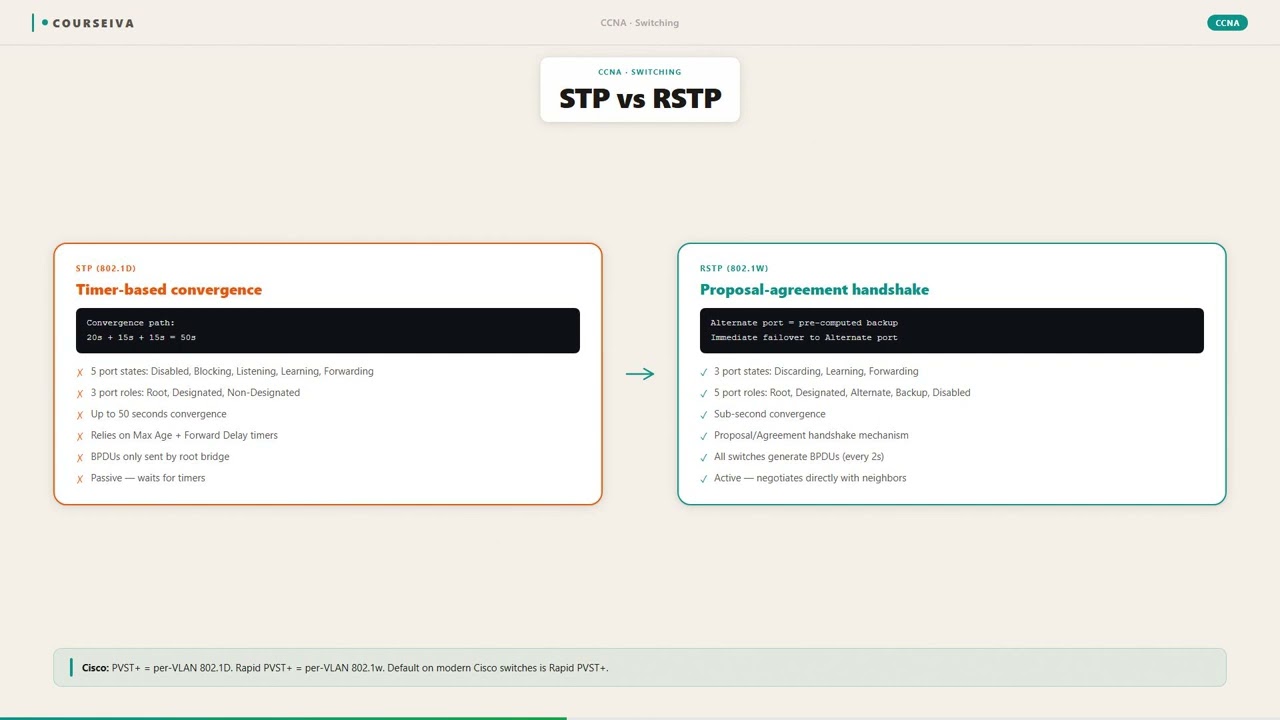
STP (802.1D)
Convergence time: 30-50 seconds
Port states: Blocking, Listening, Learning, Forwarding, Disabled
Port roles: Root, Designated, Blocking (non-designated)
BPDUs sent only from designated ports
Timer-based convergence (Max Age, Forward Delay)
RSTP (802.1w)
Convergence time: sub-second (on P2P links)
Port states: Discarding, Learning, Forwarding
Port roles: Root, Designated, Alternate, Backup
BPDUs sent from all ports every 2 seconds
Proposal/Agreement handshake for rapid transition
Watch Out for These
Mistake
RSTP has five port states like STP.
Correct
RSTP has only three port states: Discarding, Learning, and Forwarding. The old Blocking, Listening, and Disabled states are consolidated into Discarding.
Candidates memorize the five STP states and assume RSTP is the same, but RSTP simplifies the states.
Mistake
An Alternate port is a backup to a Designated port.
Correct
An Alternate port is a backup to the Root port. A Backup port is a backup to a Designated port.
The names are similar, leading to confusion. The mnemonic: 'Alternate' for 'Root alternative'.
Mistake
RSTP always converges faster than STP.
Correct
RSTP converges faster only on point-to-point (full-duplex) links. On shared (half-duplex) links, it uses timer-based transitions identical to STP.
Cisco marketing emphasizes 'rapid', but the mechanism depends on link type.
Mistake
RSTP does not send BPDUs on blocking ports.
Correct
RSTP sends BPDUs every 2 seconds out of all ports, including those in Discarding state. This allows fast failure detection.
In STP, only designated ports send BPDUs. Candidates carry over this behavior incorrectly.
Do You Actually Know This?
Reveal each answer, then mark whether you got it right. Score 60%+ to unlock the next chapter.
Frequently Asked Questions
What is the difference between RSTP and Rapid PVST+?
RSTP (802.1w) is the IEEE standard for rapid spanning tree, which runs a single instance for all VLANs. Rapid PVST+ is Cisco's implementation that runs a separate RSTP instance per VLAN, providing per-VLAN load balancing and faster convergence per VLAN. On Cisco switches, the default mode is Rapid PVST+. The exam expects you to know both terms.
How does RSTP detect a link failure faster than STP?
RSTP sends BPDUs every 2 seconds out of all ports, including blocking ports. If a switch misses three consecutive BPDUs (6 seconds), it considers the neighbor dead and starts reconfiguration. In STP, the Max Age timer (default 20 seconds) must expire before a port is considered dead. This 6-second detection is much faster.
What is the purpose of the proposal/agreement handshake?
The P/A handshake allows a port to transition directly from Discarding to Forwarding without waiting for the Forward Delay timer (15 seconds). It ensures that a loop-free topology is built quickly by having the downstream switch agree to block its port before the upstream port starts forwarding. This handshake only works on point-to-point links.
Can RSTP interoperate with legacy STP switches?
Yes, RSTP is backward compatible with 802.1D STP. When an RSTP switch receives an STP BPDU (version 0) on a port, it falls back to STP mode on that port, using timer-based convergence. This is called 'protocol migration'. The RSTP switch continues to send RSTP BPDUs, but if it receives STP BPDUs, it will revert to STP on that link.
What is an edge port in RSTP?
An edge port is a port that connects to an end device (PC, server, printer) and is assumed to never create a loop. Edge ports transition immediately to forwarding state without any handshake or delay. If an RSTP BPDU is received on an edge port, it loses its edge status and becomes a normal spanning-tree port. On Cisco switches, this is configured with the 'spanning-tree portfast' command.
How does RSTP handle topology changes?
When an RSTP switch detects a topology change (e.g., a link going down), it starts a TC while timer (default 4 seconds) and sets the TC flag in its BPDUs. It also flushes MAC addresses learned on all ports except the port that received the TC BPDU. This is much faster than STP, which uses a 35-second aging mechanism.
What is the difference between an Alternate port and a Backup port?
An Alternate port provides an alternate path to the root bridge (i.e., it is a backup to the root port). A Backup port provides a backup to a designated port on the same segment (rare, only occurs with hubs). In the show spanning-tree output, Alternate ports are listed as 'Altn' and Backup ports as 'Back'.
Terms Worth Knowing
Ready to put this to the test?
You've just covered RSTP — Rapid Spanning Tree — now see how well it sticks with free CCNA 200-301 practice questions. Full explanations included, no account needed.
Done with this chapter?