What Does STP Mean?
This page mentions older exam versions. See the Current Exam Context and Legacy Exam Context sections below for the updated mapping.
On This Page
Quick Definition
STP stands for Spanning Tree Protocol. It is a network protocol that stops data from going in circles forever inside a network of switches. It does this by blocking some paths while keeping others open, so there is only one active route between any two points. This prevents network crashes caused by broadcast storms and duplicate frames.
Commonly Confused With
RSTP is an evolution of STP that provides much faster convergence, typically within a few seconds instead of 30-50 seconds. It introduces edge ports, alternate ports, and a handshake mechanism. The port roles are also slightly different: STP has root, designated, and blocked, while RSTP has root, designated, alternate, and backup.
On a network with 50 switches, classic STP might take 50 seconds to converge after a link failure, causing all users to lose connectivity. RSTP would restore connectivity in under 5 seconds.
MSTP allows multiple VLANs to be mapped to different spanning tree instances. This means you can have different root bridges for different VLANs, enabling load balancing across redundant links. STP runs a single instance for all VLANs, so all traffic uses the same path.
In a network with two trunk links between switches, STP will block one link entirely. MSTP can map VLANs 1-100 to instance 1 (root on switch A) and VLANs 101-200 to instance 2 (root on switch B), so both links are active, each carrying traffic for different VLANs.
VTP is a Cisco proprietary protocol for distributing VLAN information across switches. It does not prevent loops. It is often confused with STP because both use BPDU-like messages and control plane traffic. VTP manages VLAN databases, while STP manages loop-free topologies.
If you add a new VLAN on one switch, VTP can propagate that information to all other switches automatically. STP does not care about VLANs individually (unless MSTP is used). A switch can have VTP disabled but still run STP perfectly fine.
Must Know for Exams
STP is a core topic in several major IT certifications. For the CompTIA Network+ (N10-008), STP appears in Domain 1.5, which covers switching technologies. You need to understand the purpose of STP, the difference between STP and RSTP, and basic configuration concepts. Questions are often conceptual, asking why STP is used or what happens during convergence.
For the Cisco CCNA (200-301), STP is a very heavy topic. It appears under the 'Network Access' domain, which covers VLANs, trunking, and spanning tree. You must know the entire STP election process: root bridge selection, port roles (root, designated, alternate, backup), port states, and the BPDU process. Configuration scenarios are common, where you must determine which port will be blocked or which switch will become root. RSTP and MSTP are also tested, with emphasis on faster convergence and VLAN mapping.
The Juniper JNCIA-Junos (JN0-104) also includes STP under the 'Spanning Tree' section. You need to understand how Juniper implements RSTP by default, how to configure bridge priority, and how to troubleshoot STP issues using commands like 'show spanning-tree interface'. The exam focuses on J-Web and CLI configuration.
In all these exams, STP questions take several forms. Multiple-choice questions ask about the number of BPDU types or the purpose of the Blocking state. Drag-and-drop questions ask you to order the port states during convergence. Simulation questions require you to identify which port is root or blocked based on a topology diagram. Troubleshooting scenarios present symptoms like 'network is slow' or 'users in one VLAN cannot communicate', and you must trace the issue to an STP loop or a misconfigured root bridge.
Mastering STP for exams means memorizing the step-by-step election process, understanding BPDU fields, and practicing with lab topologies. Many learners lose points because they confuse port states or forget that RSTP reduces convergence time but changes the port roles. Pay extra attention to the differences between classic STP, RSTP, and MSTP. Expect at least 3-5 questions on STP in CCNA and 1-2 in Network+.
Simple Meaning
Imagine a city with many streets and intersections. If there is no traffic management, cars could end up driving in endless loops, causing gridlock and chaos. In a computer network, switches are like intersections, and data packets are like cars. When multiple switches are connected in a way that creates loops, data packets can circle around forever, which is called a broadcast storm. This storm can overwhelm the network and make it stop working.
STP is like a smart traffic control system. It surveys all the streets and decides which ones should be open and which ones should be closed to prevent cars from going in circles. The protocol designates one switch as the root bridge, which is like the main traffic control center. From there, it calculates the best path to every other switch and blocks any alternative paths that would create a loop. If a street (network link) goes down, STP quickly reopens a previously blocked path to keep the network connected.
The goal of STP is to have a network that has redundancy (multiple paths) for reliability, but without the loops that cause problems. It is a bit like having backup roads that are normally closed but open up when the main road is blocked. This keeps the network running smoothly and prevents the digital traffic jams that can bring everything to a halt.
Full Technical Definition
Spanning Tree Protocol (STP) is a Layer 2 network protocol standardized as IEEE 802.1D. It is designed to prevent loops in bridged Ethernet networks. Ethernet networks do not have a built-in loop prevention mechanism at Layer 2, so without STP, redundant links between switches would cause broadcast storms, multiple frame copies, and unstable MAC address tables. STP solves this by creating a logical tree topology that ensures there is only one active path between any two network devices.
STP operates by having switches exchange Bridge Protocol Data Units (BPDUs). These BPDUs contain information about the switch's bridge ID (a combination of priority and MAC address) and path cost. The protocol uses a four-step decision process: elect a root bridge, elect root ports on non-root switches, elect designated ports on each segment, and block all other ports as backup or alternate ports. The root bridge is the central reference point, chosen as the switch with the lowest bridge ID. Root ports are the ports on non-root switches that have the lowest path cost to the root bridge. Designated ports are the ports on each network segment that offer the best path toward the root bridge. Ports that are not root or designated are placed into a blocking state.
STP port states include Blocking, Listening, Learning, Forwarding, and Disabled. A port moves through these states to ensure no loops form during the transition. Listening and Learning states are temporary, lasting about 15 seconds each, which is why STP convergence can take up to 30-50 seconds. Rapid Spanning Tree Protocol (RSTP), defined in IEEE 802.1w, improves convergence time to a few seconds by introducing edge ports, alternate ports, and a handshake mechanism. Multiple Spanning Tree Protocol (MSTP), IEEE 802.1s, allows for multiple VLANs to be mapped to different spanning tree instances, improving load balancing.
In real IT implementations, STP is almost always configured on managed switches. Network administrators can adjust bridge priority values to influence which switch becomes the root bridge. They can also set port costs, enable PortFast on access ports to bypass listening/learning, and configure BPDU guard to protect against unauthorized switches. Common issues include incorrect root bridge placement, asymmetrical path costs, and STP convergence delays in large networks. Understanding STP is essential for designing redundant network topologies that are both resilient and loop-free.
Real-Life Example
Think of a large office building with multiple hallways and many meeting rooms. There is a main hallway (root bridge) that connects to every other hallway. Each meeting room (switch) has a door that opens to the main hallway. But the building also has emergency staircases (redundant links) that connect meeting rooms to each other. If everyone uses all doors and staircases at the same time, people could run in circles between rooms, never finding the exit.
STP is like a security guard stationed at each door. The guard’s job is to make sure only one door is open at a time for each room. The guard communicates with guards at other doors to decide which door remains open and which one stays locked. The guard always keeps the door to the main hallway open, because that is the best path to the rest of the building. The door to the emergency staircase is kept locked under normal conditions.
If the main hallway gets blocked by construction (a link failure), the guard receives a message to open the emergency staircase door. Now people can still reach the main hallway through a different route. The guards work together to choose a new path without creating new loops. This system keeps the building accessible without the chaos of people running in circles. In a network, STP works exactly like those guards: it keeps redundant paths blocked until they are needed, then quickly opens them to maintain connectivity without loops.
Why This Term Matters
STP matters because modern networks cannot afford downtime. In any enterprise or campus network, redundancy is built in by having multiple links between switches. Without STP, those redundant links would create loops, which immediately cause network-wide failures. A single loop can saturate all available bandwidth with broadcast traffic, effectively taking the entire network offline. STP allows network designers to create resilient topologies with backup paths without risking these catastrophic failures.
For IT professionals, understanding STP is a foundational skill. It appears in almost every network troubleshooting scenario. When a user complains about slow network speeds or intermittent connectivity, the root cause is often an STP convergence event or a misconfigured port. Network engineers must know how to tune STP timers, set bridge priorities, and enable features like Rapid STP to minimize convergence delays.
STP is not just a relic of older networks. Even in modern data centers with more advanced protocols like TRILL or SPB, the concept of loop prevention is fundamental. Many networks still run RSTP or MSTP because they are simple, reliable, and well understood. Certifications such as CompTIA Network+, Cisco CCNA, and Juniper JNCIA all cover STP extensively. A solid grasp of STP is essential for earning these credentials and for performing real-world network administration.
How It Appears in Exam Questions
STP questions appear in several common patterns across certification exams. One pattern is the 'root bridge selection' question. You are given the bridge IDs (priority + MAC address) of four switches and asked which one becomes the root bridge. The trick is to remember the lower bridge ID wins. Priority is compared first, then MAC address. For example, a switch with priority 32768 and MAC 0011.2233.4455 beats a switch with the same priority and MAC 0011.2233.4466 because the MAC is lower.
Another pattern is the 'port role' question. You are shown a topology with switches, link costs, and the root bridge, then asked to identify the root port, designated port, or blocked port on a specific switch. This requires calculating the path cost to the root bridge. For instance, if Switch A has two paths to the root, one with cost 19 and one with cost 38, the port with cost 19 becomes the root port. The other port becomes an alternate (blocked) port.
Configuration scenario questions present a network with VLANs and ask you to configure STP accordingly. You might need to set the bridge priority on a distribution switch to ensure it becomes the root for a specific VLAN in MSTP. Or you might be asked to enable PortFast on an access port to speed up host connectivity. These questions test your ability to apply STP features in a practical context.
Troubleshooting questions are also common. You are told that users in VLAN 10 cannot communicate, and the network has redundant links. You must infer that an STP loop is occurring, or that a port is stuck in blocking state due to BPDU guard. You might be asked to verify the STP status using a command like 'show spanning-tree' and identify the errant port. Some questions combine STP with VLAN trunking, where a misconfigured trunk leads to STP blocking the correct VLAN.
In advanced exams like CCNP, you may encounter MSTP questions that require you to map multiple VLANs to an instance and calculate the spanning tree for that instance. The key is to understand that MSTP runs multiple instances of STP, each with its own root bridge. These questions demand a deeper understanding of load balancing and instance mapping.
Practise STP Questions
Test your understanding with exam-style practice questions.
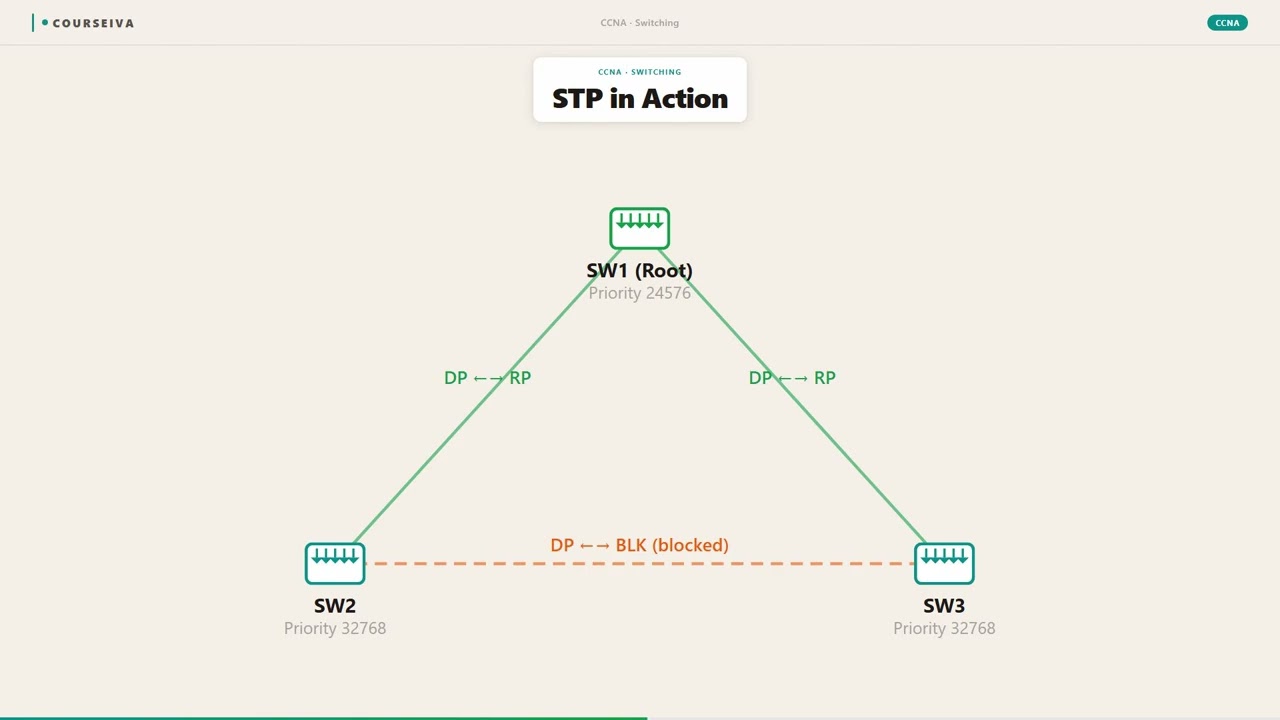
Example Scenario
You are setting up a small office network with two switches. Each switch connects to the company's file server and to the internet router. You also connect the two switches to each other for redundancy. This setup creates a loop: data can travel from switch A to the router, then to switch B, then back to switch A, and so on. Without STP, this loop will cause a broadcast storm that brings the network down.
You enable STP on both switches. The protocol elects one switch as the root bridge based on the lower bridge ID. Let's say switch A has a lower MAC address, so it becomes root. Switch B then calculates its root port: the port with the lowest path cost to switch A. Suppose both uplinks have the same cost, but one is faster, so that port becomes the root port. The other port on switch B that connects to switch A becomes an alternate port and is placed in blocking state.
Now the network is loop-free. Data flows from the file server to switch A, then to the router, and from switch A to switch B through only one link. If that link fails, STP detects the loss of BPDUs and transitions the blocked alternate port to forwarding state. This happens within 30 seconds for classic STP or a few seconds for RSTP. The network remains operational without any manual intervention.
This scenario illustrates the perfect balance STP provides: you have redundancy because there are two physical connections, but only one is active at a time. If you did not use STP, you would have to choose between having a single point of failure or risking a network crash. STP gives you both reliability and safety.
Common Mistakes
Assuming the switch with the lowest MAC address always becomes the root bridge.
The root bridge is chosen based on the bridge ID, which is a combination of priority and MAC address. The priority is compared first. Only if priorities are equal does the MAC address break the tie. So a switch with higher priority but lower MAC address could still lose to a switch with lower priority and higher MAC address.
Always check the priority value first. The bridge ID is a 8-byte field: 2 bytes for priority (0-61440 in increments of 4096) and 6 bytes for MAC address. Lowest bridge ID wins.
Confusing root ports with designated ports.
Root ports are on non-root switches and are the ports that lead toward the root bridge. Designated ports are on each network segment and are the ports that have the best path to the root. Every segment has exactly one designated port, and it is always on the switch that is closer to the root. A common error is to think that the root bridge has no root ports (true) but that all its ports are designated (also true), but learners often mix up which ports are root vs designated on other switches.
Memorize: Root ports face the root (away from the switch). Designated ports face away from the root. On a single link, the port on the switch closer to the root is designated, the other switch's port is root if it is the path to the root, otherwise it is alternate.
Thinking that blocking state means the port is completely disabled.
In blocking state, the port does not forward data frames and does not learn MAC addresses, but it does continue to listen for BPDUs. The port is not shut down; it is waiting for a topology change. If the port received no BPDUs for a certain time (Max Age, default 20 seconds), it transitions to listening, then learning, then forwarding.
Understand that blocking ports are still active for STP control traffic. They are not disabled but are held in reserve to prevent loops while still being able to react to changes.
Forgetting to enable PortFast on access ports and then blaming STP for slow boot times.
By default, every port on a switch goes through STP listening and learning states, which adds about 30 seconds before a host can send traffic. On access ports that connect to end devices (not switches), this is unnecessary delay. If PortFast is not configured, hosts take longer to obtain an IP address via DHCP, and users perceive slow boot times.
Always enable PortFast on ports that connect to end hosts. For Cisco switches, use 'spanning-tree portfast' on the interface. Or enable globally with 'spanning-tree portfast default'. For extra safety, use BPDU guard alongside PortFast.
Exam Trap — Don't Get Fooled
{"trap":"The question states: 'Which port will be the root port on Switch B?' and the topology shows two links from Switch B to the root bridge, one with cost 19 and one with cost 38. The trap answer is the port with cost 19, but the question asks for the root port, and there can only be one root port per switch.
The candidate might pick both or choose the wrong one because they forget that the lowest cost port wins, but then a second trap is that the port with cost 19 is indeed the root port, but the other port becomes an alternate port, not a designated port.","why_learners_choose_it":"Learners often think that both ports could be root ports or that the alternate port is designated. They confuse the port roles or do not calculate path cost correctly."
,"how_to_avoid_it":"Always remember: For a non-root switch, there is exactly one root port. It is the port with the lowest path cost to the root bridge. All other ports on that switch that lead to the root (or to other switches) are either designated or alternate.
If a port is not root and leads to the root bridge, it is an alternate port (blocked). If it leads to a downstream switch, it can be designated."
Step-by-Step Breakdown
Root Bridge Election
All switches exchange BPDUs. Each BPDU contains the bridge ID of the sending switch. Switches compare bridge IDs. The switch with the lowest bridge ID is elected as the root bridge. Once elected, the root bridge continues to send BPDUs every 2 seconds to all other switches.
Root Port Selection
Every non-root switch selects one root port. The root port is the port on that switch that has the lowest path cost to the root bridge. Path cost is calculated based on the speed of the links along the path. For example, a 1 Gbps link has cost 4, a 100 Mbps link has cost 19.
Designated Port Selection
On each network segment (link), one port is elected as the designated port. This port is on the switch that has the lowest path cost to the root bridge. The designated port is the port that is allowed to forward traffic on that segment. All other ports on that segment become non-designated and are blocked.
Blocking of Non-Designated Ports
All ports that are not root ports and not designated ports are placed into a blocking state. These ports do not forward traffic and do not learn MAC addresses. They only listen for BPDUs to detect topology changes. This step ensures a loop-free topology.
Convergence and Steady State
After the election and blocking, the network converges. The root bridge continues to send BPDUs every 2 seconds. Non-root switches forward BPDUs from the root out of their designated ports. The network stays in steady state until a link fails or a new switch is added, triggering a new election.
Practical Mini-Lesson
In a real network, STP is often taken for granted until something goes wrong. As an IT professional, you need to know how to check the STP status on your switches. The most basic command on Cisco switches is 'show spanning-tree'. This displays the root bridge, local bridge ID, port roles, and port states. You can also use 'show spanning-tree interface gigabitethernet0/1' to see details for a specific port.
One common mistake is placing the root bridge incorrectly. For optimal performance, the root bridge should be a core switch that is centrally located, not an edge switch. If an access layer switch becomes the root, traffic paths become suboptimal and may cause congestion. You can influence the election by setting the bridge priority lower on the desired root switch. For example, 'spanning-tree vlan 1 priority 4096' on a core switch makes it likely to be root for VLAN 1.
Another practical consideration is STP with VLANs. In a network with many VLANs, you should consider using MSTP to balance traffic across redundant uplinks. Without MSTP, all VLANs would use the same path, potentially overloading one link while the other sits idle. MSTP allows you to map VLANs to different instances, each with its own spanning tree. For example, instance 1 could carry VLANs 10,20,30 with root on switch A, while instance 2 carries VLANs 40,50,60 with root on switch B.
Troubleshooting STP issues is a common task. If you see a 'BPDU guard error' or 'port is err-disabled', it means a switch or device sent a BPDU on a port that was configured with BPDU guard. This is a security feature that protects against rogue switches. To recover, you need to shut down and re-enable the port or remove the offending device. Also, if a port stays in blocking state and never transitions, check for a configuration mismatch like different STP versions or inconsistent port costs.
Finally, be aware of STP timers. The default hello timer is 2 seconds, forward delay is 15 seconds, and max age is 20 seconds. These can be tuned, but changing them without understanding can cause loops. In modern networks, it is better to use RSTP or MSTP for faster convergence rather than tuning timers on classic STP. Always enable PortFast on ports that connect to end devices, and consider using BPDU guard and root guard for additional protection.
Memory Tip
Remember STP port roles with the phrase 'Roots point up, Designated points out, others are blocked.' The root port points toward the root bridge (up the tree), designated ports point away from the root (out to branches), and everything else is blocked.
Covered in These Exams
Current Exam Context
Current exam versions that test this topic — use these objectives when studying.
200-301Cisco CCNA →N10-009CompTIA Network+ →Legacy Exam Context
Older materials may mention these exam versions, but learners should use the current objectives for their target exam.
N10-008N10-009(current version)Related Glossary Terms
802.1Q is the networking standard that allows multiple virtual LANs (VLANs) to share a single physical network link by tagging Ethernet frames with VLAN identification information.
802.1X is a network access control standard that authenticates devices before they are allowed to connect to a wired or wireless network.
Two-factor authentication (2FA) is a security method that requires two different types of proof before granting access to an account or system.
Frequently Asked Questions
Why does STP take so long to converge?
Classic STP has a 30-50 second convergence time because it uses timer-based transitions (listening, learning, forwarding). Each state lasts about 15 seconds to ensure no loops form during the transition. RSTP reduces this to a few seconds using a handshake mechanism.
Can I disable STP on my network?
Technically yes, but it is extremely dangerous. If you have any redundant links, disabling STP will cause broadcast storms and network outages. Even if your topology is a tree, it is safer to keep STP enabled for future changes.
What is the difference between STP and RSTP?
RSTP (IEEE 802.1w) is an evolution of STP that provides faster convergence. It uses port roles like alternate and backup instead of blocking, and it uses a handshake mechanism to quickly transition ports to forwarding. RSTP is backward compatible with STP.
What is PortFast and why should I use it?
PortFast is a feature that bypasses the listening and learning states on a port, allowing it to go directly to forwarding. It is used on access ports connecting to end devices (PCs, printers) to avoid wait times during boot. Always use it with BPDU guard for security.
How do I choose which switch should be the root bridge?
The root bridge should be a core switch in the center of your network with high availability and good connectivity to all other switches. You can set a lower bridge priority on that switch to ensure it wins the election.
What happens if a BPDU is received on a PortFast port?
If BPDU guard is enabled, the port will be put into err-disable state, effectively shutting it down. If BPDU guard is not enabled, PortFast is disabled on that port, and STP runs normally. This can be a security risk if an unauthorized switch is connected.
Summary
STP is a foundational Layer 2 protocol that prevents loops in Ethernet networks by creating a logical tree topology. It works by electing a root bridge, selecting root ports, designating the best ports on each segment, and blocking redundant paths. While classic STP converges slowly, RSTP and MSTP offer faster and more flexible alternatives.
For IT certification candidates, mastering STP is essential. It appears in CompTIA Network+, Cisco CCNA, and Juniper JNCIA exams. You must understand the election process, port roles, port states, and configuration options. Practical skills include setting bridge priorities, enabling PortFast, using BPDU guard, and troubleshooting common STP issues like loops or err-disabled ports.
The key takeaway for exams is to never forget that STP is about loop prevention, not merely redundancy. Redundancy is the benefit, but loop prevention is the mechanism. Always think in terms of path cost, bridge ID, and port roles when analyzing STP questions. Practice with topology diagrams and command outputs to build intuition. With a solid understanding of STP, you will be better prepared for both certification exams and real-world network administration.