STP Port States and Roles
Spanning Tree Protocol (STP) port states and roles are the foundation of loop-free Layer 2 network design. Understanding how switches transition ports through states like Blocking, Listening, Learning, and Forwarding — and how they elect Root, Designated, and Alternate ports — is critical for the CCNA 200-301 exam (Objective 2.5). Misconfiguring STP can bring down an entire network, so mastering these concepts separates a junior engineer from a professional.
Jump to a section
The Intersection Traffic Light System
Imagine a busy four-way intersection with no traffic lights — cars would collide, creating gridlock. Now add a traffic light with a careful sequence: Red (Blocking), Red-Yellow (Listening), Green-Yellow (Learning), and Green (Forwarding). The traffic light controller (the Root Bridge) decides which direction gets to go (Designated port) and which must wait (Alternate port). Initially, all lights are Red (Blocking) to prevent any movement. Then, one direction gets a Red-Yellow (Listening) — cars prepare but don't move yet. Next, it turns Green-Yellow (Learning) — cars learn the layout of the intersection (MAC addresses) but still don't move. Finally, it turns Green (Forwarding) — traffic flows. Meanwhile, the other direction stays Red (Blocking) to avoid collisions. If the controller fails, a new one is elected (Root Bridge election) and the sequence restarts. This mirrors STP perfectly: Blocking prevents loops, Listening ensures no temporary loops during convergence, Learning populates the MAC table without forwarding data, and Forwarding allows normal traffic. The Root Bridge is the traffic controller, Designated ports are the 'green light' directions, and Alternate ports are the 'red light' directions ready to take over if the primary path fails.
How It Actually Works
What Are STP Port States and Roles?
Spanning Tree Protocol (STP), defined in IEEE 802.1D, is a Layer 2 protocol that prevents loops in Ethernet networks by creating a loop-free logical topology. Switches exchange Bridge Protocol Data Units (BPDUs) to elect a Root Bridge and determine port roles and states. The exam objective 2.5 specifically tests your ability to identify and describe these roles and states, and to interpret show commands.
Port States
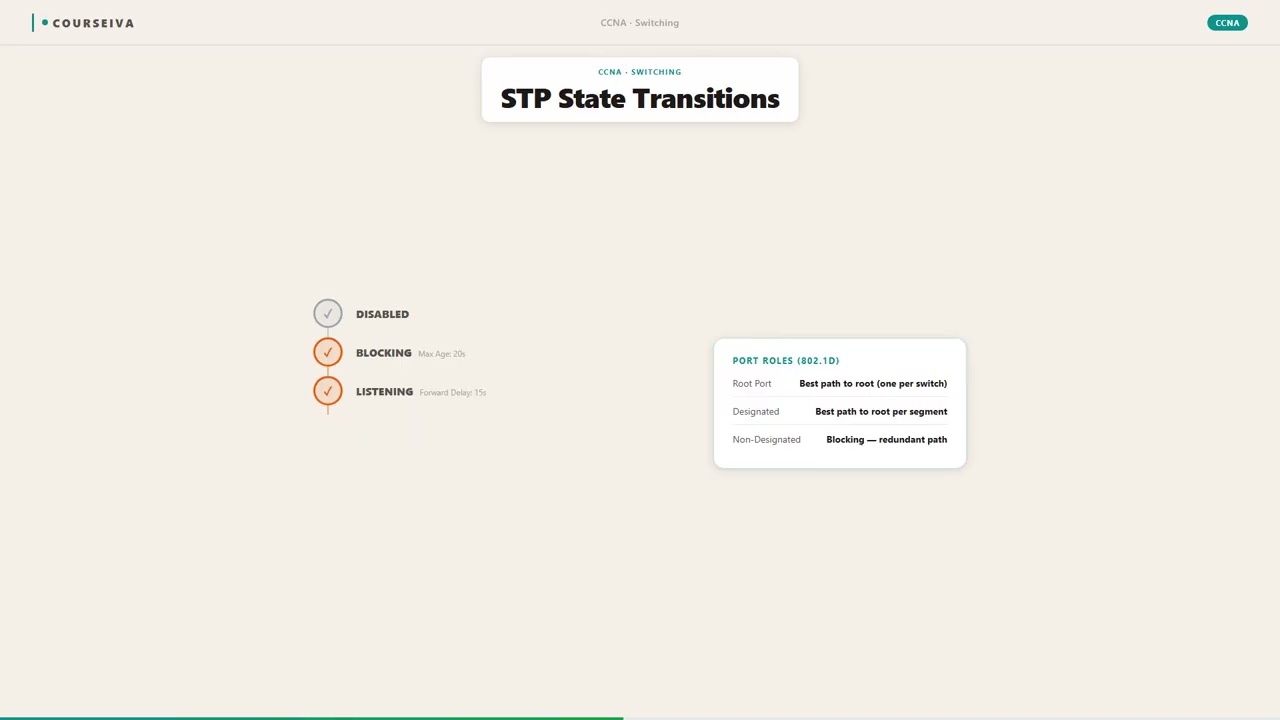
STP ports transition through five states. The first four are temporary during convergence; the fifth is stable.
Blocking: The port is administratively up but does not forward frames or learn MAC addresses. It only listens for BPDUs. A port in Blocking is a backup port that will become active if the forwarding path fails. Default time in Blocking: 20 seconds (Max Age timer).
Listening: The port listens for BPDUs to determine the network topology. It does not forward frames or learn MAC addresses. This state lasts for the Forward Delay timer (default 15 seconds). During Listening, the switch participates in the Root Bridge election and determines port roles.
Learning: The port continues to listen for BPDUs and now begins to learn MAC addresses from incoming frames, but still does not forward frames. This also lasts for Forward Delay (15 seconds). Learning populates the MAC address table to avoid flooding when the port eventually forwards.
Forwarding: The port is fully operational — it forwards frames, sends and receives BPDUs, and learns MAC addresses. This is the normal stable state for Root and Designated ports.
Disabled: The port is administratively shut down (shutdown command) or has failed. It does not participate in STP.
Port Roles
Each port on a switch is assigned one of four roles:
Root Port (RP): The single port on each non-Root switch that has the best path (lowest cost) to the Root Bridge. Only one Root Port per switch. It is always in Forwarding state.
Designated Port (DP): The port on each network segment (collision domain) that has the best path to the Root Bridge. Every segment has exactly one Designated Port. It is always in Forwarding state. The Root Bridge has all ports as Designated Ports (unless it has a loop to itself).
Alternate Port: A port that provides an alternative path to the Root Bridge. It is in Blocking state, ready to become the Root Port if the current Root Port fails. Alternate ports listen for BPDUs to stay updated.
Backup Port: A rare port that provides a backup for a Designated Port on the same segment (e.g., when a switch has two connections to the same hub). It is in Blocking state. Not commonly tested.
Election Process (Step by Step)
Root Bridge Election: All switches start by claiming they are the Root Bridge. They send BPDUs with their Bridge ID (Bridge Priority + MAC address). The switch with the lowest Bridge ID wins. If priorities are equal, the lowest MAC address breaks the tie.
Root Port Selection: Each non-Root switch determines its Root Port by comparing the Root Path Cost (sum of costs to the Root Bridge) received on each port. The port with the lowest cost becomes the Root Port. If costs are equal, the lowest neighbor Bridge ID breaks the tie, then lowest neighbor port priority, then lowest neighbor port number.
Designated Port Selection: On each segment, the switch that advertises the lowest Root Path Cost becomes the Designated Port. If costs are equal, the switch with the lowest Bridge ID wins. The Root Bridge always wins on its directly connected segments because its Root Path Cost is zero.
Port State Transitions: Once roles are assigned, ports transition through Blocking -> Listening -> Learning -> Forwarding (or stay Blocking for Alternate/Backup ports). This process takes about 30 seconds (20 sec Max Age + 15 sec Forward Delay for Listening + 15 sec Forward Delay for Learning = 50 seconds total in classic STP, but actually: Blocking to Listening happens after Max Age expires (20 sec), then Listening lasts Forward Delay (15 sec), then Learning lasts Forward Delay (15 sec) = 50 seconds. However, if a port is already in Blocking and the Root Port fails, it transitions directly to Listening after Max Age, so total convergence can be up to 50 seconds.
Default Timers and Values
Hello Time: 2 seconds (default)
Forward Delay: 15 seconds (default)
Max Age: 20 seconds (default)
Bridge Priority: 32768 (default)
Port Cost: 100 Mbps = 19, 1 Gbps = 4, 10 Gbps = 2 (older standard); Cisco uses its own cost values: 100 Mbps = 19, 1 Gbps = 4, 10 Gbps = 2 (same as IEEE).
Verification Commands
Use show spanning-tree to see port roles and states:
Switch# show spanning-tree

VLAN0001
  Spanning tree enabled protocol ieee
  Root ID    Priority    32769
             Address     0000.0c12.3456
             This bridge is the root
             Hello Time   2 sec  Max Age 20 sec  Forward Delay 15 sec

  Bridge ID  Priority    32769  (priority 32768 sys-id-ext 1)
             Address     0000.0c12.3456
             Hello Time   2 sec  Max Age 20 sec  Forward Delay 15 sec
             Aging Time  300 sec

Interface        Role Sts Cost      Prio.Nbr Type
---------------- ---- --- --------- -------- --------------------------------
Gi0/0            Desg FWD 4         128.1    P2p
Gi0/1            Desg FWD 4         128.2    P2p
On a non-root switch:
Switch2# show spanning-tree

VLAN0001
  Spanning tree enabled protocol ieee
  Root ID    Priority    32769
             Address     0000.0c12.3456
             Cost        4
             Port        128 (GigabitEthernet0/0)
             Hello Time   2 sec  Max Age 20 sec  Forward Delay 15 sec

  Bridge ID  Priority    32769  (priority 32768 sys-id-ext 1)
             Address     0000.0c12.7890
             Hello Time   2 sec  Max Age 20 sec  Forward Delay 15 sec
             Aging Time  300 sec

Interface        Role Sts Cost      Prio.Nbr Type
---------------- ---- --- --------- -------- --------------------------------
Gi0/0            Root FWD 4         128.1    P2p
Gi0/1            Altn BLK 4         128.2    P2p
Interaction with Related Protocols
Rapid PVST+ (IEEE 802.1w): Reduces convergence time to seconds by introducing discarding, learning, and forwarding states (no listening). Port roles include Root, Designated, Alternate, and Backup. It uses proposal-agreement handshakes instead of timers.
MST (IEEE 802.1s): Maps multiple VLANs to a single spanning-tree instance, reducing CPU overhead. Port roles are per instance.
PortFast: Bypasses Listening and Learning states for access ports, moving directly to Forwarding. Used for end devices to avoid 30-second delay. Must be used only on access ports to prevent loops.
BPDU Guard: Shuts down a PortFast-enabled port if it receives a BPDU, protecting against accidental loop creation.
Trap Patterns on the Exam
Trap: Confusing Listening and Learning states. Remember: Listening does NOT learn MAC addresses; Learning does NOT forward frames.
Trap: Thinking the Root Bridge has a Root Port. It does not — all its ports are Designated (unless there is a loop to itself).
Trap: Assuming higher bandwidth always means lower cost. Cost is inversely related to bandwidth: 10 Gbps cost is lower than 1 Gbps cost.
Trap: Forgetting that Alternate ports are in Blocking state, not Disabled. They still listen for BPDUs.
Walk-Through
Elect the Root Bridge
All switches send BPDUs claiming to be the Root Bridge. The BPDU contains the Bridge ID (priority + MAC). The switch with the lowest Bridge ID wins. If priorities are equal, the lowest MAC address breaks the tie. The Root Bridge is the central reference for all path cost calculations. On the exam, you may be given a topology and asked to identify the Root Bridge. Remember that the Root Bridge has all ports as Designated (forwarding) unless it has a loop to itself.
Select Root Ports on non-Root switches
Each non-Root switch selects one Root Port — the port with the lowest Root Path Cost to the Root Bridge. Root Path Cost is the sum of costs along the path. If costs are equal, the switch chooses the port connected to the neighbor with the lowest Bridge ID. If still tied, the lowest neighbor port priority and then port number. The Root Port is always in Forwarding state. On the exam, you might need to calculate path costs given bandwidths.
Select Designated Ports on each segment
On every network segment (link between two switches, or switch to host), one port becomes the Designated Port. The switch that advertises the lowest Root Path Cost on that segment wins. If costs are equal, the switch with the lower Bridge ID wins. The Root Bridge always wins on its directly connected segments because its Root Path Cost is zero. Designated Ports are always Forwarding. All other ports on the segment become Alternate (Blocking).
Transition ports through states
After roles are assigned, ports move through states: Blocking -> Listening (15 sec) -> Learning (15 sec) -> Forwarding. Alternate/Backup ports stay in Blocking. The transition is driven by timers: Max Age (20 sec) determines how long a port stays in Blocking before moving to Listening if no better BPDU is received. Then Forward Delay (15 sec) for Listening, then another Forward Delay for Learning. Total convergence time is up to 50 seconds. On the exam, know that Listening and Learning each last Forward Delay.
Verify with show spanning-tree
Use `show spanning-tree` to see the Root Bridge, local Bridge ID, port roles (Root, Desg, Altn, Bckp), and states (FWD, BLK, LSN, LRN). The output shows cost, priority, and type. For a specific interface, use `show spanning-tree interface gigabitethernet 0/0`. On the exam, you may be given show output and asked to identify roles or states. Look for 'Role' and 'Sts' columns.
Troubleshoot STP issues
Common issues: No Root Bridge elected (all switches think they are root) — check BPDU filtering or VLAN mismatch. Port stuck in Blocking — verify cost or priority settings. Unexpected blocking — check for unidirectional link or duplex mismatch. Use `debug spanning-tree events` (sparingly) or `show spanning-tree detail`. Also check `show interfaces` for errors. The exam may present a scenario where a host cannot get an IP address due to STP delay — solution is PortFast on access ports.
What This Looks Like on the Job
In a typical enterprise campus network, STP is essential for redundancy without loops. Consider a building with two distribution switches and multiple access switches. Each access switch connects to both distribution switches for redundancy. Without STP, this creates loops. STP elects one distribution switch as Root Bridge (often the one with lower priority). The access switch's uplink to the Root becomes Root Port (Forwarding), and the other uplink becomes Alternate (Blocking). If the primary uplink fails, the Alternate transitions to Forwarding after convergence (30-50 seconds). This is acceptable for many networks, but for critical applications, Rapid PVST+ (802.1w) reduces convergence to under 10 seconds.
Another scenario: Data center with top-of-rack switches connecting to spine switches. Here, STP is often disabled in favor of fabric technologies like VXLAN or TRILL, but in smaller data centers, STP still runs. Engineers tune timers (Hello, Forward Delay, Max Age) to speed convergence, but must be careful not to cause loops. They also use PortFast on server ports to avoid delay during server boot.
Common misconfiguration: Setting Bridge Priority too low on a non-critical switch, making it the Root Bridge. This can cause suboptimal paths because traffic may traverse slower links to reach the Root. Engineers should manually set the Root Bridge priority (e.g., 4096) on the desired core switch and secondary (8192) on the backup.
Another issue: Forgetting to enable PortFast on ports connecting to end devices. Users complain of slow network connectivity after boot, because the port spends 30 seconds in Listening/Learning. The fix is spanning-tree portfast on access ports. But never enable PortFast on trunk ports — it can cause loops.
Scale: In large networks with hundreds of VLANs, PVST+ (Per VLAN Spanning Tree) runs an instance per VLAN, consuming CPU and memory. MST (Multiple Spanning Tree) reduces instances by grouping VLANs. Engineers must plan MST region configuration carefully.
How CCNA 200-301 Actually Tests This
The CCNA 200-301 exam tests STP port states and roles under Objective 2.5. Expect 3-5 questions on this topic. The exam focuses on:
Identifying port states and roles from show output. You will see a show spanning-tree output and must determine which port is Root, Designated, or Alternate, and its state (FWD, BLK, LSN, LRN).
Election tie-breakers. Given a topology with switch priorities and MAC addresses, you must identify the Root Bridge, Root Ports, and Designated Ports. Common trap: forgetting that the Root Bridge has no Root Port.
State transition sequence and timers. Know the order: Blocking -> Listening -> Learning -> Forwarding. Remember that Listening and Learning each last Forward Delay (default 15 sec), and Blocking lasts until Max Age (20 sec) if no BPDU is received. Total convergence: up to 50 sec.
Cost values. Know the default port costs: 10 Mbps = 100, 100 Mbps = 19, 1 Gbps = 4, 10 Gbps = 2. The exam may ask you to calculate Root Path Cost.
Common wrong answers: - Trap: Choosing 'Listening' as the state where MAC addresses are learned. Wrong — Learning learns MACs; Listening only listens for BPDUs. - Trap: Thinking the Root Bridge has a Root Port. Wrong — the Root Bridge has no Root Port; all its ports are Designated. - Trap: Confusing Alternate and Backup ports. Alternate provides alternate path to Root; Backup provides backup to Designated on same segment. - Trap: Assuming a port in Blocking does not listen for BPDUs. It does — it listens to stay updated.
Decision rule for scenario questions: When asked which port becomes Root Port, first find the Root Bridge. Then for each non-root switch, calculate the path cost to Root via each port. The port with lowest cost is Root Port. If equal, compare neighbor Bridge ID.
Calculation trap: The exam might give you a mix of FastEthernet (100 Mbps, cost 19) and GigabitEthernet (1 Gbps, cost 4). Add costs along the path. Do not forget to include the cost of the outgoing port on the neighbor switch — actually, the cost is cumulative from the Root Bridge outward. The Root Path Cost received in BPDU is the cost from the Root to the advertising switch. The receiving switch adds its port cost to that to get its own Root Path Cost.
Key Takeaways
STP port states (in order): Blocking, Listening, Learning, Forwarding, Disabled.
Listening lasts Forward Delay (15 sec), Learning lasts Forward Delay (15 sec), Blocking lasts until Max Age (20 sec) if no BPDU.
Port roles: Root Port (one per non-root switch, Forwarding), Designated Port (one per segment, Forwarding), Alternate Port (Blocking, backup for Root), Backup Port (Blocking, backup for Designated).
Root Bridge is elected by lowest Bridge ID (priority + MAC). All its ports are Designated (unless looped).
Port costs: 100 Mbps = 19, 1 Gbps = 4, 10 Gbps = 2 (Cisco and IEEE).
Use 'show spanning-tree' to verify roles and states.
PortFast bypasses Listening and Learning; BPDU Guard shuts down PortFast port if BPDU received.
Easy to Mix Up
These come up on the exam all the time. Here's how to tell them apart.
Classic STP (802.1D)
Convergence time up to 50 seconds
Uses Listening and Learning states
Relies on timers (Forward Delay, Max Age)
Port roles: Root, Designated, Alternate, Backup
One instance per VLAN (PVST+)
Rapid PVST+ (802.1w)
Convergence time under 10 seconds
Uses discarding, learning, forwarding states (no listening)
Uses proposal-agreement handshake
Same port roles plus additional edge port type
Also one instance per VLAN (Rapid PVST+)
Watch Out for These
Mistake
A port in Listening state learns MAC addresses.
Correct
Listening only listens for BPDUs; MAC learning happens in Learning state.
Candidates confuse the names 'Listening' and 'Learning' due to their similarity.
Mistake
The Root Bridge has a Root Port.
Correct
The Root Bridge has no Root Port; all its ports are Designated Ports (unless there's a loop to itself).
Candidates think every switch has a Root Port, but the Root Bridge is the reference point.
Mistake
Alternate and Backup ports are the same thing.
Correct
Alternate port provides an alternate path to the Root Bridge; Backup port provides a backup for a Designated port on the same segment.
Both are blocking, but their roles differ based on location.
Mistake
A port in Blocking state does not process BPDUs.
Correct
A port in Blocking still listens for BPDUs to stay updated on topology changes.
Candidates think Blocking means completely disabled, but it only blocks data frames.
Do You Actually Know This?
Reveal each answer, then mark whether you got it right. Score 60%+ to unlock the next chapter.
Frequently Asked Questions
What is the difference between Alternate and Backup port in STP?
An Alternate port provides an alternative path to the Root Bridge. It is located on a switch that has another path to the Root via a different neighbor. A Backup port provides a backup for a Designated port on the same segment, which occurs when a switch has two connections to the same hub or segment (rare). Both are in Blocking state. On the exam, if you see a port that is blocking and it's on a switch that has another port in Forwarding to the same segment, it's likely a Backup port.
Why does STP take 50 seconds to converge?
Classic STP uses three timers: Max Age (20 sec), Forward Delay (15 sec for Listening, 15 sec for Learning). When a link fails, the switch waits Max Age (20 sec) to ensure the BPDU is truly gone. Then it moves to Listening (15 sec), then Learning (15 sec), then Forwarding. Total = 20+15+15 = 50 seconds. Rapid PVST+ reduces this to seconds by using handshakes.
How do I verify the STP port role and state on a Cisco switch?
Use `show spanning-tree` for all VLANs or `show spanning-tree vlan 1` for a specific VLAN. Look at the Interface column for role (Root, Desg, Altn, Bckp) and state (FWD, BLK, LSN, LRN). For a specific interface, use `show spanning-tree interface gigabitethernet 0/0`. The exam often gives you partial output and asks you to identify the role.
Can a Designated Port be in Blocking state?
No. By definition, a Designated Port is the best port on a segment and must be in Forwarding state. Only Alternate and Backup ports are in Blocking. If you see a port in Blocking, it cannot be Designated.
What is the default Bridge Priority on a Cisco switch?
32768. This is the default priority for all switches. The Bridge ID is the priority + VLAN ID (extended system ID). So for VLAN 1, the priority is 32768+1 = 32769. You can change the priority in increments of 4096.
How does STP handle a new switch being added to the network?
When a new switch is added, it sends BPDUs. The existing switches may recalculate the topology. The new switch's ports will go through Blocking, Listening, Learning, then Forwarding (or stay Blocking if it becomes an Alternate). This can cause a temporary disruption. To minimize impact, use PortFast on access ports and configure the new switch with a higher priority so it doesn't become Root.
What is the purpose of the Listening state?
The Listening state allows the switch to listen for BPDUs and determine the network topology without forwarding any data frames. This prevents temporary loops during convergence. The port stays in Listening for Forward Delay (15 seconds) before moving to Learning.
Terms Worth Knowing
Ready to put this to the test?
You've just covered STP Port States and Roles — now see how well it sticks with free CCNA 200-301 practice questions. Full explanations included, no account needed.
Done with this chapter?