What Does RSTP Mean?
On This Page
Quick Definition
RSTP is a faster version of STP that helps network switches avoid creating loops when multiple paths exist. It quickly recovers when a cable breaks or a switch fails, often within a few seconds. This keeps the network running smoothly without interruptions.
Commonly Confused With
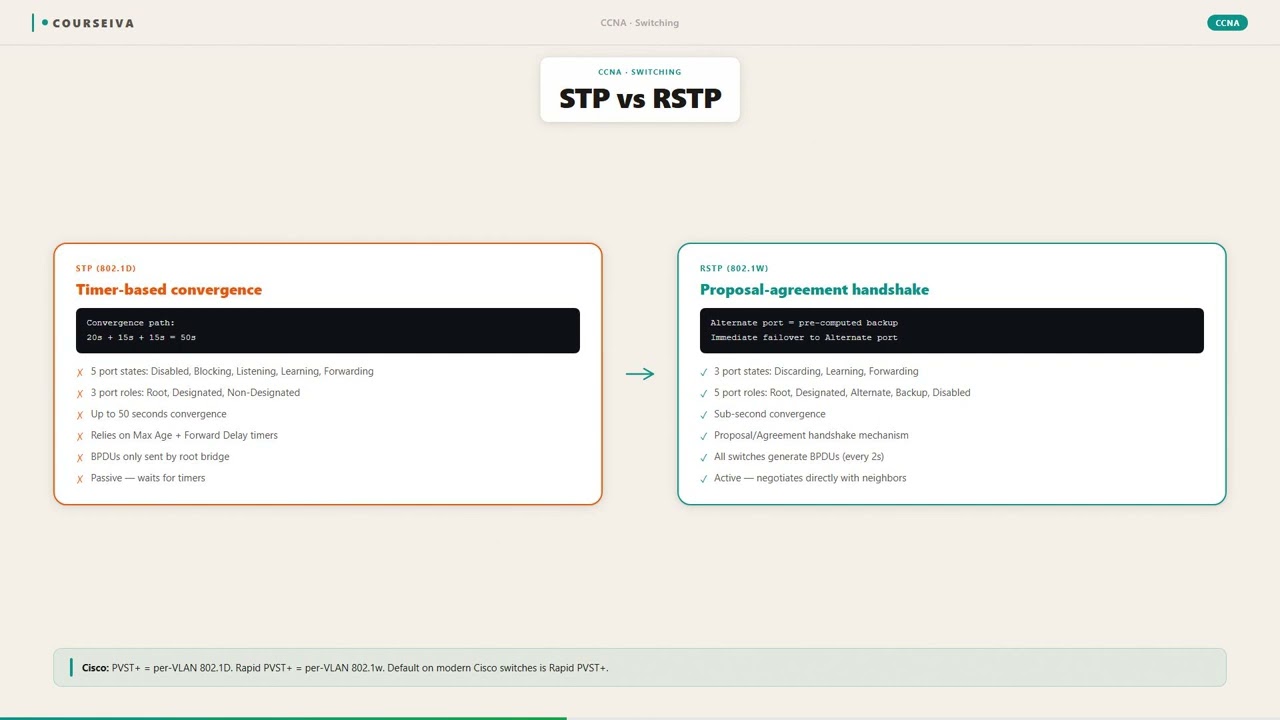
STP (IEEE 802.1D) is the original spanning tree protocol, which takes 30-50 seconds to converge after a topology change. RSTP (IEEE 802.1w) is much faster, often converging in under 10 seconds. STP uses five port states, while RSTP uses three. RSTP also introduces alternate and backup port roles.
If a cable breaks, STP might take 45 seconds to restore connectivity, but RSTP would restore it in under 5 seconds.
MSTP (IEEE 802.1s) allows multiple spanning tree instances for different VLANs, enabling better load balancing. RSTP provides a single spanning tree instance for all VLANs. MSTP is essentially RSTP extended to support multiple logical topologies.
In a network with 10 VLANs, RSTP would use the same blocking decisions for all VLANs. MSTP could block different links for different VLANs, balancing traffic.
PVST+ (Per-VLAN Spanning Tree Plus) is a Cisco proprietary protocol that runs a separate spanning tree instance for each VLAN. RSTP is a standard protocol that runs a single instance. PVST+ is slower but allows per-VLAN load balancing.
On a Cisco switch, you might choose Rapid PVST+ (a Cisco implementation of RSTP per VLAN) to get fast convergence plus per-VLAN load balancing.
Must Know for Exams
RSTP is a core topic for several major IT certification exams, including CompTIA Network+, Cisco CCNA, and Juniper JNCIA. For these exams, understanding RSTP is not just about memorizing definitions; candidates are expected to know how it works, how it differs from STP, and how to configure it on network equipment. In CompTIA Network+, RSTP appears under the "Network Operations" and "Network Troubleshooting" domains. Questions often ask about convergence time, port roles, and the purpose of RSTP compared to STP.
For Cisco CCNA (200-301), RSTP is a key topic in the "Network Access" and "IP Connectivity" sections. The exam tests candidates on configuring RSTP on Cisco switches, verifying the spanning tree topology with commands like 'show spanning-tree', and interpreting the output to identify root ports, designated ports, alternate ports, and port states. Common question types include multiple-choice questions on the number of switches and port roles, scenario-based questions where a link fails and the candidate must predict which port becomes forwarding, and simulation questions where the candidate configures RSTP parameters like bridge priority or port cost.
Juniper JNCIA-Junos (JN0-104) also covers RSTP, as Juniper switches run RSTP as the default spanning tree protocol. Candidates must know how to configure RSTP, verify the topology using show commands, and understand the difference between RSTP and MSTP. Exam questions may ask about the benefits of RSTP over STP or ask the candidate to interpret a network topology diagram to determine which ports will be in blocking or forwarding state after convergence.
For all these exams, memorizing the IEEE standard number (802.1w) and the key port states (discarding, learning, forwarding) is helpful. Understanding the proposal-agreement mechanism and the concept of edge ports (equivalent to Cisco's PortFast) is also frequently tested. Candidates may be asked to calculate convergence time or explain why RSTP is faster than STP. Scenario-based questions often present a network with a redundancy failure and ask the candidate to troubleshoot why a backup path is not being used. Knowing how to interpret 'show spanning-tree' output to spot incorrect configurations is critical. Overall, RSTP is a high-probability topic, and mastery can mean the difference between passing and failing the exam.
Simple Meaning
Imagine a large office building with multiple hallways connecting different rooms. If you send a message from one room to another, you want it to take the shortest path without circling around endlessly. Without a system to manage this, messages could get stuck in loops, traveling forever and clogging the hallways. RSTP acts like a smart traffic director for network switches. It decides which paths to use and which to block so that data takes the most efficient route. If a hallway becomes blocked (like a cable breaking), RSTP quickly opens an alternate path without causing delays.
Think of RSTP as a GPS that reroutes you instantly when there is a road closure. The older version, STP, is like an old paper map that takes a long time to find a new route. RSTP is much faster, typically restoring connectivity within a second or two. This speed is crucial for modern networks where even a few seconds of downtime can disrupt phone calls, video conferences, or critical transactions. RSTP works automatically in the background, so users never notice when a failure happens. The protocol runs on network switches and uses special messages called BPDUs (Bridge Protocol Data Units) to share information about the network topology. These messages allow switches to agree on which paths to use and which to block to maintain a loop-free network. The rapid recovery feature makes RSTP the standard choice for most enterprise networks today.
Full Technical Definition
RSTP, defined in IEEE 802.1w, is an evolution of the original Spanning Tree Protocol (STP, IEEE 802.1D) that provides faster convergence after a topology change. While STP can take 30 to 50 seconds to recover from a link failure, RSTP typically converges in under 10 seconds, often within a few hundred milliseconds. This improvement is achieved through several key mechanisms: the use of edge ports, alternate ports, and a more efficient state machine.
RSTP defines port roles more granularly than STP. In addition to the classic root port and designated port, RSTP introduces the alternate port and backup port. An alternate port provides a path to the root bridge that is different from the root port and is immediately available for use if the root port fails. A backup port offers a redundant connection back to the same network segment, acting as a backup for a designated port. These roles allow RSTP to pre-compute failover paths so that a backup port can transition to forwarding almost instantly without going through the slow listening and learning phases required by STP.
RSTP also changes the port state model. STP uses five states: blocking, listening, learning, forwarding, and disabled. RSTP reduces this to three: discarding, learning, and forwarding. The discarding state combines the functions of the old blocking, listening, and disabled states. This simplification speeds convergence because ports can move from discarding to forwarding more quickly. RSTP also uses a proposal-agreement handshake process between switches to rapidly synchronize the topology. When a switch proposes a new root port or designated port, neighboring switches can immediately agree, bypassing the typical STP timers.
Another important feature is the treatment of edge ports. An edge port is a port that connects to an end device like a computer or printer, not to another switch. RSTP assumes these ports will not create loops, so they transition directly to forwarding without going through the spanning tree process. This eliminates the 30-second delay that STP would impose when a device is plugged in. If an edge port receives a BPDU, RSTP automatically converts it to a normal switch port.
RSTP also improves BPDU handling. In STP, each switch waits for a BPDU from the root bridge and starts a timer. If the timer expires, the switch assumes the root is gone and begins re-election. RSTP uses a more interactive approach: if a switch stops receiving BPDUs from a neighbor, it can initiate a topology change immediately. RSTP also uses the concept of link-type to determine how fast a port can transition. Point-to-point links (direct connections between switches) can transition quickly, while shared links (like hubs) require slower operations. In modern full-duplex networks, most links are point-to-point, enabling rapid convergence. The protocol is backward compatible with STP; if RSTP detects an STP-speaking neighbor, it falls back to STP mode on that port, ensuring interoperability in mixed environments.
Real-Life Example
Think of a city with multiple bridges connecting different islands. Each bridge has a toll booth that controls traffic flow. If all bridges are open at the same time, cars could go around in circles, creating gridlock. The city traffic department decides to keep only a few bridges open at any time and block the others to prevent loops. This is like STP. But when a bridge suddenly collapses (a link failure), the traffic department takes a long time to decide which blocked bridge to open. During that time, cars are stuck in traffic, and some islands become completely inaccessible.
Now imagine a smarter traffic system called RSTP. The city engineers pre-identify alternate bridges that can be used if the main bridge fails. They install sensors that detect a collapse instantly and automatically switch traffic to the alternate bridge without needing a central decision. The new route opens in seconds instead of minutes. RSTP does exactly this for network switches. When a cable breaks or a switch malfunctions, a backup port that was already identified as an alternate path can immediately forward traffic. The protocol does not need to wait for timers to expire or for re-election of a root bridge.
Another analogy: RSTP is like having a spare tire in your car that is already mounted and ready to use. If you get a flat tire, you can switch to the spare instantly without having to find a repair shop. The older STP is like having to call a tow truck and wait for it to arrive before you can continue. For networks that carry critical data, voice, or video, this difference in speed is crucial. The spare tire analogy also explains alternate ports: they are always ready to take over, just like a fully inflated spare that is stored in the trunk. The network is designed for resilience, and RSTP ensures that resilience is available without delay.
Why This Term Matters
In any modern network, reliability is paramount. Users expect that the network will be available 24/7, and even a short outage can result in lost revenue, productivity, or customer trust. RSTP matters because it provides a cost-effective and automatic way to build redundant Ethernet networks without the risk of broadcast storms or MAC address table instability that loops can cause. Without RSTP, network administrators would have to manually disable redundant links or accept the downtime caused by STP's slow convergence.
RSTP is particularly important for networks that carry time-sensitive traffic such as VoIP (Voice over IP) or video conferencing. A 30-second STP convergence could drop a phone call or freeze a video stream, causing frustration and disruption. With RSTP, the recovery happens so fast that users may not even notice a hiccup. This makes RSTP suitable for modern converged networks where voice, video, and data share the same infrastructure.
For IT professionals, understanding RSTP is essential for designing resilient networks. It allows them to create redundant topologies such as triangles or meshes without fear of loops. RSTP handles the complexity automatically, freeing the administrator to focus on other tasks. RSTP is compatible with other redundancy protocols like Link Aggregation (LAG) and can be tuned for even faster convergence using features like PortFast, UplinkFast, and BackboneFast, which are now integrated into RSTP.
In practical terms, RSTP reduces mean time to repair (MTTR) because the network heals itself quickly. This reduces the urgency for physical repairs, though broken cables should still be fixed promptly. Many managed switches support RSTP by default, and it is a standard feature in enterprise-grade equipment from vendors like Cisco, Juniper, HP, and Dell. For any IT professional involved in network design or troubleshooting, RSTP knowledge is fundamental. It is also a prerequisite for understanding more advanced protocols like Multiple Spanning Tree Protocol (MSTP) and Shortest Path Bridging (SPB).
How It Appears in Exam Questions
Exam questions on RSTP typically fall into three categories: concept recall, configuration verification, and troubleshooting.
Concept recall questions are straightforward: "Which IEEE standard defines RSTP?" (Answer: 802.1w) "What is the typical convergence time for RSTP compared to STP?" (Answer: Under 10 seconds compared to 30-50 seconds) "Which port role in RSTP provides an immediate backup to the root port?" (Answer: Alternate port) These questions test basic knowledge and are common in CompTIA Network+ and entry-level vendor exams.
Configuration verification questions require candidates to interpret switch output. For example, a candidate might be shown a 'show spanning-tree' output and asked: "Which port is the root port?" "Which ports are alternate ports?" "What is the state of port Gi0/3?" These questions appear frequently in CCNA and JNCIA exams. Candidates must know how to read the output and understand the role and state of each port. A common trick is to present a network where the root bridge is not the one with the lowest MAC address because of priority settings. Candidates must remember that priority is checked first, and if priorities are equal, the lowest MAC address breaks the tie.
Troubleshooting questions present a scenario where redundancy is not working as expected. For example: "After adding a new switch to the network, users complain of intermittent connectivity. The show spanning-tree output shows that a port is in 'discarding' state but never transitions to forwarding. What could cause this?" Possible answers: incompatible STP version, BPDU misconfiguration, or port cost mismatch. Candidates must use their knowledge of RSTP operation to isolate the problem. Another scenario might involve a link failure where the network takes too long to recover. The candidate must identify if the issue is due to RSTP not being enabled, or if the backup port is not properly configured as an alternate port.
Simulation questions on the CCNA exam might ask the candidate to configure RSTP on a set of switches, set bridge priorities, and verify the resulting topology. Candidates must be able to enter commands like 'spanning-tree mode rapid-pvst', 'spanning-tree vlan 1 priority 4096', and 'show spanning-tree' to confirm the root bridge selection. These questions emphasize hands-on skills and require familiarity with the command-line interface.
Practise RSTP Questions
Test your understanding with exam-style practice questions.
Example Scenario
You are a network technician at a small company with three switches connected in a triangle. Each switch is connected to two neighbors. This creates a physical loop in the Ethernet network. Without a spanning tree protocol, broadcast frames would circulate forever, overwhelming the switches and causing the network to stop working. To prevent this, you enable RSTP on all three switches.
After RSTP converges, you check the topology. Switch A becomes the root bridge because it has the lowest MAC address. On Switch A, both ports become designated ports and are in the forwarding state. On Switch B, the port connected to Switch A becomes the root port (forwarding). The second port on Switch B, which connects to Switch C, becomes an alternate port (discarding). On Switch C, the port connected to Switch A becomes the root port (forwarding). The second port on Switch C, connecting to Switch B, also becomes an alternate port (discarding). This blocks the redundant path between B and C, preventing the loop while still providing a backup.
Now suppose the cable between Switch A and Switch C breaks. RSTP detects the loss of BPDUs from Switch A on Switch C. Within milliseconds, the alternate port on Switch C that was blocking transitions to the forwarding state. Switch C's traffic now flows to Switch A via Switch B. The network recovers almost instantly. Users in the office experience only a brief pause, if any. Without RSTP, they would have lost connectivity for 30 seconds or more, which would have disrupted their work and caused complaints. This scenario illustrates why RSTP is valuable in any network where uptime is important.
Common Mistakes
Assuming RSTP convergence is always instantaneous.
While RSTP is much faster than STP, it still takes time to detect a failure and transition the backup port. Convergence time depends on factors like link type, timer settings, and network size. It is typically under 10 seconds but not zero.
Expect RSTP convergence to take from a few hundred milliseconds up to about 10 seconds. Design for this and do not assume zero downtime.
Confusing RSTP port roles with STP port states.
RSTP uses port roles (root, designated, alternate, backup) and port states (discarding, learning, forwarding). STP uses only root port, designated port, and blocking port. Mixing them up leads to incorrect troubleshooting.
Learn the RSTP roles and states separately. Remember that RSTP has alternate and backup roles, and the discarding state replaces the blocking and listening states.
Thinking RSTP is unnecessary in small networks.
Even small networks can have loops if switches have multiple connections. RSTP prevents broadcast storms that can bring down even a small network. It is a best practice to enable RSTP on any managed switch with redundant links.
Enable RSTP on all managed switches, even in small networks. It adds minimal overhead and provides essential protection.
Forgetting that RSTP is backward compatible with STP.
When an RSTP switch connects to an older STP switch, the RSTP switch falls back to STP on that port. This can slow down convergence for that segment. Some candidates assume RSTP works at full speed regardless of the neighbor.
Check the neighbor switch's spanning tree version. If it runs STP, the port will operate in STP mode. Consider upgrading older switches to maintain full RSTP performance.
Exam Trap — Don't Get Fooled
{"trap":"The exam shows a network diagram with a loop and asks which port will block after RSTP converges. The candidate sees that the root bridge has two connections to the same switch and assumes one will block. But if both paths have equal cost, the lower neighbor's bridge ID is used to decide."
,"why_learners_choose_it":"Learners focus on the concept that only one path should be active and forget that RSTP uses path cost and bridge ID to break ties. They assume any redundant link will be blocked.","how_to_avoid_it":"Always calculate the path cost from each switch to the root bridge.
The port with the higher path cost becomes the alternate or backup. If path costs are equal, the lower neighbor bridge ID (priority + MAC) decides which port blocks."
Step-by-Step Breakdown
Election of Root Bridge
All switches exchange BPDUs containing their bridge ID (priority + MAC address). The switch with the lowest bridge ID becomes the root bridge. This is the central reference point for the spanning tree topology.
Determination of Root Ports
Each non-root switch selects one port that has the lowest path cost to the root bridge. This port is called the root port. It becomes the forwarding port for that switch, carrying traffic toward the root.
Determination of Designated Ports
On each network segment (link), the switch with the lowest path cost to the root bridge becomes the designated port for that segment. The designated port forwards traffic for that segment. The root bridge has all its ports as designated.
Blocking of Alternate and Backup Ports
Ports that are not root or designated become alternate or backup ports and are placed in the discarding state. Alternate ports provide a backup path to the root bridge. Backup ports provide redundant connections to the same segment.
Proposal-Agreement Handshake
RSTP uses a handshake mechanism to quickly transition ports to forwarding. A switch proposes a port as designated, and the neighboring switch agrees immediately if it recognizes that the proposer is closer to the root. This bypasses the slow timer-based transitions of STP.
Convergence and Loop-Free Operation
Once all roles are assigned, the network is in a stable loop-free state. Only root ports and designated ports forward traffic; alternate and backup ports are on standby. The network remains converged until a link or switch fails.
Fast Recovery on Failure
When a root or designated port fails, the switch immediately transitions its alternate port (if exists) to forwarding. No new election is needed. This provides sub-second recovery for most failures.
Practical Mini-Lesson
RSTP is a fundamental protocol for network redundancy. In practice, it is enabled by default on most managed switches. However, an IT professional should know how to verify that RSTP is running and how to tune it for optimal performance. The first step is to connect to a switch and use commands like 'show spanning-tree' on Cisco switches or 'show spanning-tree interface' to see port roles and states. The output shows the root bridge ID, local bridge ID, root port, and a list of all ports with their role (Root, Desg, Altn, Back) and state (FWD, LRN, DSBL).
If RSTP is not enabled, you can enable it globally: on Cisco switches, the command is 'spanning-tree mode rapid-pvst' (for per-VLAN rapid spanning tree). On Juniper switches, RSTP is the default mode, and you can configure it with 'set protocols rstp' and then apply to interfaces. After enabling, you should verify convergence by checking that no ports are stuck in 'discarding' for more than a few seconds.
Common issues in practice include misconfigured edge ports. If a port connected to a server is not configured as an edge port (or PortFast in Cisco terms), RSTP will delay moving it to forwarding, causing slow host connectivity. The fix is to set 'spanning-tree portfast' on Cisco or 'edge' on Juniper. Another issue is when two switches are connected with two cables for redundancy, but both links are shown as forwarding and causing a loop. This can happen if RSTP is disabled or if the switches are using different VLANs with PVST. Always test redundancy by removing one link and verifying that traffic fails over to the backup path within seconds.
Monitoring is also important. RSTP triggers topology change notifications that can be logged. Administrators should check logs for repeated topology changes, which may indicate flapping links or faulty cables. Tools like SNMP can be used to monitor RSTP state changes. In large networks, MSTP is often used to improve load balancing, but RSTP remains the foundation. Understanding RSTP at a deep level allows an IT professional to design redundant networks confidently, troubleshoot failures quickly, and ensure high availability for critical applications.
Memory Tip
Remember '802.1w' as 'w for win' (fast win over STP). Associate RSTP roles: Root, Designated, Alternate, Backup, think R-DAB.
Covered in These Exams
Current Exam Context
Current exam versions that test this topic — use these objectives when studying.
200-301Cisco CCNA →N10-009CompTIA Network+ →Related Glossary Terms
802.1Q is the networking standard that allows multiple virtual LANs (VLANs) to share a single physical network link by tagging Ethernet frames with VLAN identification information.
802.1X is a network access control standard that authenticates devices before they are allowed to connect to a wired or wireless network.
AAA (Authentication, Authorization, and Accounting) is a security framework that controls who can access a network, what they are allowed to do, and tracks what they did.
An A record is a type of DNS resource record that maps a domain name to an IPv4 address.
Frequently Asked Questions
Is RSTP the same as Rapid PVST+?
No. RSTP (IEEE 802.1w) is a standard protocol that runs a single spanning tree instance for all VLANs. Rapid PVST+ is Cisco's proprietary implementation that runs separate RSTP instances per VLAN, allowing load balancing.
How does RSTP differ from STP?
RSTP converges much faster (under 10 seconds vs. 30-50 seconds). It uses only three port states (discarding, learning, forwarding) instead of five, and introduces alternate and backup port roles for immediate failover.
What is an edge port in RSTP?
An edge port is a port that connects to an end device (like a computer or printer) and is assumed to not create loops. It transitions directly to forwarding without delay, similar to Cisco's PortFast feature.
Can RSTP work with older STP switches?
Yes, RSTP is backward compatible. When an RSTP switch detects an STP-speaking neighbor, it falls back to STP mode on that port, ensuring interoperability but losing the fast convergence benefit.
What does the 'discarding' state mean in RSTP?
In RSTP, a port in the discarding state does not forward traffic. This state includes what STP called blocking, listening, and disabled. The port can still receive BPDUs and can transition to learning or forwarding.
How do I know if RSTP is enabled on my switch?
Use the command 'show spanning-tree' on Cisco switches or 'show spanning-tree interface' on Juniper. The output will indicate the spanning tree mode (e.g., Rapid PVST or RSTP).
Summary
RSTP is a critical network protocol that provides fast recovery from link failures while preventing loops in Ethernet networks. It improves upon the original STP by reducing convergence time from 30-50 seconds to under 10 seconds, making it suitable for modern networks that carry voice, video, and real-time data. RSTP achieves this through features like alternate ports, proposal-agreement handshakes, and edge ports.
For IT certification exams like CompTIA Network+, Cisco CCNA, and Juniper JNCIA, RSTP is a core topic. Candidates must understand its operation, port roles, and states, as well as how to configure and verify it on network equipment. Common exam traps include confusing RSTP with STP or MSTP, misunderstanding port roles, and misapplying edge port settings.
In practice, RSTP is the default spanning tree protocol on many managed switches. IT professionals should verify that it is enabled, configure edge ports for end devices, and test failover to ensure resilience. Understanding RSTP is a foundational skill for anyone working with enterprise networks. Mastery of this protocol will not only help you pass exams but also build robust, reliable networks that keep businesses running smoothly.