Native VLAN Security
In modern switched networks, the concept of a Native VLAN is essential for trunk link operation, but it also introduces a critical security vulnerability that the CCNA 200-301 exam expects you to master. The Native VLAN is the only VLAN that traverses a trunk without an 802.1Q tag, making it a potential vector for VLAN hopping attacks if misconfigured. This chapter covers exam objective 2.1 (Network Access) and gives you the tools to secure your switches against these threats—a skill that separates competent network engineers from those who leave gaping security holes in their infrastructure.
Jump to a section
A simple way to picture Native VLAN Security
The Unlabeled Diplomatic Pouch
A secure office building, its floors divided into multiple departments (VLANs). Each department has its own color-coded ID badge (802.1Q tag) that must be shown to enter the elevator (trunk link). But there is one special department—the Native VLAN—whose employees do not need a badge; they just walk in. This is like a diplomatic pouch that passes through customs without inspection. Now, an attacker (malicious insider) notices that the unlabeled pouch is never checked. He prints a fake badge that looks exactly like the unlabeled pouch—essentially sending untagged frames that match the Native VLAN. The elevator assumes these frames are legitimate and lets him pass. Once inside, he can take the stairs to any floor (VLAN) because the elevator's security only checked the badge at the entrance. In network terms, the attacker sends frames with a double 802.1Q tag: the outer tag is stripped by the first switch, and the inner tag (the target VLAN) is exposed, allowing the frame to reach a different VLAN. The root cause is that the Native VLAN is implicitly trusted—it is not tagged, so it bypasses the normal VLAN filtering. The fix is to change the Native VLAN to an unused VLAN (not VLAN 1) and to explicitly tag the Native VLAN using the 'vlan dot1q tag native' command, forcing all frames to be labeled. This is like requiring even diplomatic pouches to carry a special seal, so they cannot be impersonated.
How It Actually Works
What is the Native VLAN?
The Native VLAN is a concept specific to 802.1Q trunk links. On a trunk, all frames belonging to VLANs other than the Native VLAN are tagged with a 4-byte 802.1Q header that includes the VLAN ID. Frames belonging to the Native VLAN are sent untagged. This design was intended to support backward compatibility with devices that do not understand 802.1Q tagging (e.g., older hubs or switches). By default, the Native VLAN is VLAN 1 on all Cisco switches.
Why is Native VLAN Security Important?
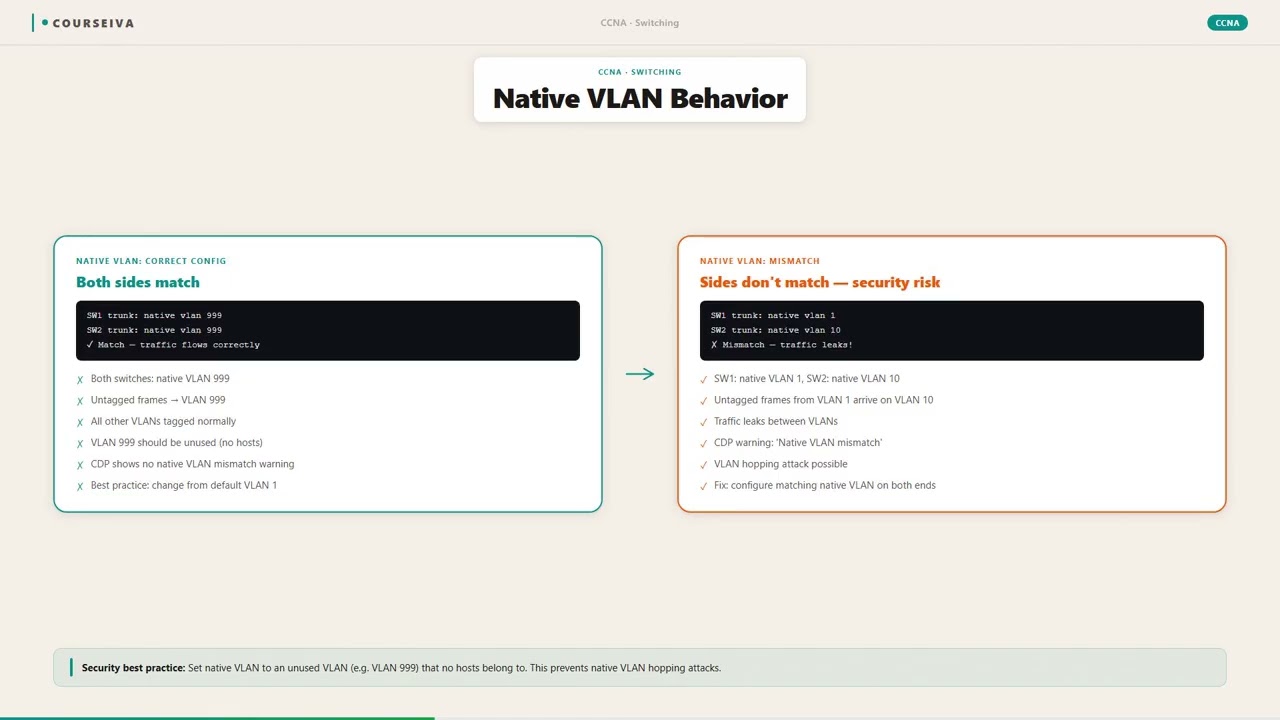
If an attacker can send frames on a trunk link that are untagged or that use a double-tagging technique, they may be able to access VLANs they should not. The two primary attacks are: - VLAN Hopping via Double Tagging: The attacker sends a frame with two 802.1Q tags. The first (outer) tag is the Native VLAN of the trunk. When the switch receives the frame, it strips the outer tag because it is the Native VLAN (untagged). The second (inner) tag is then exposed, and the switch forwards the frame according to that tag, potentially into a different VLAN. - Native VLAN Mismatch: If two switches have different Native VLANs configured on a trunk, they will not properly communicate. Control traffic (like CDP, VTP, DTP) and user data in the Native VLAN will be misdirected. This can lead to VLAN hopping if an attacker can inject frames into the mismatched segment.
Step-by-Step Frame Flow for Double Tagging
The attacker is connected to an access port in VLAN 10 (the Native VLAN of the trunk).
The attacker crafts a frame with an 802.1Q tag for VLAN 20 (the target) inside a frame that is untagged (or tagged with VLAN 10).
The first switch (Switch A) receives the frame on an access port in VLAN 10. It treats the frame as belonging to VLAN 10 and forwards it out the trunk port untagged (since VLAN 10 is the Native VLAN).
When the frame leaves Switch A, the outer tag (if any) is stripped, leaving only the inner tag for VLAN 20.
The second switch (Switch B) receives the frame on its trunk port. Because the frame is now tagged with VLAN 20, Switch B processes it as a normal tagged frame for VLAN 20 and forwards it to the corresponding access ports.
The attacker has successfully jumped from VLAN 10 to VLAN 20 without authorization.
Defaults and Timers
Default Native VLAN: VLAN 1 on all Cisco switches.
The Native VLAN is configured per trunk interface using the switchport trunk native vlan <vlan-id> command.
The vlan dot1q tag native global command forces all frames on trunk ports to be tagged, including the Native VLAN. This eliminates the untagged vulnerability.
DTP (Dynamic Trunking Protocol) frames are sent untagged and are associated with the Native VLAN. If an attacker can spoof DTP, they can negotiate a trunk and gain access.
Verification Commands
To verify the Native VLAN configuration on a trunk:
Switch# show interfaces trunk

Port        Mode         Encapsulation  Status        Native vlan
Gi0/1       on           802.1q         trunking      10

Port        Vlans allowed on trunk
Gi0/1       1-1005

Port        Vlans allowed and active in management domain
Gi0/1       1-1005

Port        Vlans in spanning tree forwarding state and not pruned
Gi0/1       1-1005
To check the Native VLAN on a specific interface:
Switch# show interfaces gigabitethernet 0/1 switchport
Name: Gi0/1
Switchport: Enabled
Administrative Mode: trunk
Operational Mode: trunk
Administrative Trunking Encapsulation: dot1q
Operational Trunking Encapsulation: dot1q
Negotiation of Trunking: On
Access Mode VLAN: 1 (default)
Trunking Native Mode VLAN: 10 (In use)
Administrative Native VLAN tagging: enabled
Voice VLAN: none
Note the line "Administrative Native VLAN tagging: enabled" — this indicates that the vlan dot1q tag native command is active, forcing all frames to be tagged.
Interaction with Related Protocols
DTP: Dynamic Trunking Protocol uses the Native VLAN to negotiate trunking. If DTP is enabled (default on some platforms), an attacker can attempt to become a trunk neighbor and gain access to all VLANs. Best practice is to disable DTP with switchport nonegotiate.
CDP: Cisco Discovery Protocol frames are sent untagged on the Native VLAN. CDP can leak information about the switch. Disable CDP on trunk ports facing untrusted devices.
VTP: VLAN Trunking Protocol also uses the Native VLAN for its advertisements. A malicious VTP advertisement could alter the VLAN database. Use VTP transparent mode or VTP version 3 with authentication.
STP: Spanning Tree Protocol BPDUs are sent untagged on the Native VLAN. An attacker could manipulate STP to become the root bridge and intercept traffic. Use BPDU Guard and Root Guard.
Best Practices for Native VLAN Security
Change the Native VLAN to an unused VLAN: Do not use VLAN 1. Pick a VLAN that is not used for any user traffic, e.g., VLAN 999.
Explicitly tag the Native VLAN: Enable vlan dot1q tag native globally. This forces all frames, including those on the Native VLAN, to be tagged. This prevents double-tagging attacks because the switch will drop any untagged frame on a trunk (except DTP/CDP, which are still untagged but can be secured separately).
Disable DTP: Use switchport nonegotiate on trunk ports to prevent dynamic trunk negotiation.
Disable CDP on trunk ports: Use no cdp enable on interfaces facing untrusted networks.
Use VTP transparent mode: Or disable VTP entirely to prevent VLAN manipulation.
Implement port security: Limit the number of MAC addresses on access ports.
Common Exam Traps
Trap: The Native VLAN is always VLAN 1. Wrong! It can be changed, and best practice is to change it.
Trap: Double-tagging attacks only work if the Native VLAN is the same on both switches. Actually, the attack requires the attacker's access port to be in the Native VLAN of the trunk. The two switches can have different Native VLANs, but the attack will fail because the frame will be dropped due to Native VLAN mismatch.
Trap: The `switchport trunk native vlan` command is enough to prevent attacks. Not true! You must also enable vlan dot1q tag native to actually tag the Native VLAN frames. Without that, frames are still untagged and vulnerable.
Trap: DTP is a security feature. Actually, DTP is a security risk because it can be exploited to form an unauthorized trunk. Always disable it on ports that should be access ports.
Summary
Native VLAN security is about preventing unauthorized access through the untagged VLAN on trunk links. By changing the default VLAN, tagging the native VLAN, and disabling unnecessary protocols, you can close the most common VLAN hopping vectors. The CCNA exam will test your understanding of these concepts and the specific commands to implement them.
Walk-Through
Identify the current Native VLAN
First, determine the current Native VLAN configuration on your trunk interfaces. Use the `show interfaces trunk` command to see the Native VLAN for each trunk. For a specific interface, use `show interfaces <interface> switchport`. Look for the line 'Trunking Native Mode VLAN'. By default, it is VLAN 1. Also check if 'Administrative Native VLAN tagging' is enabled or disabled. This gives you a baseline before making changes.
Create an unused VLAN for Native
Choose a VLAN ID that is not used anywhere else on the network. For example, VLAN 999. Create it on the switch using `vlan 999` in global configuration mode. Ensure that VLAN 999 is not used for any access ports, as it will become the new Native VLAN. If the VLAN already exists, you can skip this step, but verify it is unused to avoid misrouting traffic.
Change the Native VLAN on trunk ports
On each trunk interface, change the Native VLAN to the unused VLAN using the interface configuration command `switchport trunk native vlan 999`. Do this on both ends of the trunk to ensure consistency. A mismatch in Native VLAN will cause the trunk to stop passing Native VLAN traffic and may cause the port to go into errdisable state or cause STP issues. Use `show interfaces trunk` to verify the change.
Enable native VLAN tagging globally
To force all frames on trunk ports to be tagged, including the Native VLAN, use the global configuration command `vlan dot1q tag native`. This command ensures that even frames belonging to the Native VLAN are sent with an 802.1Q tag. This prevents double-tagging attacks because the switch will drop any untagged frame received on a trunk (except control protocols like CDP and DTP, which are still untagged but can be secured separately). Verify with `show interfaces trunk` — the 'Native VLAN tagging' field should show 'enabled'.
Disable DTP on trunk ports
Dynamic Trunking Protocol (DTP) can be exploited by an attacker to negotiate a trunk and gain access to all VLANs. On trunk ports that should remain trunks, disable DTP with the interface command `switchport nonegotiate`. Also, on access ports, ensure they are configured as `switchport mode access` and `switchport nonegotiate` to prevent them from becoming trunks. Verify with `show interfaces <interface> switchport` — the 'Negotiation of Trunking' field should show 'Off'.
Verify configuration and test connectivity
After making changes, verify the configuration using `show interfaces trunk` and `show running-config interface <interface>`. Ensure that the Native VLAN is set to the unused VLAN and that native tagging is enabled. Test connectivity by pinging devices across the trunk. If the Native VLAN was previously used for management traffic (e.g., VLAN 1), you may need to move the management IP to a different VLAN or ensure that the new Native VLAN is allowed on the trunk. Also, check for any errdisable states or STP issues.
What This Looks Like on the Job
In a typical enterprise campus network, switches are interconnected via trunk links that carry multiple VLANs. The Native VLAN is often left as the default VLAN 1, which is a major security risk. A real-world scenario: A financial company has a network with 500 access switches and 20 distribution switches. The default Native VLAN (VLAN 1) is used for management traffic. A security audit reveals that an attacker could potentially perform a VLAN hopping attack from a public access port in VLAN 1 to the management VLAN. The network engineer implements the following: creates a new VLAN 999, changes the Native VLAN on all trunk ports to 999, enables vlan dot1q tag native globally, and disables DTP on all trunk ports. This closes the attack vector. Another common scenario is in data center environments where switches connect to servers with virtual NICs. Some server operating systems may not handle tagged frames correctly for the Native VLAN. By enabling native tagging, the network ensures all frames are tagged, simplifying the server configuration and eliminating the possibility of untagged frames being misinterpreted. Performance considerations: enabling native tagging adds a 4-byte tag to every frame, which slightly increases overhead. In modern 10GbE+ networks, this is negligible. However, on older or low-end switches, the added processing may be a concern. Misconfiguration consequences: if the Native VLAN is changed on only one side of a trunk, the trunk will not pass Native VLAN traffic, and the port may go into errdisable due to Native VLAN mismatch detection (depending on the switch). This can cause loss of connectivity for devices in that VLAN. Also, if the new Native VLAN is accidentally used for user traffic, those users will lose connectivity because their frames will be tagged on the trunk but expected untagged on the access side. Therefore, careful planning and verification are essential.
How CCNA 200-301 Actually Tests This
The CCNA 200-301 exam tests Native VLAN security under objective 2.1 (Network Access). Expect questions that require you to identify the correct commands to change the Native VLAN, enable native tagging, and disable DTP. You may be given a scenario where an attacker is performing a VLAN hopping attack, and you must choose the mitigation. Common wrong answers: (1) 'Use switchport trunk allowed vlan to restrict VLANs' — this does not prevent double-tagging because the Native VLAN is still untagged. (2) 'Use switchport mode access on trunk ports' — this would break the trunk. (3) 'Enable VTP pruning' — this only prunes unused VLANs, not security. (4) 'Use no cdp enable' — this helps but does not address the Native VLAN vulnerability directly. The correct answer often involves changing the Native VLAN and enabling native tagging. Specific values to remember: the default Native VLAN is VLAN 1. The command to change it is switchport trunk native vlan <vlan-id>. The command to enable native tagging is vlan dot1q tag native (global). The command to disable DTP is switchport nonegotiate. A decision rule: if the question involves an attacker sending double-tagged frames, the fix is to enable native tagging. If the question involves an attacker negotiating a trunk, the fix is to disable DTP. Also, note that the Native VLAN mismatch can cause the trunk to stop working for the Native VLAN traffic, but the trunk itself remains up (unless errdisable is triggered). The exam may ask about the effect of a mismatch: the Native VLAN traffic will be misdirected or dropped.
Key Takeaways
The Native VLAN default is VLAN 1.
Change the Native VLAN to an unused VLAN using 'switchport trunk native vlan <vlan-id>'.
Enable native tagging globally with 'vlan dot1q tag native' to force all frames to be tagged.
Disable DTP on trunk ports with 'switchport nonegotiate' to prevent trunk negotiation.
Double-tagging attacks require the attacker's access port to be in the Native VLAN.
Native VLAN mismatch causes loss of Native VLAN traffic but does not bring down the trunk.
Always verify configuration with 'show interfaces trunk' and 'show interfaces switchport'.
Easy to Mix Up
These come up on the exam all the time. Here's how to tell them apart.
Native VLAN Change Only
Changes the untagged VLAN to a different VLAN ID
Frames on the Native VLAN are still sent untagged
Vulnerable to double-tagging attacks
Simple to configure, one command per interface
Does not affect other VLANs
Native VLAN Change + Tag Native
Changes the untagged VLAN and forces all frames to be tagged
All frames on trunk are tagged, including Native VLAN
Eliminates double-tagging vulnerability
Requires global command 'vlan dot1q tag native' in addition to interface command
May cause compatibility issues with devices that expect untagged frames
Watch Out for These
Mistake
The Native VLAN is always VLAN 1 and cannot be changed.
Correct
The Native VLAN can be changed to any VLAN using the 'switchport trunk native vlan' command. Cisco best practice is to change it to an unused VLAN.
Many candidates assume default settings are immutable, but the exam tests the ability to modify defaults.
Mistake
Enabling 'vlan dot1q tag native' is optional and does not improve security.
Correct
This command forces all frames on trunk ports to be tagged, including the Native VLAN. It is a critical security measure to prevent double-tagging attacks.
Candidates may think that changing the Native VLAN alone is sufficient, but the tag native command closes the untagged frame vulnerability.
Mistake
DTP is a security feature that should be enabled on all ports.
Correct
DTP is a security risk because it can be exploited to form unauthorized trunks. It should be disabled on ports that are not intended to trunk, using 'switchport nonegotiate'.
Candidates confuse DTP with a beneficial protocol, but it is actually a vulnerability.
Mistake
A Native VLAN mismatch will cause the entire trunk to go down.
Correct
A Native VLAN mismatch only affects traffic in the Native VLAN. The trunk remains up for other VLANs, but CDP and DTP may fail, and the port may go into errdisable if the switch detects the mismatch.
Candidates overestimate the impact of a mismatch; the exam tests the precise effect.
Do You Actually Know This?
Reveal each answer, then mark whether you got it right. Score 60%+ to unlock the next chapter.
Frequently Asked Questions
What is the default Native VLAN on Cisco switches?
The default Native VLAN is VLAN 1. This is a well-known default that is often targeted in attacks. Cisco best practice is to change the Native VLAN to an unused VLAN, such as VLAN 999, to reduce the attack surface. On the exam, remember that VLAN 1 is the default, but it should be changed for security.
Does 'vlan dot1q tag native' affect all trunk ports?
Yes, the 'vlan dot1q tag native' command is a global configuration command that affects all trunk ports on the switch. Once enabled, all frames on any trunk port will be tagged, including those belonging to the Native VLAN. This is a simple way to enforce tagging across the entire switch.
Can I change the Native VLAN on a trunk without affecting traffic?
Changing the Native VLAN on a trunk will cause traffic in the old Native VLAN to be dropped or misrouted if the other end is not updated. To avoid disruption, change the Native VLAN on both ends of the trunk simultaneously or during a maintenance window. Also, ensure that the new Native VLAN is not used for any access ports to prevent misrouting.
What is the difference between a trunk and an access port regarding Native VLAN?
An access port belongs to a single VLAN and does not use the concept of Native VLAN; all frames are untagged. A trunk port carries multiple VLANs and uses the Native VLAN for untagged frames. The Native VLAN is only relevant on trunk ports. On access ports, the VLAN is simply the access VLAN.
How does double-tagging work in a VLAN hopping attack?
The attacker sends a frame with two 802.1Q tags. The outer tag matches the Native VLAN of the trunk. The first switch strips the outer tag (because it is untagged on the trunk), exposing the inner tag. The second switch then forwards the frame based on the inner tag, potentially into a different VLAN. This allows the attacker to bypass VLAN segmentation.
Is it necessary to disable DTP on trunk ports?
Yes, it is a best practice to disable DTP on trunk ports that are statically configured as trunks. DTP can be exploited to form unauthorized trunks. Use the 'switchport nonegotiate' command to disable DTP. On access ports, also disable DTP to prevent them from becoming trunks.
What is the impact of Native VLAN mismatch on CDP and STP?
CDP and STP BPDUs are sent untagged on the Native VLAN. If the Native VLANs do not match, these control protocols may not work correctly, leading to issues like STP topology changes or CDP neighbor discovery failures. This can cause network instability.
Terms Worth Knowing
Ready to put this to the test?
You've just covered Native VLAN Security — now see how well it sticks with free CCNA 200-301 practice questions. Full explanations included, no account needed.
Done with this chapter?