IPv6 Address Types
IPv6 is not just a bigger address pool — it's a fundamentally different protocol with its own addressing architecture, and the CCNA 200-301 exam (objective 1.9) expects you to know the types, their purposes, and how to identify them at a glance. In real networks, IPv6 is increasingly deployed in enterprise and service provider environments, so understanding whether an address is global, unique-local, link-local, or multicast directly impacts routing, security, and troubleshooting. This chapter breaks down each IPv6 address type so you can confidently answer exam questions and configure real-world networks.
Jump to a section
The Apartment Building Mail Analogy
Imagine a massive apartment building with thousands of residents. Each resident has several ways to receive mail. First, every apartment has a unique global mailing address (like 123 Main Street, Apt 4B) — this is the Global Unicast Address (GUA), routable from anywhere in the world. Second, the building management assigns each apartment a private internal address (like 'Apartment 4B') that only works within the building — this is the Unique Local Address (ULA), routable only within a private domain. Third, every apartment also has a local delivery slot number assigned by the mail carrier, like 'Slot 47' — this is the Link-Local Address (LLA), used only for communication on the same floor (link) and automatically generated. Fourth, sometimes the building manager sends a broadcast message to all residents (like 'Fire drill tomorrow') — but in IPv6, instead of shouting to everyone, the manager sends a multicast message to a specific group, like 'All residents on floor 4' — this is the Multicast Address (FF02::1 for all nodes, FF02::2 for all routers). Finally, any resident can send a message to 'anyone who can help' by putting a note on the community board — this is the Anycast Address, where multiple apartments share the same address and the network delivers to the nearest one. Just as a resident might use different addresses for different purposes (global mail, internal notes, local delivery, group announcements), an IPv6 host uses different address types for different communication scopes.
How It Actually Works
What Are IPv6 Address Types and Why Do They Exist?
IPv6 was designed to replace IPv4, and with it came a complete rethinking of addressing. IPv4 had unicast, multicast, and broadcast — but broadcast was inefficient and often unnecessary. IPv6 eliminates broadcast entirely and introduces new address types: Global Unicast (routable on the public internet), Unique Local (private, analogous to RFC 1918), Link-Local (for neighbor discovery and local-link communication, mandatory for every interface), Multicast (one-to-many, replaces broadcast), and Anycast (one-to-nearest, used for load balancing). The exam tests your ability to recognize these types by their prefix and to understand their scope (global, site-local, link-local).
Global Unicast Address (GUA)
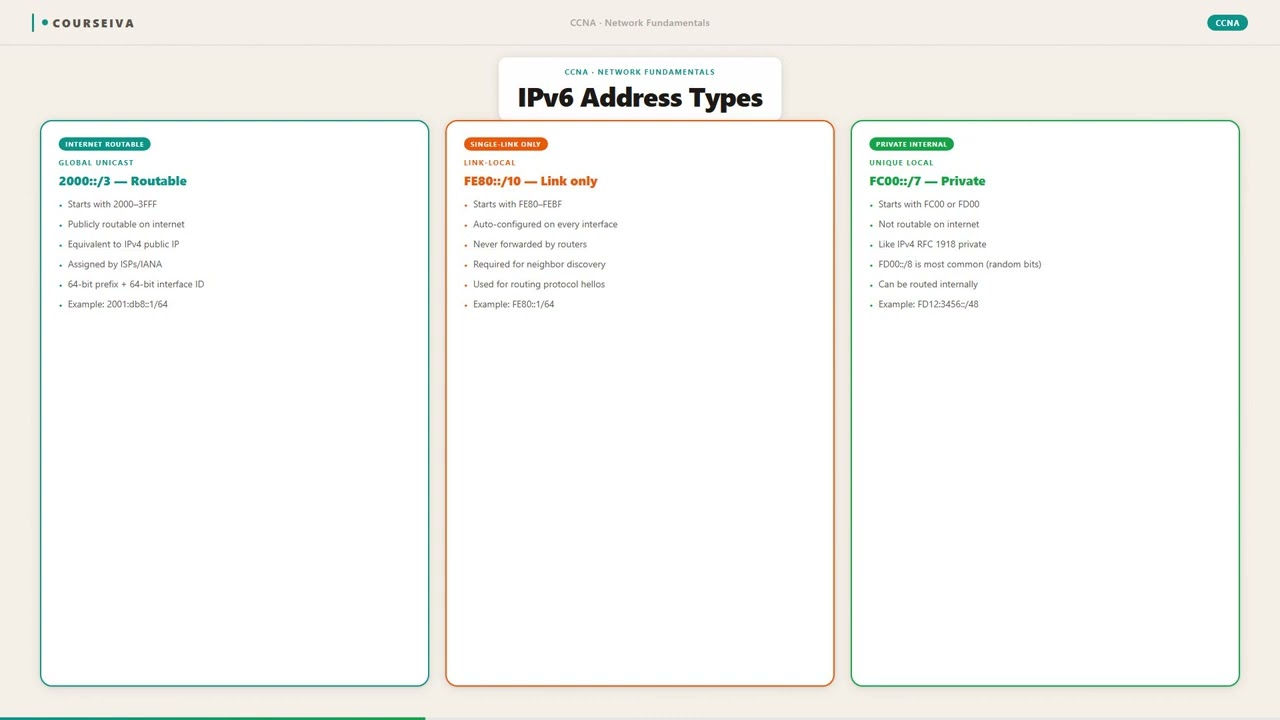
GUAs are globally routable on the internet, similar to public IPv4 addresses. They are assigned by RIRs (like ARIN, RIPE) and typically have a /48 prefix for sites, /64 for subnets. The structure: global routing prefix (48 bits) + subnet ID (16 bits) + interface ID (64 bits). The first 3 bits are 001 (2000::/3), so GUAs always start with 2 or 3 (e.g., 2001:db8::/32 is documentation, 2001:470::/32 is Hurricane Electric). In the exam, if you see an address starting with 2000::/3 (i.e., 2000:: to 3FFF:FFFF:...), it's a GUA. Configuration: either static (ipv6 address 2001:db8:1:1::1/64) or via SLAAC/DHCPv6.
Unique Local Address (ULA)
ULAs are the IPv6 equivalent of IPv4 private addresses (10.0.0.0/8, 172.16.0.0/12, 192.168.0.0/16). They are not meant to be routed on the global internet. Prefix: FC00::/7 (first 7 bits are 1111110), so addresses start with FD (locally assigned) or FC (central assignment, but rarely used). The format: FD + 40-bit global ID (random) + 16-bit subnet ID + 64-bit interface ID. Example: FD12:3456:789A:1::1/64. ULAs are routable within a site but not across the internet. Exam tip: if the address starts with FD, it's ULA.
Link-Local Address (LLA)
LLAs are mandatory for every IPv6-enabled interface. They are used for communication on the same link (subnet) for Neighbor Discovery Protocol (NDP), routing protocols (OSPFv3, EIGRP for IPv6), and as the next-hop address for static routes. Prefix: FE80::/10 (first 10 bits are 1111111010), so addresses start with FE80, FE90, FEA0, or FEB0 — but typically you see FE80::. The interface ID is usually derived from the MAC address using EUI-64 (inverting the U/L bit) or randomized for privacy (RFC 4941). LLAs are not routable — they are only valid on the local link. When pinging, you must specify the outgoing interface: ping FE80::1%GigabitEthernet0/0. In the exam, if you see an address starting with FE80, it's link-local.
Multicast Address
IPv6 multicast replaces broadcast. Addresses start with FF00::/8 (first 8 bits are 11111111). The second byte defines flags and scope: FF02::/16 is link-local scope (used for NDP), FF05::/16 is site-local. Common multicast addresses: FF02::1 (all nodes), FF02::2 (all routers), FF02::9 (RIPng), FF02::5 (OSPF), FF02::A (EIGRP). Multicast is used for neighbor solicitation, router solicitation, and routing protocols. Exam tip: if the address starts with FF, it's multicast. The scope is critical: FF02 is link-local, FF05 is site-local, FF0E is global.
Anycast Address
Anycast is a unicast address assigned to multiple interfaces (typically on different devices). Packets are routed to the nearest interface (by routing protocol metric). There is no special prefix — anycast addresses are taken from the unicast address space (GUA or ULA). The sender cannot distinguish anycast from unicast; the network does the work. Common use: DNS root servers (2001:7fd::1). Exam tip: anycast is not a separate address type by prefix; it's a property of a unicast address. The exam might ask: 'Which address type allows multiple devices to share the same address?' Answer: anycast.
IOS CLI Verification
To see IPv6 addresses on a router:
R1# show ipv6 interface brief
GigabitEthernet0/0   [up/up]
    FE80::1
    2001:DB8:1:1::1
GigabitEthernet0/1   [up/up]
    FE80::2
    2001:DB8:2:1::1
To see detailed info:
R1# show ipv6 interface GigabitEthernet0/0
GigabitEthernet0/0 is up, line protocol is up
  IPv6 is enabled, link-local address is FE80::1
  No Virtual link-local address(es):
  Global unicast address(es):
    2001:DB8:1:1::1, subnet is 2001:DB8:1:1::/64
  Joined group address(es):
    FF02::1
    FF02::2
    FF02::1:FF00:1
  MTU is 1500 bytes
  ICMP error messages limited to one every 100 milliseconds
  ND reachable time is 30000 milliseconds (default)
  ND advertised reachable time is 0 (unspecified)
  ND advertised retransmit interval is 0 (unspecified)
  ND router advertisements are sent every 200 seconds
  ND router advertisements live for 1800 seconds
  Hosts use stateless autoconfiguration for addresses.
Interaction with Related Protocols
IPv6 address types are intimately tied to Neighbor Discovery Protocol (NDP). NDP uses ICMPv6 messages like Neighbor Solicitation (NS) and Neighbor Advertisement (NA) for address resolution (ARP replacement). Router Solicitation (RS) and Router Advertisement (RA) allow hosts to learn the default gateway and prefix. SLAAC (Stateless Address Autoconfiguration) uses RA to assign a GUA. DHCPv6 can provide additional options. Link-local addresses are essential for NDP to work. Multicast addresses (like solicited-node multicast FF02::1:FFxx:xxxx) are used for efficient neighbor discovery.
Walk-Through
Identify Address Type by Prefix
The first step in any IPv6 addressing task is to determine the address type from its first hexadecimal digits. The exam expects you to instantly recognize: 2000::/3 (2000-3FFF) = Global Unicast; FC00::/7 (FC00-FDFF) = Unique Local; FE80::/10 (FE80-FEBF) = Link-Local; FF00::/8 (FF00-FFFF) = Multicast. Any other prefix is either unspecified (::), loopback (::1), or IPv4-mapped (::ffff:0:0/96). Practice: given 2001:db8:1::1, it's GUA. Given FD12::1, it's ULA. Given FE80::1, it's LLA. Given FF02::1, it's multicast. Traps: candidates often confuse FE80 (link-local) with FC00 (ULA) because both start with F. Remember: FE80 has 'E8' after 'F', while FC00 has 'C0'.
Understand Address Scope
Each address type has a defined scope: Global (entire internet), Site (within a private site), Link (local link only). GUA has global scope. ULA has site scope (routable within a site but not globally). LLA has link-local scope (cannot be routed). Multicast has a scope field in the second byte: FF02 = link-local, FF05 = site-local, FF0E = global. The exam tests scope with questions like 'Which address type is not routable?' Answer: link-local. Or 'Which address type is used for NDP?' Answer: link-local and multicast. Remember: LLAs are automatically generated and must be present for IPv6 to work. Without a link-local address, an interface cannot send or receive IPv6 packets.
Configure IPv6 Addresses on Cisco IOS
To configure a GUA: `ipv6 address 2001:db8:1:1::1/64`. To configure a ULA: `ipv6 address FD12:3456:789A:1::1/64`. To enable IPv6 on an interface, you must first enable it globally with `ipv6 unicast-routing` (so the router can forward IPv6 packets). The link-local address is automatically generated when you configure any IPv6 address, but you can manually set it: `ipv6 address FE80::1 link-local`. Note: the `link-local` keyword is required to configure a link-local address. Example configuration: ``` interface GigabitEthernet0/0 ipv6 address 2001:db8:1:1::1/64 ipv6 address FE80::1 link-local ``` This sets both a GUA and a manual LLA. The LLA is used as the next-hop for static routes and routing protocols.
Verify Addresses with Show Commands
After configuration, use `show ipv6 interface brief` to see a summary. For detailed info: `show ipv6 interface GigabitEthernet0/0`. The output shows the link-local address, global unicast address(es), and joined multicast groups. Example output: ``` R1# show ipv6 interface GigabitEthernet0/0 GigabitEthernet0/0 is up, line protocol is up IPv6 is enabled, link-local address is FE80::1 Global unicast address(es): 2001:DB8:1:1::1, subnet is 2001:DB8:1:1::/64 Joined group address(es): FF02::1 FF02::2 FF02::1:FF00:1 ``` Notice the solicited-node multicast address (FF02::1:FF00:1) is automatically joined. This is derived from the last 24 bits of the unicast address. The exam may ask: 'Which multicast group is used for neighbor solicitation?' Answer: solicited-node multicast (FF02::1:FFxx:xxxx).
Troubleshoot Address Assignment Issues
Common issues: no link-local address (interface not enabled for IPv6), duplicate address detection (DAD) failure, or wrong prefix. Use `debug ipv6 nd` to see NDP messages. If a host cannot get a GUA via SLAAC, check that the router is sending RAs: `show ipv6 interface | include RA`. The RA interval default is 200 seconds. For manual configuration, ensure the prefix length matches the subnet. A common exam trap: configuring a /64 on a point-to-point link is fine, but using a /127 is also allowed (RFC 6164). However, the default on Cisco is /64. To verify DAD: `show ipv6 interface` shows 'DAD enabled'. If DAD fails, the address is marked as 'duplicate' and not used. Use `clear ipv6 neighbors` to reset.
Apply Address Types in Routing and Security
In routing, OSPFv3 uses link-local addresses as next-hops. When configuring a static route: `ipv6 route 2001:db8:2::/64 GigabitEthernet0/0 FE80::2`. The next-hop must be a link-local address if the exit interface is specified. For security, ACLs can filter by address type. For example, permit only GUAs from a specific prefix. Also, note that ULAs are often used in internal networks with NAT66 (though not common). The exam may ask: 'Why would an enterprise use ULA instead of GUA?' Answer: to avoid renumbering when changing providers, and for internal communication without global reachability.
What This Looks Like on the Job
In a large enterprise campus network, IPv6 is typically deployed with a mix of GUAs and ULAs. For example, a company might receive a /48 prefix from its ISP (e.g., 2001:db8:acad::/48) and subnet it into /64s for each VLAN. Each access layer switch interface is configured with a GUA for user devices and a link-local address for management. The core routers use OSPFv3, which relies on link-local addresses for neighbor adjacency. A common practice is to assign manual link-local addresses (e.g., FE80::1 on each router's loopback) for easier troubleshooting — this way, the OSPF router ID can be set to the loopback's GUA, but the neighbor relationship uses the predictable LLA.
Another scenario: a data center uses anycast for DNS servers. Multiple DNS servers are configured with the same GUA (e.g., 2001:db8:1::53). The network routes to the nearest server based on IGP metric. This provides redundancy and load distribution without complex load balancers. The exam may test this by asking: 'Which address type allows multiple servers to share the same address?' The answer is anycast, but note the address itself is a GUA.
A common misconfiguration is forgetting to enable ipv6 unicast-routing globally. Without it, the router will not forward IPv6 packets between interfaces, even if addresses are configured. Also, using the wrong prefix length (e.g., /48 on a LAN) can cause routing issues because the subnet is too large. In production, always use /64 for subnets to support SLAAC and NDP. If you need smaller subnets for point-to-point links, use /126 or /127, but be aware that some older implementations expect /64. The exam assumes /64 for LANs.
Performance considerations: IPv6 addresses are longer, so routing tables are larger. But modern hardware handles this fine. Security: link-local addresses are often overlooked in ACLs — remember to permit FE80::/10 for routing protocols. Also, RA guard and DHCPv6 guard are used to prevent rogue router advertisements.
How CCNA 200-301 Actually Tests This
The CCNA 200-301 exam objective 1.9 is 'Configure and verify IPv6 addressing and prefix'. This includes recognizing address types, configuring them, and understanding their use. The exam tests:
Prefix identification: You must know that 2000::/3 is GUA, FC00::/7 is ULA, FE80::/10 is link-local, FF00::/8 is multicast. Common wrong answer: 'FE80 is a private address' — no, private is ULA (FC00). Another: 'FF02::1 is a unicast address' — no, it's multicast.
Scope: You must know that link-local addresses are not routable. A typical question: 'Which IPv6 address type can be used for communication within a single subnet?' Answer: link-local. Wrong answer: unique local (which is routable within a site).
Configuration: You may be given a router configuration and asked to identify errors. For example, if the command ipv6 address FE80::1 is entered without the link-local keyword, the router will assume it's a GUA (because it doesn't start with FE80? Actually, the router will accept it but treat it as a GUA? No — Cisco IOS requires the link-local keyword for any address in the FE80::/10 range to be considered link-local; otherwise it's rejected? Actually, the router will accept it as a unicast address but it will be a GUA? No, FE80::/10 is reserved for link-local, so the router will automatically treat it as link-local even without the keyword? Let me clarify: In Cisco IOS, if you configure ipv6 address FE80::1 (without link-local), it is accepted as a link-local address. The link-local keyword is optional but recommended for clarity. The exam may trick you by saying 'The link-local address must be configured with the link-local keyword' — that's false. However, to manually set a specific link-local, you use the link-local keyword. This is a common trap.
Values: Default RA interval is 200 seconds, RA lifetime is 1800 seconds. DAD sends NS messages to the solicited-node multicast address. The solicited-node multicast address is formed by appending the last 24 bits of the unicast address to FF02::1:FF00:0/104.
Decision rule: When you see an IPv6 address, first check the first hex digit. If it's 2 or 3, it's GUA. If it's F, check the second digit: if it's C or D, it's ULA; if it's E and third is 8 or 9 or A or B, it's link-local; if it's F, it's multicast. If it's all zeros except last bit, it's loopback. If it's all zeros, it's unspecified.
Key Takeaways
Global Unicast Addresses (GUA) start with 2000::/3 (first hex digit 2 or 3).
Unique Local Addresses (ULA) start with FC00::/7 (first hex digits FD or FC).
Link-Local Addresses (LLA) start with FE80::/10 (first hex digits FE80 to FEBF).
Multicast addresses start with FF00::/8 (first two hex digits FF).
Anycast is not a separate prefix; it's a property of a unicast address.
Link-local addresses are mandatory on every IPv6-enabled interface and are not routable.
Solicited-node multicast address is FF02::1:FFxx:xxxx, used for NDP.
Easy to Mix Up
These come up on the exam all the time. Here's how to tell them apart.
Global Unicast (GUA)
Prefix: 2000::/3 (first digit 2 or 3)
Globally routable on the internet
Assigned by RIRs or ISPs
Used for public-facing services
Must be unique globally
Unique Local (ULA)
Prefix: FC00::/7 (first digit F, second C or D)
Routable within a site only
Locally assigned (random 40-bit global ID)
Used for internal communication
Does not need global uniqueness (but should be random to avoid collision)
Watch Out for These
Mistake
Link-local addresses are private and can be routed within a site.
Correct
Link-local addresses (FE80::/10) are only valid on a single link and are never routed. Routers drop packets with a link-local source or destination address. Unique Local Addresses (FC00::/7) are the private, routable within a site.
Candidates confuse 'private' with 'not globally routable'. Both ULAs and LLAs are not globally routable, but LLAs are also not routable at all.
Mistake
IPv6 multicast addresses are the same as IPv4 broadcast addresses.
Correct
IPv6 multicast is more efficient than IPv4 broadcast because packets are only delivered to interfaces that have joined the multicast group. IPv6 has no broadcast. The all-nodes multicast address FF02::1 is similar to broadcast but only reaches IPv6-enabled hosts.
Candidates think multicast just replaces broadcast, but the mechanism is different — hosts must join groups.
Mistake
The prefix length for a link-local address is always /64.
Correct
Link-local addresses have a fixed prefix of FE80::/10. The remaining 54 bits of the prefix are typically zero, but the prefix length is /10, not /64. However, the interface ID is 64 bits, so the subnet prefix is effectively /64 if you consider the standard format, but the official prefix length is /10.
Candidates see FE80::/64 in some outputs and assume that's the prefix length.
Mistake
Unique Local Addresses (ULAs) are not routable at all.
Correct
ULAs are routable within a site (like RFC 1918 addresses in IPv4). They are not routable on the global internet. They can be used for internal routing and are often used with NAT66.
Candidates think 'private' means 'not routable', but private IPv4 addresses are routable within a private network.
Do You Actually Know This?
Reveal each answer, then mark whether you got it right. Score 60%+ to unlock the next chapter.
Frequently Asked Questions
What is the difference between link-local and unique local IPv6 addresses?
Link-local addresses (FE80::/10) are only valid on a single physical link (subnet). They are automatically generated and used for neighbor discovery, routing protocol adjacencies, and as next-hop addresses. They are never routed. Unique local addresses (FC00::/7) are routable within a private site but not on the internet. They are manually assigned and used for internal communication, similar to IPv4 private addresses. Exam tip: if you need communication between subnets without global routing, use ULA; if you only need local-link communication, use LLA.
How do I manually configure a link-local address on a Cisco router?
Use the command `ipv6 address FE80::1 link-local` under interface configuration mode. The `link-local` keyword is required to explicitly set a link-local address. Without it, the router may interpret the address as a global unicast if it doesn't fall in the FE80::/10 range. However, if you use an FE80:: address, the router will still treat it as link-local even without the keyword. Example: `interface GigabitEthernet0/0` then `ipv6 address FE80::1 link-local`. Verify with `show ipv6 interface brief`.
What is the solicited-node multicast address and why is it used?
The solicited-node multicast address is derived from a unicast address by taking the last 24 bits and appending them to FF02::1:FF00:0/104. For example, for address 2001:db8::1, the solicited-node address is FF02::1:FF00:1. It is used by Neighbor Discovery Protocol (NDP) for efficient address resolution. Instead of sending a multicast to all nodes (FF02::1), a host sends a Neighbor Solicitation to the solicited-node multicast address of the target, which only a few hosts (those with the same last 24 bits) will receive. This reduces processing overhead.
Can I use a /64 prefix for a point-to-point link?
Yes, you can, but it wastes address space. Cisco defaults to /64 for all subnets. However, RFC 6164 recommends using /127 for point-to-point links to avoid the waste of a /64. But some older implementations may have issues with /127 because they expect a /64 for NDP. In the exam, unless specified otherwise, assume /64 for LAN subnets. For point-to-point, you might see /64 or /127. The key is that the prefix length must match on both ends.
What is anycast and how is it configured in IPv6?
Anycast is a unicast address assigned to multiple interfaces (usually on different devices). Packets sent to that address are delivered to the nearest interface (by routing metric). There is no special prefix; any unicast address can be anycast. To configure anycast on Cisco IOS, you assign the same unicast address to multiple interfaces and then adjust routing metrics so that the nearest one is preferred. You must also disable Duplicate Address Detection (DAD) because the address is intentionally duplicated: `no ipv6 nd dad attempts` on the interface. Exam tip: anycast is used for services like DNS.
How do I verify the IPv6 address type on a Cisco router?
Use `show ipv6 interface` or `show ipv6 interface brief`. The output lists the link-local address separately from global unicast addresses. For example: 'IPv6 is enabled, link-local address is FE80::1' and 'Global unicast address(es): 2001:DB8::1'. To see the prefix type, look at the first hex digit. You can also use `show ipv6 route` to see how the router learned the address. For multicast, `show ipv6 multicast` shows groups joined.
What is the default prefix length for IPv6 subnets on Cisco routers?
The default prefix length for IPv6 subnets is /64. This is because SLAAC requires a /64 to generate the interface ID. When you configure an IPv6 address without a prefix length, the router assumes /64. However, you can manually specify any length. For example, `ipv6 address 2001:db8::1/48` configures a /48. But for LAN segments, always use /64 to ensure NDP works correctly.
Terms Worth Knowing
Ready to put this to the test?
You've just covered IPv6 Address Types — now see how well it sticks with free CCNA 200-301 practice questions. Full explanations included, no account needed.
Done with this chapter?