CIDR Notation
CIDR (Classless Inter-Domain Routing) notation is the universal language of IP addressing and subnetting. Without it, you cannot describe a network's prefix length or calculate subnets efficiently. The CCNA 200-301 exam tests your ability to interpret CIDR notation, convert it to subnet masks, and apply it in addressing schemes (Objective 1.6). Mastering CIDR is not just about passing the exam—it is the foundation of every IP network design and troubleshooting task you will face as a network engineer.
Jump to a section
The Postal Zip Code System
Imagine the postal system uses a zip code of 9 digits to deliver mail. Originally, the system only allowed zip codes that were exactly 5 digits (like a classful network). But as the country grew, 5 digits were not enough—some large cities needed more specific delivery. So the postal service introduced a 9-digit zip code (ZIP+4), where the first 5 digits identify the general area (the network portion) and the last 4 digits identify a specific delivery route (the host portion). However, not every address uses all 9 digits; some use only 5, some use 7, some use 9. To tell the mail sorter how many digits are the network part, the post office prints a slash after the zip code with a number: e.g., "12345/5" means the first 5 digits are the network part, and the remaining 4 digits (if any) are the local part. But wait—if the slash says /5, that's exactly the old 5-digit system. If it says /7, the first 7 digits are the network, leaving only 2 digits for the local part. This slash notation is exactly CIDR notation. The IP address is like the full 9-digit zip code, and the /prefix length tells you how many bits (from the left) belong to the network portion. The remaining bits are the host portion. Just as the postal sorter uses the slash to decide where to route the mail, a router uses the CIDR prefix length to determine the network address and make forwarding decisions. Without the slash, the sorter would have to guess—classful routing assumed a fixed boundary (like always /8, /16, or /24), but CIDR allows any boundary, making IP address allocation efficient and flexible.
How It Actually Works
What is CIDR Notation?
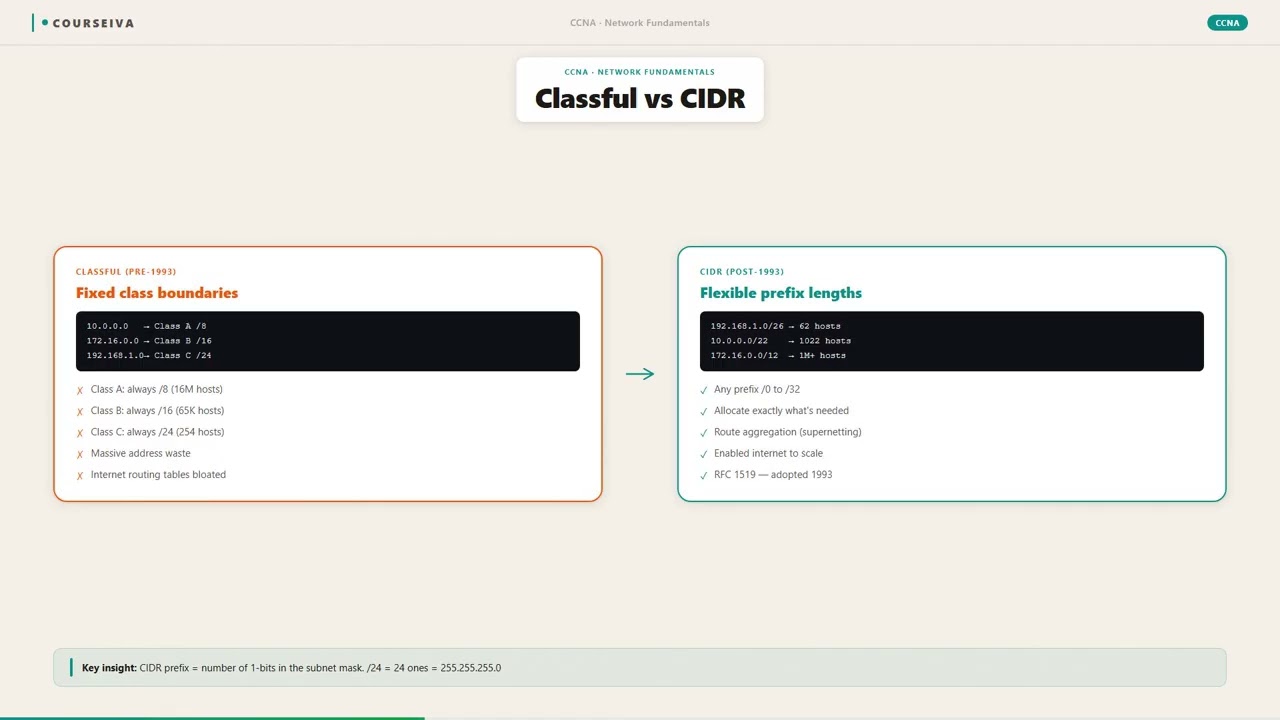
CIDR (Classless Inter-Domain Routing) notation is a compact way to specify an IP address and its associated routing prefix. It is written as an IP address followed by a slash (/) and a decimal number (the prefix length). The prefix length indicates the number of consecutive 1 bits in the subnet mask, counting from the leftmost bit. For example, 192.168.1.0/24 means the first 24 bits are the network portion, and the remaining 8 bits are for host addresses. This replaced the older classful system (Class A, B, C) which forced fixed prefix lengths of /8, /16, and /24 respectively.
Why CIDR Exists
Before CIDR (introduced in 1993, RFC 1517-1520), IP addresses were assigned based on class. A Class A network (prefix /8) had 16 million hosts, far too large for most organizations. Class C networks (/24) had only 254 hosts, often too small. This led to massive waste of IP addresses and routing table bloat—the Internet routing table was growing exponentially. CIDR allows any prefix length (e.g., /22, /27), enabling network engineers to carve out exactly the right number of addresses. It also supports route aggregation (supernetting), where multiple contiguous prefixes are summarized into one, shrinking routing tables.
How CIDR Works at the Packet Level
CIDR itself is not a protocol; it is a notation used in routing tables and IP address configuration. When a router receives an IP packet, it performs a longest prefix match (LPM) on its routing table. Each routing table entry includes a destination network and a prefix length. The router looks for the entry with the most specific (longest) prefix that matches the destination IP. For example, if the routing table has 10.0.0.0/8 and 10.1.0.0/16, a packet to 10.1.2.3 matches both, but the /16 is more specific (longer prefix), so it wins. This is fundamental to CIDR-based routing.
Prefix Length and Subnet Mask Conversion
The prefix length directly maps to a subnet mask. The subnet mask is a 32-bit number where the first N bits are 1 and the rest are 0. For example: - /24 = 255.255.255.0 (binary: 11111111.11111111.11111111.00000000) - /25 = 255.255.255.128 - /26 = 255.255.255.192 - /27 = 255.255.255.224 - /28 = 255.255.255.240 - /29 = 255.255.255.248 - /30 = 255.255.255.252 (used for point-to-point links, gives 2 usable addresses) - /31 = 255.255.255.254 (used for point-to-point links with no broadcast, RFC 3021) - /32 = 255.255.255.255 (single host)
Calculating Network, Broadcast, and Usable Hosts
Given an IP address and prefix length, you can compute: - Network address: Set all host bits to 0. - Broadcast address: Set all host bits to 1. - Number of usable hosts: 2^(32 - prefix) - 2 (subtract network and broadcast).
Example: 192.168.1.100/26 - Prefix = 26, so host bits = 6 - Network: 192.168.1.64 (binary last octet: 01000000) - Broadcast: 192.168.1.127 (binary last octet: 01111111) - Usable hosts: 2^6 - 2 = 62
CIDR in IOS Configuration
When configuring an interface with an IP address, you use the prefix length directly:
interface GigabitEthernet0/0
 ip address 192.168.1.1 255.255.255.0
Or you can use the prefix length form (some IOS versions):
ip address 192.168.1.1/24In routing protocols like OSPF and EIGRP, network statements often use wildcard masks, which are the inverse of the subnet mask. For example, to advertise 192.168.1.0/24:
router ospf 1
 network 192.168.1.0 0.0.0.255 area 0
The wildcard mask 0.0.0.255 is the inverse of 255.255.255.0.
Verification Commands
To see the IP address and prefix length on an interface:
show ip interface brief
show running-config interface GigabitEthernet0/0
Example output:
GigabitEthernet0/0 is up, line protocol is up
  Internet address is 192.168.1.1/24
To view the routing table with CIDR prefixes:
show ip routeExample:
10.0.0.0/8 is variably subnetted, 2 subnets, 2 masks
C       10.1.1.0/24 is directly connected, GigabitEthernet0/0
L       10.1.1.1/32 is directly connected, GigabitEthernet0/0
The 'C' and 'L' codes show directly connected and local routes with their prefix lengths.
Interaction with VLSM
CIDR enables Variable Length Subnet Masking (VLSM), where different subnets within the same major network can have different prefix lengths. For example, you can have 10.0.0.0/24 for a LAN and 10.0.1.0/30 for a point-to-point link. This is impossible in classful routing. VLSM is essential for efficient IP address utilization.
Common Exam Values
Memorize these prefix lengths and their masks: - /30: 255.255.255.252 (2 usable addresses) - /29: 255.255.255.248 (6 usable) - /28: 255.255.255.240 (14 usable) - /27: 255.255.255.224 (30 usable) - /26: 255.255.255.192 (62 usable) - /25: 255.255.255.128 (126 usable) - /24: 255.255.255.0 (254 usable) - /23: 255.255.254.0 (510 usable) - /22: 255.255.252.0 (1022 usable) - /16: 255.255.0.0 (65534 usable) - /8: 255.0.0.0 (16777214 usable)
Traps on the Exam
Confusing prefix length with number of hosts: A /24 does not have 24 usable hosts; it has 254 usable hosts. The prefix length is the number of network bits, not host bits.
Forgetting to subtract 2: For point-to-point links, a /30 gives 2 usable addresses, but many candidates mistakenly think it gives 4.
Incorrect wildcard mask calculation: For a /26, the wildcard mask is 0.0.0.63 (not 0.0.0.64). The wildcard mask is the inverse of the subnet mask: 255.255.255.192 inverted is 0.0.0.63.
Mixing up network and broadcast addresses: The network address is the first address in the block; the broadcast is the last. For 192.168.1.128/25, network is 192.168.1.128, broadcast is 192.168.1.255.
Walk-Through
Identify the Prefix Length
Given an IP address with CIDR notation (e.g., 172.16.5.10/20), the prefix length is the number after the slash. In this case, /20 means the first 20 bits of the IP address are the network portion. The remaining 12 bits (32 - 20) are host bits. This is your starting point for any subnetting calculation.
Convert Prefix to Subnet Mask
Write the subnet mask in binary: 20 ones followed by 12 zeros: 11111111.11111111.11110000.00000000. Convert each octet to decimal: 255.255.240.0. So /20 corresponds to 255.255.240.0. Memorize common conversions: /24 = 255.255.255.0, /16 = 255.255.0.0, /8 = 255.0.0.0. For less common ones, practice binary conversion.
Determine the Network Address
To find the network address, perform a bitwise AND between the IP address and the subnet mask. For 172.16.5.10/20, the subnet mask is 255.255.240.0. Convert IP to binary: 172.16.5.10 = 10101100.00010000.00000101.00001010. Mask: 11111111.11111111.11110000.00000000. AND result: 10101100.00010000.00000000.00000000 = 172.16.0.0. So the network address is 172.16.0.0.
Calculate the Broadcast Address
Set all host bits to 1. The host bits are the last 12 bits. Starting from the network address 172.16.0.0 (binary: 10101100.00010000.00000000.00000000), flip the last 12 bits to 1: 10101100.00010000.00001111.11111111 = 172.16.15.255. So the broadcast address is 172.16.15.255.
Compute Usable Host Range
Usable hosts are all addresses between network and broadcast. For 172.16.0.0/20, the first usable host is network + 1: 172.16.0.1. The last usable host is broadcast - 1: 172.16.15.254. The total number of usable hosts is 2^(32-20) - 2 = 2^12 - 2 = 4096 - 2 = 4094. Always subtract 2 for network and broadcast addresses.
Verify with IOS Commands
On a Cisco router, configure an interface with an IP address and prefix: `interface gigabitethernet 0/0` then `ip address 172.16.5.1 255.255.240.0`. Use `show ip interface brief` to verify. To see the subnet mask in prefix form, use `show running-config interface gigabitethernet 0/0`. The output shows `ip address 172.16.5.1 255.255.240.0`. You can also use `show ip route` to see the connected network with prefix length, e.g., `172.16.0.0/20 is directly connected, GigabitEthernet0/0`.
What This Looks Like on the Job
In a real enterprise network, CIDR notation is used daily for IP address planning, routing protocol configuration, and firewall rules. For example, a company with 2000 hosts might be allocated a /21 block (2048 addresses, 2046 usable) from their ISP. The network engineer then subnets that /21 into smaller blocks for different departments: a /24 for the engineering VLAN (254 hosts), a /23 for the sales VLAN (510 hosts), and a /30 for a point-to-point link to a branch office. Without CIDR, the engineer would be forced to use classful boundaries, wasting addresses or requiring multiple separate allocations.
Another scenario: route summarization. A router has four /24 subnets: 10.1.0.0/24, 10.1.1.0/24, 10.1.2.0/24, 10.1.3.0/24. These can be summarized as 10.1.0.0/22 (since the first 22 bits are common). The engineer configures a static route: ip route 10.1.0.0 255.255.252.0 Serial0/0/0. This reduces the routing table size and improves convergence. Misconfiguration happens when the summary includes addresses not actually in use, causing black holes. For instance, summarizing 10.1.0.0/22 when only 10.1.0.0/24 and 10.1.1.0/24 exist would cause traffic to 10.1.2.0/24 to be forwarded to the summarizer, which may not have a route, dropping packets.
Performance considerations: In large networks, using CIDR with proper summarization reduces routing table size, which lowers CPU and memory usage on routers. However, if VLSM is used carelessly, it can lead to fragmented subnets that cannot be summarized, defeating the purpose. Best practice is to plan IP allocations in contiguous blocks aligned to power-of-two boundaries to allow summarization.
When misconfigured, such as using a wrong prefix length in a static route, traffic may not reach its destination. For example, a static route to 192.168.1.0/24 with mask 255.255.255.0 (correct) vs. 255.255.255.192 (incorrect) would only match packets destined to the first 62 addresses of that subnet, leaving the rest unreachable. Troubleshooting such issues involves checking the routing table with show ip route and verifying the prefix length.
How CCNA 200-301 Actually Tests This
On the CCNA 200-301 exam, Objective 1.6 requires you to "Configure, verify, and troubleshoot IPv4 addressing and subnetting." CIDR notation is central to this. Expect questions that ask you to identify the network address, broadcast address, or usable host range given an IP and prefix. You may also be asked to choose the appropriate prefix length for a given number of hosts, or to determine if two addresses are in the same subnet.
Common wrong answers and why candidates choose them: 1. Confusing /24 with 24 usable hosts: Many candidates see the number 24 and think it's the host count. Remember: /24 means 24 network bits, leaving 8 host bits, which gives 254 usable addresses (2^8 - 2). 2. Forgetting to subtract 2 for network and broadcast: When asked how many usable hosts in a /30, a common trap answer is 4 (2^2). The correct answer is 2. Always subtract 2. 3. Using the subnet mask instead of prefix length in a calculation: For example, given 10.0.0.0/26, a candidate might mistakenly use /26 as the number of host bits. The host bits are 32 - 26 = 6. 4. Misidentifying the network address: For an IP like 192.168.1.130/25, some candidates think the network is 192.168.1.0 (because they assume classful boundary). The correct network is 192.168.1.128.
Calculation traps: The exam may present a scenario where you need to choose a subnet mask that meets host requirements. For example, "Which subnet mask supports 50 hosts?" The smallest mask that gives at least 50 usable hosts is /26 (62 usable). A /27 gives only 30, so it's too small. Candidates often pick /27 because they miscompute 2^5 = 32, forgetting to subtract 2.
Decision rule for scenario questions: Always convert the number of required hosts to a power of 2 minus 2. For 50 hosts, 2^6 = 64, minus 2 = 62, so need 6 host bits, thus prefix = 32-6 = /26. If the question asks for the network address, perform the bitwise AND. If asked for broadcast, set host bits to 1. Practice these conversions until they are automatic.
Key Takeaways
CIDR notation is IP_address/prefix_length, where prefix_length is the number of network bits.
Subnet mask = 32-bit number with prefix_length ones followed by zeros; e.g., /24 = 255.255.255.0.
Number of usable hosts = 2^(32 - prefix_length) - 2.
Network address = IP address AND subnet mask; broadcast = network with all host bits set to 1.
Common prefix lengths: /30 (2 usable), /29 (6), /28 (14), /27 (30), /26 (62), /25 (126), /24 (254).
IOS configuration uses subnet mask (e.g., ip address 192.168.1.1 255.255.255.0) or prefix form (ip address 192.168.1.1/24).
Verification commands: show ip interface brief, show running-config interface, show ip route.
Wildcard mask = inverse of subnet mask; used in OSPF/EIGRP network statements.
Easy to Mix Up
These come up on the exam all the time. Here's how to tell them apart.
Classful Addressing
Fixed prefix lengths: /8, /16, /24
Wasteful due to fixed sizes
No route summarization across classes
Routing tables larger
Obsolete; not used in modern networks
CIDR (Classless Inter-Domain Routing)
Variable prefix lengths (any from /0 to /32)
Efficient use of IP address space
Supports supernetting and VLSM
Enables route aggregation to shrink tables
Standard for modern IP routing
Watch Out for These
Mistake
/24 means 24 usable host addresses.
Correct
/24 means 24 network bits, leaving 8 host bits, which yields 2^8 - 2 = 254 usable addresses.
Candidates misinterpret the number after the slash as host bits instead of network bits.
Mistake
The network address for 10.1.2.3/16 is 10.1.0.0.
Correct
/16 means first 16 bits are network. 10.1.2.3 in binary: 00001010.00000001.00000010.00000011. AND with 255.255.0.0 gives 00001010.00000001.00000000.00000000 = 10.1.0.0. That is correct, but many think it's 10.0.0.0 because of classful thinking.
Candidates default to classful boundaries (Class A = /8, B = /16) and ignore the given prefix.
Mistake
A /30 subnet provides 4 usable addresses.
Correct
A /30 has 2 host bits, so 2^2 = 4 total addresses, but network and broadcast consume 2, leaving 2 usable.
Candidates forget to subtract 2 for network and broadcast addresses.
Mistake
The prefix length is the same as the subnet mask in decimal.
Correct
Prefix length is the count of consecutive ones; subnet mask is a 32-bit number. For example, /24 is 255.255.255.0, not 24.
Candidates confuse the abstract number with the dotted decimal representation.
Do You Actually Know This?
Reveal each answer, then mark whether you got it right. Score 60%+ to unlock the next chapter.
Frequently Asked Questions
What is the difference between CIDR notation and subnet mask?
CIDR notation is a shorthand: it uses a slash followed by the number of network bits (e.g., /24). The subnet mask is the full 32-bit representation (e.g., 255.255.255.0). Both convey the same information; CIDR is just more compact. On the exam, you may be asked to convert between them. For example, /26 equals 255.255.255.192. Tip: memorize common pairs.
How do I calculate the number of hosts from a CIDR prefix?
Subtract the prefix length from 32 to get the number of host bits. Then compute 2^(host bits) - 2. For example, /27: 32-27=5 host bits, 2^5=32, minus 2 = 30 usable hosts. Always subtract 2 for network and broadcast addresses. Exam trap: they might ask for total addresses vs usable, so read carefully.
What is a /32 address used for?
A /32 address is a host route, meaning the entire IP address is the network and there are no host bits. It identifies a single host. In routing tables, you often see a /32 route for the router's own interface IP (local route) or for loopback interfaces. On exam, know that /32 means exactly one address, no subnetting.
Can I use a /31 subnet for a point-to-point link?
Yes, according to RFC 3021, /31 subnets (255.255.255.254) can be used on point-to-point links. They provide only two addresses, both usable (no network or broadcast). This conserves IP space. However, not all older IOS versions support it. The exam may test that /30 is traditional, but /31 is valid for point-to-point. Be aware of both.
How do I find the wildcard mask from a CIDR prefix?
The wildcard mask is the inverse of the subnet mask. For a /24, subnet mask 255.255.255.0, wildcard is 0.0.0.255. For a /26, subnet 255.255.255.192, wildcard is 0.0.0.63. To calculate: subtract each octet from 255. So 255-255=0, 255-255=0, 255-255=0, 255-192=63. On exam, you might need to convert quickly.
What does 'VLSM' mean and how does it relate to CIDR?
VLSM (Variable Length Subnet Masking) is the practice of using different prefix lengths within the same major network. CIDR enables VLSM because it allows arbitrary prefix lengths. For example, you can have 10.0.0.0/24 and 10.0.1.0/30 in the same classful network. Without CIDR, you could not mix masks. The exam expects you to understand that CIDR and VLSM go hand in hand.
How do I configure a static route with CIDR notation on a Cisco router?
You use the subnet mask, not the prefix length, in the command. For example: `ip route 192.168.0.0 255.255.255.0 GigabitEthernet0/1`. To advertise a summary route in OSPF, you use the `area range` command with the prefix length: `area 0 range 10.0.0.0 255.255.252.0`. Some newer IOS versions accept prefix length in the `ip route` command: `ip route 192.168.0.0/24 GigabitEthernet0/1`. Check the IOS version.
Terms Worth Knowing
Ready to put this to the test?
You've just covered CIDR Notation — now see how well it sticks with free CCNA 200-301 practice questions. Full explanations included, no account needed.
Done with this chapter?