IPv4 Addressing and Address Classes
Imagine you're building a giant postal system for the internet. Every letter needs a unique address to reach its destination. In networking, that unique address is the IPv4 address. This chapter is your deep dive into the very foundation of the CCNA 200-301 exam: understanding how IPv4 addresses are structured, how they're classified, and why it matters for designing and troubleshooting networks. Exam objective 1.6 demands you master this before you can even think about subnetting, routing, or troubleshooting.
Jump to a section
The Library of Congress Call Number System
Think of the global internet as the Library of Congress. Every book (a device like a computer or router) needs a unique call number (IP address) so librarians (routers) can find it and deliver books (data packets). But not all call numbers are equal. The Library of Congress uses a hierarchical system: the first part of the call number identifies the subject area (like history or science), which is like the network portion of an IP address. The second part is a unique number for the specific book, like the host portion.
In the early days of the internet, the 'subject areas' were fixed sizes: the first few letters of the call number determined how many books could be in that section. A call number starting with 'A' (Class A) might allow millions of books, but only a few sections. A call number starting with 'B' (Class B) might allow fewer books per section but more sections. A call number starting with 'C' (Class C) allowed even fewer books but many, many sections. This is exactly how IPv4 address classes worked: the first few bits of the address determined the size of the network (how many hosts it could support) and the number of possible networks. Class A had huge networks (16 million hosts) but only 128 possible networks. Class C had tiny networks (254 hosts) but over 2 million possible networks. This rigid system wasted a lot of addresses because a company might get a Class B with 65,534 hosts when they only needed 500. This led to the development of subnetting and CIDR, which are like allowing librarians to split a subject section into smaller subsections, making the system much more efficient.
How It Actually Works
What is an IPv4 Address?
An IPv4 address is a 32-bit binary number, typically written in dotted-decimal notation (e.g., 192.168.1.1). Each of the four decimal numbers represents 8 bits (an octet). The total address space is 2^32 = 4,294,967,296 possible addresses, though many are reserved. Every device on an IP network must have a unique IPv4 address to communicate. The address has two parts: the network portion (which identifies the network the device belongs to) and the host portion (which identifies the specific device on that network). The boundary between these two parts is defined by the subnet mask.
IP Address Classes (Classful Addressing)
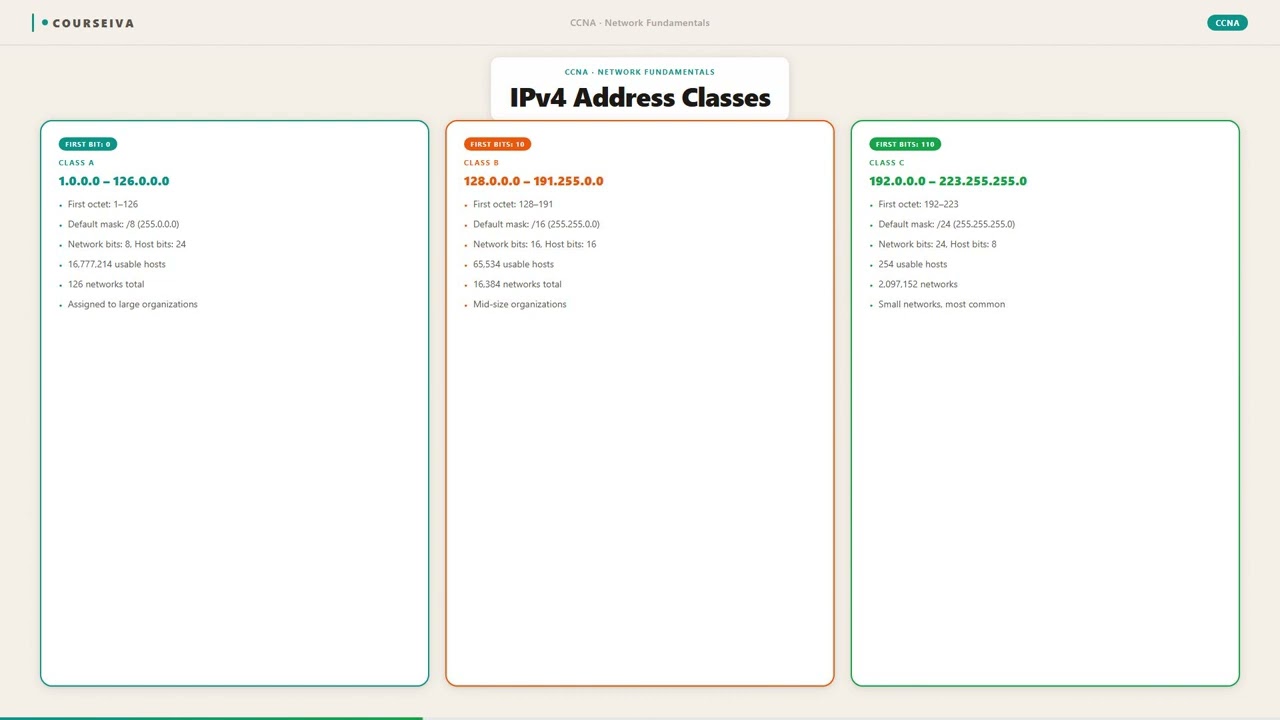
When IPv4 was first designed, the Internet was much smaller. To simplify routing, the address space was divided into five classes (A, B, C, D, E) based on the first few bits of the address. Classes A, B, and C were for unicast (one-to-one) communication. Class D was for multicast, and Class E was reserved for experimental use. The class determined the default subnet mask and the size of the network and host portions.
Class A: First bit is 0. Range: 1.0.0.0 to 126.0.0.0 (127 is reserved for loopback). Default mask: 255.0.0.0 (/8). Network portion: first octet. Host portion: last three octets (16,777,214 hosts per network).
Class B: First two bits are 10. Range: 128.0.0.0 to 191.255.0.0. Default mask: 255.255.0.0 (/16). Network portion: first two octets. Host portion: last two octets (65,534 hosts per network).
Class C: First three bits are 110. Range: 192.0.0.0 to 223.255.255.0. Default mask: 255.255.255.0 (/24). Network portion: first three octets. Host portion: last octet (254 hosts per network).
Class D: First four bits are 1110. Range: 224.0.0.0 to 239.255.255.255. Used for multicast groups.
Class E: First four bits are 1111. Range: 240.0.0.0 to 255.255.255.255. Reserved for experimental use.
How Classful Addressing Works (Step by Step)
When a router receives an IPv4 packet, it looks at the destination IP address. In classful routing (used by protocols like RIP version 1), the router determines the class by examining the first few bits: 1. If the first bit is 0, it's Class A. The network is the first octet; the router uses the default mask /8. 2. If the first two bits are 10, it's Class B. The network is the first two octets; the router uses /16. 3. If the first three bits are 110, it's Class C. The network is the first three octets; the router uses /24. 4. The router then looks up the network portion in its routing table and forwards the packet accordingly.
This automatic determination of the subnet mask means that classful networks cannot be subnetted without breaking the classful routing protocol. That's why modern networks use Classless Inter-Domain Routing (CIDR), where the subnet mask is explicitly specified.
Reserved and Special Addresses
Within each class, certain addresses are reserved: - Network Address: The address where all host bits are 0 (e.g., 192.168.1.0). This identifies the network itself and cannot be assigned to a device. - Broadcast Address: The address where all host bits are 1 (e.g., 192.168.1.255). Packets sent to this address are delivered to all devices on that network. - Loopback Address: 127.0.0.1 (Class A network 127). Used for testing the local host. - Private IP Addresses: Defined in RFC 1918, these are not routable on the public internet. They are used within private networks:
- Class A: 10.0.0.0/8 - Class B: 172.16.0.0/12 - Class C: 192.168.0.0/16 - APIPA (Automatic Private IP Addressing): 169.254.0.0/16. Assigned automatically when a device cannot reach a DHCP server.
Verification Commands on Cisco IOS
To see IP addresses configured on interfaces:
Router# show ip interface brief
Interface              IP-Address      OK? Method Status                Protocol
GigabitEthernet0/0     192.168.1.1     YES manual up                    up
GigabitEthernet0/1     10.0.0.1        YES manual up                    up
To see detailed information including the subnet mask:
Router# show interfaces GigabitEthernet0/0
GigabitEthernet0/0 is up, line protocol is up
  Internet address is 192.168.1.1/24
  ...
To check the routing table (classful vs classless behavior):
Router# show ip route
Codes: C - connected, S - static, ...
     10.0.0.0/8 is variably subnetted, 2 subnets, 2 masks
C       10.0.0.0/16 is directly connected, GigabitEthernet0/1
C       10.1.0.0/24 is directly connected, GigabitEthernet0/2
Interaction with Related Protocols
ARP: Uses IP addresses to resolve MAC addresses. The host portion of the IP address is used to identify the target device on the local network.
DHCP: Assigns IP addresses dynamically. The server must know the subnet mask to assign a valid address.
DNS: Maps hostnames to IP addresses. The class of the IP address is irrelevant to DNS.
RIP v1: A classful routing protocol that does not send subnet masks in updates. This forces all subnets of a major network to use the same mask.
OSPF and EIGRP: Classless routing protocols that include subnet mask information, allowing VLSM (Variable Length Subnet Masking).
Walk-Through
Determine the address class
Look at the first octet of the IP address in decimal. If it's between 1 and 126, it's Class A. If between 128 and 191, it's Class B. If between 192 and 223, it's Class C. If between 224 and 239, it's Class D (multicast). If between 240 and 255, it's Class E (reserved). Note that 127.0.0.0/8 is loopback, not a usable Class A network. Also, 0.0.0.0/8 is reserved for 'this network'. For example, 10.0.0.1 is Class A; 172.16.0.1 is Class B; 192.168.1.1 is Class C.
Identify default subnet mask
Based on the class, assign the default subnet mask: Class A: 255.0.0.0 (/8); Class B: 255.255.0.0 (/16); Class C: 255.255.255.0 (/24). For Class D and E, subnet masks are not defined because they are not used for unicast. The default mask defines the boundary between network and host portions. For example, a Class B address like 172.16.0.1 has default mask 255.255.0.0, meaning the first two octets are network, last two are host.
Find network address
To find the network address, take the IP address and perform a bitwise AND with the subnet mask. For a Class C address 192.168.1.55 with mask 255.255.255.0, the network address is 192.168.1.0. For a Class B address 172.16.5.10 with mask 255.255.0.0, the network address is 172.16.0.0. The network address is the first address in the range and cannot be assigned to a host.
Calculate broadcast address
The broadcast address is the last address in the network range. For a Class C network with mask 255.255.255.0, the broadcast address is the network address with all host bits set to 1. For 192.168.1.0/24, that's 192.168.1.255. For a Class B network 172.16.0.0/16, the broadcast is 172.16.255.255. The broadcast address is used to send packets to all hosts on the network.
Determine usable host range
The usable host addresses are all addresses between the network address and the broadcast address. For a Class C network 192.168.1.0/24, usable addresses are 192.168.1.1 to 192.168.1.254. That's 254 hosts. For a Class B network 172.16.0.0/16, usable addresses are 172.16.0.1 to 172.16.255.254, which is 65,534 hosts. The formula is 2^(number of host bits) - 2. The minus 2 accounts for network and broadcast addresses.
Classify private vs public
Check if the address falls into one of the private ranges: 10.0.0.0/8, 172.16.0.0/12 (172.16.0.0 to 172.31.255.255), or 192.168.0.0/16. If yes, it's a private address and cannot be routed on the public internet. Otherwise, it's a public address (unless it's reserved like 127.0.0.0/8 or 169.254.0.0/16). For example, 10.0.0.1 is private; 8.8.8.8 is public.
What This Looks Like on the Job
In enterprise networks, understanding IP address classes is crucial for network design, especially when integrating legacy systems. For example, a company might have acquired a Class B address 172.16.0.0/16 years ago. They have multiple departments, each needing separate subnets. Using VLSM, they can subnet this Class B into smaller subnets like /24 for each department, allowing efficient use of addresses. Without understanding the classful boundary, an engineer might mistakenly think they are limited to a single flat network.
Another scenario is when dealing with routing protocols. A network engineer might encounter a legacy router running RIP version 1, which is classful. If they configure subnets with different masks (e.g., 172.16.1.0/24 and 172.16.2.0/25), RIP v1 will not advertise the subnet mask, causing routing issues. The engineer must either use a classless protocol like RIP v2 or OSPF, or ensure all subnets of the same major network have the same mask.
Common scale considerations: In large enterprises, using private IP addresses (RFC 1918) with NAT is standard. A network engineer must know which addresses are private to design internal networks and configure NAT. Misconfiguration can lead to IP conflicts or inability to access the internet. For instance, using a public IP address internally without proper planning can cause routing problems.
Performance: The classful system itself doesn't affect performance, but inefficient addressing can lead to larger routing tables. CIDR and summarization help reduce table size. An engineer should be able to identify classful boundaries to perform route summarization effectively. For example, summarizing 10.1.0.0/24 and 10.1.1.0/24 into 10.1.0.0/23 requires understanding that these are Class A addresses with a custom mask.
How CCNA 200-301 Actually Tests This
The CCNA 200-301 exam tests your ability to work with IPv4 addresses, including determining the class, network address, broadcast address, and usable host range. Exam objective 1.6 specifically covers 'Configure and verify IPv4 addressing and subnetting'. Expect questions that require you to identify the class of an address, calculate the number of hosts, or recognize private vs public addresses.
Common wrong answers and why candidates choose them: 1. Confusing Class A range with 0-127: Many think Class A starts at 0.0.0.0, but 0.0.0.0/8 is reserved for 'this network', and 127.0.0.0/8 is loopback. The actual Class A range is 1-126. 2. Assuming 255.255.255.255 is a broadcast for Class C: The all-ones address (255.255.255.255) is a limited broadcast for the local network, not a specific network broadcast. The directed broadcast for a Class C network is x.x.x.255. 3. Miscounting usable hosts: Candidates often forget to subtract 2 for network and broadcast addresses. For a /24, they might say 256 instead of 254. 4. Misidentifying private ranges: The 172.16.0.0/12 range is often mistaken as 172.16.0.0/16. The actual private range includes 172.16.0.0 through 172.31.255.255.
Calculation traps: On the exam, you may be given an IP and mask and asked for the network address. A common trap is to assume the default class mask even when a non-default mask is given. Always use the given mask, not the classful default.
Decision rule: When asked 'Which of the following is a valid host address?', first eliminate network and broadcast addresses. Then ensure it's not a reserved address (loopback, multicast, experimental). Finally, check if it's within the correct range. For example, 192.168.1.0 is a network address, so invalid; 192.168.1.255 is broadcast; 224.0.0.1 is multicast; 127.0.0.1 is loopback. The remaining are valid hosts.
Key Takeaways
IPv4 addresses are 32 bits, written in dotted decimal (4 octets).
Class A: 1-126, default mask /8 (255.0.0.0), 16,777,214 hosts.
Class B: 128-191, default mask /16 (255.255.0.0), 65,534 hosts.
Class C: 192-223, default mask /24 (255.255.255.0), 254 hosts.
Class D: 224-239, multicast; Class E: 240-255, reserved.
Private IP ranges: 10.0.0.0/8, 172.16.0.0/12, 192.168.0.0/16.
Network address: all host bits 0; Broadcast: all host bits 1.
Usable hosts = 2^(32 - prefix length) - 2.
Easy to Mix Up
These come up on the exam all the time. Here's how to tell them apart.
Classful Addressing
Uses fixed default subnet masks based on class.
RIP v1 is classful; does not send mask in updates.
Wastes addresses due to rigid boundaries.
Network portion determined by first few bits.
No support for VLSM (variable-length subnet masks).
Classless Addressing (CIDR)
Uses any prefix length (e.g., /23, /27).
RIP v2, OSPF, EIGRP are classless; include mask.
Efficient use of address space via subnetting.
Subnet mask is explicitly provided.
Supports VLSM and route summarization.
Watch Out for These
Mistake
Class A includes 127.0.0.0/8 as a usable network.
Correct
127.0.0.0/8 is reserved for loopback addresses (e.g., 127.0.0.1). It is not a Class A network usable for hosts.
Candidates see 127 is between 1 and 126? No, 127 is not in the Class A range (1-126). This error often comes from misremembering the range boundaries.
Mistake
The default subnet mask for Class B is 255.255.255.0.
Correct
Class B default mask is 255.255.0.0 (/16). The mask 255.255.255.0 is the default for Class C.
Candidates confuse the number of octets in the network portion. Class B uses two octets, not three.
Mistake
Private IP addresses can be routed on the public internet.
Correct
Private IP addresses (RFC 1918) are not routable on the public internet. Routers are configured to drop packets with private source or destination addresses.
Some think private means 'hidden but reachable'. In reality, ISPs filter private addresses at their borders.
Mistake
The broadcast address for a /24 network is 255.255.255.255.
Correct
The directed broadcast for a /24 network is the network's last address, e.g., 192.168.1.255. 255.255.255.255 is a limited broadcast for the local network only.
Candidates confuse the all-ones address with the network-specific broadcast. The limited broadcast is 255.255.255.255, but it is not forwarded by routers.
Do You Actually Know This?
Reveal each answer, then mark whether you got it right. Score 60%+ to unlock the next chapter.
Frequently Asked Questions
What is the difference between a network address and a broadcast address?
The network address is the first address in a subnet, with all host bits set to 0. It identifies the network itself and cannot be assigned to a host. The broadcast address is the last address, with all host bits set to 1. Packets sent to the broadcast address are delivered to all hosts on that network. Both are reserved and cannot be used as host IPs. For example, in 192.168.1.0/24, 192.168.1.0 is the network address and 192.168.1.255 is the broadcast address. Exam tip: When asked for a valid host, eliminate these two first.
How do I determine the class of an IP address quickly?
Look at the first octet in decimal. If it's 1-126, it's Class A. 128-191 is Class B. 192-223 is Class C. 224-239 is Class D (multicast). 240-255 is Class E (reserved). Remember that 127 is loopback and not a class. A mnemonic: 'A is 1-126, B is 128-191, C is 192-223'. The gaps (0, 127) are special. Also, 0.0.0.0/8 is reserved for 'this network' and 127.0.0.0/8 for loopback. Exam tip: They may ask 'Which class does 10.0.0.1 belong to?' Answer: Class A.
What are private IP addresses and why are they used?
Private IP addresses are defined in RFC 1918 and are not routable on the public internet. They are used within private networks (home, office, enterprise) to conserve public IP addresses. The ranges are: 10.0.0.0/8 (Class A), 172.16.0.0/12 (Class B, but actually 172.16.0.0 to 172.31.255.255), and 192.168.0.0/16 (Class C). Devices with private addresses communicate with the internet via Network Address Translation (NAT), which maps private addresses to a public IP. Exam tip: Know these ranges precisely. A common trap is the 172.16.0.0/12 range; many think it's /16.
Can I use 0.0.0.0 as a host IP address?
No. 0.0.0.0/8 is reserved for 'this network' and is used as a source address when a device is booting and does not yet know its IP. It is also used in routing tables as a default route (0.0.0.0/0). As a host address, it is invalid. Similarly, 255.255.255.255 is a limited broadcast address and cannot be assigned to a host. Exam tip: If you see 0.0.0.0 as an option for a host IP, it's wrong.
How many hosts can I have on a Class C network?
A Class C network has a default mask of /24, meaning 8 host bits. The number of usable hosts is 2^8 - 2 = 254. The minus 2 accounts for the network address (all zeros) and the broadcast address (all ones). So the valid host range is from .1 to .254. Exam tip: They may ask 'How many addresses are wasted?' The answer is 2 (network and broadcast).
What is the loopback address and why is it important?
The loopback address is 127.0.0.1 (and the entire 127.0.0.0/8 network). It is used to test the local host's TCP/IP stack. When you ping 127.0.0.1, the packet is looped back internally without leaving the network interface. It confirms that IP is installed and working. On Cisco routers, the loopback interface (e.g., interface loopback0) is a virtual interface used for management or as a router ID. Exam tip: Remember that 127.0.0.0/8 is not a Class A network; it's reserved for loopback.
How does subnetting relate to address classes?
Subnetting borrows host bits from the default classful mask to create smaller subnetworks. For example, a Class C network 192.168.1.0/24 can be subnetted into 4 /26 subnets (each with 62 hosts). Subnetting allows more efficient use of addresses. However, classful routing protocols (RIP v1) do not support subnetting with different masks (VLSM). Modern classless protocols (OSPF, EIGRP) do. Exam tip: You may be asked to subnet a Class B or C address. Always use the given mask, not the default.
Terms Worth Knowing
Ready to put this to the test?
You've just covered IPv4 Addressing and Address Classes — now see how well it sticks with free CCNA 200-301 practice questions. Full explanations included, no account needed.
Done with this chapter?