TCP/IP Model vs OSI
If you've ever wondered why your network data doesn't just get lost in the void, you need to understand the models that make it all work. The OSI and TCP/IP models are the blueprints for how data travels across networks, and the CCNA 200-301 exam (Objective 1.1) expects you to know them cold. These models aren't just academic—they provide the common language that network engineers use to troubleshoot and design networks. Master this chapter, and you'll never look at a packet the same way again.
Jump to a section
A simple way to picture TCP/IP Model vs OSI
The Postal Service Analogy
A handwritten letter from New York to a friend in London, sealed in its envelope. You write the letter, put it in an envelope, write the recipient's address, add a stamp, and drop it in a mailbox. This process mirrors the OSI model's layers. At the Application layer (you), you write the message. The Presentation layer (your choice of language and formatting) ensures your friend can read it—maybe you use English and write neatly. The Session layer (the act of mailing) manages the conversation: you decide to send one letter now, another later. The Transport layer (the postal service's registered mail option) ensures reliability: you might request a return receipt. The Network layer (the postal sorting system) figures out the route: the letter goes from New York to a regional hub, then to an international hub, then to London. The Data Link layer (the individual trucks and planes) moves the letter between stops, each leg having its own tracking number. Finally, the Physical layer (the actual truck, plane, or mail carrier) transports the physical letter. On the receiving end, the layers work in reverse: the mail carrier delivers to the address (Physical), the local post office verifies the route (Data Link), the international sorting center checks the destination country (Network), the registered mail service confirms delivery (Transport), your friend opens the envelope (Session), reads the English text (Presentation), and understands your message (Application). Each layer only talks to its peer layer on the other end—your Transport layer (return receipt) only cares about the destination's Transport layer, not the trucks. This separation of concerns is exactly why the OSI model is so powerful.
How It Actually Works
What Are the OSI and TCP/IP Models?
The Open Systems Interconnection (OSI) model is a conceptual framework developed by the International Organization for Standardization (ISO) in 1984. It defines seven layers that describe how data flows from one application on one device to another application on a different device. The TCP/IP model, also known as the Internet protocol suite, is a more practical model based on the protocols used on the internet. It has four layers (or five, depending on who you ask). Cisco's CCNA 200-301 exam tests both models, but focuses heavily on the TCP/IP model because it maps directly to real-world protocols.
Why Two Models?
The OSI model is a teaching tool and a reference. It helps engineers think about networking in a modular way. The TCP/IP model is what actually runs on networks. Think of OSI as the blueprint and TCP/IP as the construction. On the exam, you need to know both, but you'll be quizzed more on TCP/IP layers and their functions.
The Seven Layers of the OSI Model
Layer 7 – Application: This is where user applications (web browsers, email clients) interact with the network. It provides network services to applications. Examples: HTTP, FTP, SMTP.
Layer 6 – Presentation: Handles data formatting, encryption, and compression. It ensures that data from the application layer is in a format the receiving device can understand. Examples: SSL/TLS, JPEG, ASCII.
Layer 5 – Session: Manages sessions between applications. It establishes, maintains, and terminates connections. Examples: NetBIOS, RPC.
Layer 4 – Transport: Provides end-to-end communication, error recovery, and flow control. This layer segments data and ensures reliable or unreliable delivery. Examples: TCP, UDP.
Layer 3 – Network: Handles logical addressing (IP addresses) and routing. It determines the best path to the destination. Examples: IP, ICMP, OSPF.
Layer 2 – Data Link: Provides node-to-node data transfer and error detection. It packages data into frames and uses MAC addresses. Examples: Ethernet, PPP.
Layer 1 – Physical: Transmits raw bit streams over physical media. Defines cables, connectors, and signal levels. Examples: Cat6 cable, fiber optics.
The Four Layers of the TCP/IP Model
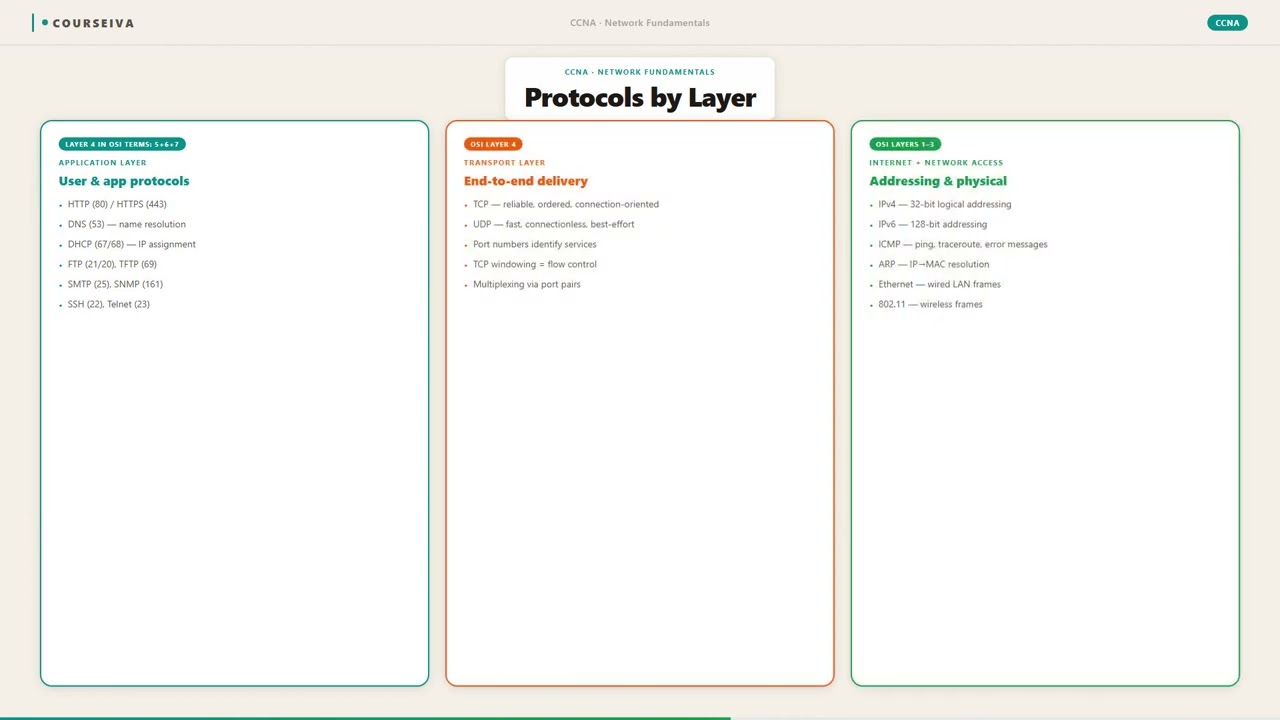
Application Layer: Combines OSI Layers 5-7 (Application, Presentation, Session). Protocols: HTTP, HTTPS, FTP, DNS, DHCP.
Transport Layer: Same as OSI Layer 4. Protocols: TCP, UDP.
Internet Layer: Same as OSI Layer 3. Protocols: IP, ICMP, ARP (though ARP is sometimes considered Layer 2).
Network Access Layer: Combines OSI Layers 1 and 2 (Physical and Data Link). Includes Ethernet, Wi-Fi, and PPP.
Some textbooks split the TCP/IP model into five layers by separating the Physical and Data Link layers, but the CCNA exam uses the four-layer model. Be aware of both.
How Data Moves: Encapsulation and De-encapsulation
When a host sends data, each layer adds its own header (and sometimes trailer) to the data from the layer above. This is called encapsulation. For example, a web request:
Application layer creates HTTP data.
Transport layer adds a TCP header (source/destination port, sequence number). Now it's a segment.
Internet layer adds an IP header (source/destination IP address). Now it's a packet.
Network Access layer adds an Ethernet header (source/destination MAC address) and a trailer (FCS). Now it's a frame.
The frame is converted to bits and sent over the wire. The receiving device reverses the process (de-encapsulation) at each layer.
Key Differences Between the Models
Number of layers: OSI has 7, TCP/IP has 4.
Development: OSI was developed first as a theoretical model; TCP/IP was developed later by the US Department of Defense and became the de facto standard.
Protocol specificity: OSI is protocol-agnostic; TCP/IP is tightly coupled with its protocols.
Layer functions: OSI separates Presentation and Session layers; TCP/IP combines them into Application.
Reliability: OSI's Transport layer handles reliability; TCP/IP's Transport layer does too, but it's optional (UDP vs TCP).
Mnemonics for Remembering the OSI Layers
Top to Bottom: All People Seem To Need Data Processing (Application, Presentation, Session, Transport, Network, Data Link, Physical)
Bottom to Top: Please Do Not Throw Sausage Pizza Away (Physical, Data Link, Network, Transport, Session, Presentation, Application)
Exam Focus: What to Know
The CCNA 200-301 exam expects you to:
Identify which layer a given protocol or device operates at.
Understand the encapsulation process.
Compare and contrast OSI and TCP/IP models.
Know the PDU (Protocol Data Unit) names at each layer: Data (L5-7), Segment (L4), Packet (L3), Frame (L2), Bits (L1).
Verification Commands
While there are no direct IOS commands to show the OSI model, you can use the following to see protocol layering:
show ip interface brief – shows IP addresses (Layer 3).
show mac address-table – shows MAC addresses (Layer 2).
show interfaces – shows physical and data link status (Layers 1 and 2).
show protocols – shows Layer 3 protocol status.
Example output of show interfaces:
GigabitEthernet0/0 is up, line protocol is up
  Hardware is CN Gigabit Ethernet, address is 0011.2233.4455 (bia 0011.2233.4455)
  Internet address is 192.168.1.1/24
  MTU 1500 bytes, BW 1000000 Kbit/sec, DLY 10 usec,
     reliability 255/255, txload 1/255, rxload 1/255
The "line protocol is up" indicates Layer 2 is working; the IP address indicates Layer 3.
Interaction with Related Protocols
ARP (Address Resolution Protocol): Operates between Layer 2 and Layer 3. It maps IP addresses to MAC addresses.
ICMP (Internet Control Message Protocol): Operates at Layer 3, used for diagnostics (ping, traceroute).
DNS (Domain Name System): Application layer protocol that resolves domain names to IP addresses.
Understanding layering helps you troubleshoot: if ping fails, you check Layer 3 (IP connectivity), then Layer 2 (MAC addressing), then Layer 1 (cables).
Walk-Through
Identify the Layers
Start by memorizing the seven layers of the OSI model and the four layers of the TCP/IP model. Use mnemonics: 'All People Seem To Need Data Processing' for OSI top-down, and 'Please Do Not Throw Sausage Pizza Away' for bottom-up. For TCP/IP, remember: Application, Transport, Internet, Network Access. On the exam, you'll often be given a protocol or device and asked which layer it belongs to. For example, a router operates at Layer 3 (Network), a switch at Layer 2 (Data Link), and a hub at Layer 1 (Physical).
Understand Encapsulation Flow
Trace the path of data from a web browser to the wire. At the Application layer, the browser generates an HTTP GET request. The Transport layer (TCP) adds a header with source port 49152 and destination port 80, creating a segment. The Network layer (IP) adds a header with source IP 192.168.1.10 and destination IP 203.0.113.5, creating a packet. The Data Link layer (Ethernet) adds a header with source MAC 0011.2233.4455 and destination MAC (default gateway's MAC), plus a trailer for error checking, creating a frame. The Physical layer converts the frame to bits and sends them. On the receiving end, each layer strips its header and passes the data up.
Learn PDU Names
Each layer has a specific name for its data unit. At Layers 5-7 (Application, Presentation, Session), the PDU is simply called 'data'. At Layer 4 (Transport), it's a 'segment' (TCP) or 'datagram' (UDP). At Layer 3 (Network), it's a 'packet'. At Layer 2 (Data Link), it's a 'frame'. At Layer 1 (Physical), it's 'bits'. The exam loves to ask: 'What is the PDU at the Transport layer?' Answer: Segment. Or: 'A frame is associated with which layer?' Answer: Data Link.
Compare OSI and TCP/IP
Create a side-by-side list. OSI has seven layers; TCP/IP has four. OSI separates Presentation and Session; TCP/IP combines them into Application. OSI's Network layer maps to TCP/IP's Internet layer. OSI's Data Link and Physical map to TCP/IP's Network Access layer. Both have a Transport layer, but TCP/IP's Transport includes both TCP and UDP. OSI is theoretical; TCP/IP is practical. The exam may ask: 'Which model is used on the internet?' Answer: TCP/IP. Or: 'Which layer of the OSI model does TCP/IP's Internet layer correspond to?' Answer: Network layer (Layer 3).
Associate Protocols with Layers
Memorize common protocols and their OSI/TCP/IP layers. HTTP, HTTPS, FTP, SMTP, DNS are Application layer (L5-7 OSI, Application TCP/IP). TCP and UDP are Transport (L4). IP, ICMP, OSPF, EIGRP are Network (L3). Ethernet, PPP, ARP (sometimes) are Data Link (L2). Wi-Fi (802.11) is also L2. Cables, connectors, repeaters, hubs are Physical (L1). A typical exam question: 'At which OSI layer does IP operate?' Answer: Layer 3. Or: 'Which protocol operates at the Transport layer and provides reliable delivery?' Answer: TCP.
Use IOS Commands to Verify Layers
Although IOS doesn't have a 'show osi' command, you can verify layer functionality. Use `show ip interface brief` to see IP addresses (Layer 3). Use `show mac address-table` to see MAC addresses (Layer 2). Use `show interfaces` to see physical and data link status (Layers 1 and 2). For example, if `show interfaces gigabitethernet0/0` shows 'line protocol is down', the problem is at Layer 2. If it shows 'GigabitEthernet0/0 is down', it's Layer 1. This is critical for troubleshooting scenarios.
What This Looks Like on the Job
In a real enterprise network, understanding the OSI and TCP/IP models is essential for troubleshooting. Consider a scenario where users in a branch office cannot access a web server in the data center. A network engineer starts at Layer 1: check the physical cables and interface status. Using show interfaces, they see that the link is up. Moving to Layer 2, they check the switch's MAC address table with show mac address-table to ensure the server's MAC is learned on the correct port. They also verify VLAN configuration. At Layer 3, they use ping and traceroute to test IP connectivity. If ping fails, they check routing tables with show ip route. They might use show ip arp to verify ARP resolution. At Layer 4, they use telnet or a port scanner to test if the destination port is open. Finally, at Layer 7, they check the web server logs. This layered approach isolates the problem quickly.
Another scenario: deploying a new VoIP system. The network team must ensure QoS (Quality of Service) markings are preserved across layers. VoIP traffic uses RTP (Real-time Transport Protocol) at the Application layer, UDP at Transport, IP at Network, and Ethernet at Data Link. The team configures trust boundaries on switches to honor the DSCP values in the IP header (Layer 3). They also set CoS (Class of Service) at Layer 2. Misconfiguration at any layer can cause voice quality issues.
A common pitfall is forgetting that a firewall operates at multiple layers. A stateful firewall inspects Layers 3 and 4, while an application firewall inspects Layer 7. If you block HTTP at Layer 7 but allow it at Layer 4, the firewall might still drop the traffic because it sees the application data. Understanding layering helps avoid such conflicts.
Scale considerations: In large networks, encapsulation overhead matters. Each layer adds headers (e.g., TCP: 20 bytes, IP: 20 bytes, Ethernet: 18 bytes). For high-throughput links, this overhead can reduce effective bandwidth. Engineers must calculate the maximum segment size (MSS) to avoid fragmentation. This is a real-world application of layering knowledge.
How CCNA 200-301 Actually Tests This
The CCNA 200-301 exam objective 1.1 explicitly states: 'Compare and contrast OSI and TCP/IP models.' This is a foundational topic that appears in multiple-choice and drag-and-drop questions. You need to know:
The exact number of layers in each model.
The names and order of layers.
Which protocols operate at which layers.
The PDU names.
The encapsulation process.
Common wrong answers and why candidates choose them:
Confusing OSI and TCP/IP layer counts. Many candidates think TCP/IP has five layers (because some textbooks split Network Access into Data Link and Physical). The exam uses four layers. Stick with the Cisco official four-layer model.
Mixing up PDU names. Candidates often say 'packet' for the Transport layer. Remember: Transport = segment, Network = packet.
Assigning the wrong layer to a protocol. For example, saying ARP is a Layer 3 protocol (it's actually Layer 2 or between L2 and L3). Or saying OSPF is Transport (it's Network).
Thinking the OSI model is used in real networks. It's not; it's a reference model. The TCP/IP model is the practical one.
Specific values and commands:
Know that TCP header is 20-60 bytes, IP header is 20-60 bytes, Ethernet header is 14 bytes, trailer is 4 bytes.
The default Ethernet MTU is 1500 bytes.
show interfaces output includes 'MTU 1500 bytes' – a common exam detail.
Calculation traps: None directly, but be ready to calculate overhead. For example, if you have a 1500-byte IP packet and Ethernet adds 18 bytes, the frame size is 1518 bytes.
Decision rule for scenario questions: When asked which layer a problem is at, use the following: If you can't ping (Layer 3), check IP configuration. If you can ping but not connect to a specific port (Layer 4), check firewall rules. If you can connect but the application doesn't work (Layer 7), check application settings. This layered troubleshooting approach is a surefire way to eliminate wrong answers.
Key Takeaways
OSI has 7 layers: Application, Presentation, Session, Transport, Network, Data Link, Physical.
TCP/IP has 4 layers: Application, Transport, Internet, Network Access.
PDU names: Data (L5-7), Segment (L4), Packet (L3), Frame (L2), Bits (L1).
Common protocols: HTTP (L7), TCP (L4), IP (L3), Ethernet (L2).
Encapsulation adds headers at each layer; de-encapsulation removes them.
Use `show interfaces` to verify Layers 1 and 2; `show ip interface brief` for Layer 3.
The OSI model is a reference; TCP/IP is the practical model used on the internet.
Easy to Mix Up
These come up on the exam all the time. Here's how to tell them apart.
OSI Model
7 layers: Application, Presentation, Session, Transport, Network, Data Link, Physical
Developed by ISO as a theoretical model
Protocol-agnostic; can describe any protocol suite
Less practical; used mainly for teaching
PDU names vary by layer (data, segment, packet, frame, bits)
TCP/IP Model
4 layers: Application, Transport, Internet, Network Access
Developed by US DoD for practical use on ARPANET/internet
Tied to specific protocols (TCP, IP, etc.)
The model used in real-world networking
Same PDU names as OSI for matching layers
Watch Out for These
Mistake
The TCP/IP model has five layers.
Correct
The official Cisco CCNA TCP/IP model has four layers: Application, Transport, Internet, Network Access. Some alternative models split Network Access into Data Link and Physical, but the exam uses four.
Candidates often see five-layer models in other resources and get confused.
Mistake
ARP operates at Layer 3 (Network).
Correct
ARP is a protocol that maps IP addresses to MAC addresses. It is encapsulated directly in Ethernet frames (L2) and is often considered a Layer 2 protocol or a bridge between L2 and L3.
Because ARP uses IP addresses, candidates think it's Layer 3, but it doesn't have an IP header.
Mistake
The Presentation layer handles encryption and compression in the TCP/IP model.
Correct
In the TCP/IP model, encryption and compression are handled at the Application layer, not a separate Presentation layer. The TCP/IP model does not have a distinct Presentation layer.
Candidates transfer OSI knowledge directly to TCP/IP without realizing the layers are combined.
Mistake
A router operates at Layer 2.
Correct
A router operates at Layer 3 (Network) because it makes forwarding decisions based on IP addresses. Switches operate at Layer 2 (Data Link) using MAC addresses.
Some candidates confuse routers with switches, especially when both have multiple ports.
Do You Actually Know This?
Reveal each answer, then mark whether you got it right. Score 60%+ to unlock the next chapter.
Frequently Asked Questions
Why does the OSI model have 7 layers while TCP/IP has only 4?
The OSI model was designed as a comprehensive, vendor-neutral reference framework. It separates functions into distinct layers for clarity, such as separating Presentation (data formatting) and Session (dialog control). The TCP/IP model was developed pragmatically based on existing protocols. It combines these into a single Application layer because, in practice, the functions are often implemented together. The CCNA exam expects you to know both models and their differences.
Do I need to memorize all seven layers of the OSI model for the CCNA?
Yes. The exam objective 1.1 explicitly requires you to compare and contrast OSI and TCP/IP models. You must know the names and order of the seven OSI layers, their functions, and example protocols. Use mnemonics to help. You also need to know the four TCP/IP layers and how they map to OSI layers.
What is the difference between a segment and a packet?
A segment is the PDU at the Transport layer (Layer 4). It includes a TCP or UDP header and the data from the upper layers. A packet is the PDU at the Network layer (Layer 3). It includes an IP header and the segment (or datagram) from the Transport layer. In encapsulation, the segment is encapsulated into a packet.
At which layer does a firewall operate?
It depends on the type of firewall. A basic packet-filtering firewall operates at Layer 3 and Layer 4, inspecting IP addresses and port numbers. A stateful firewall also tracks sessions at Layer 4 and can inspect application data at Layer 7 (Application layer). Next-generation firewalls (NGFWs) often perform deep packet inspection (DPI) at Layer 7.
How does encapsulation help with troubleshooting?
Encapsulation allows each layer to focus on its own function. When troubleshooting, you can isolate the problem to a specific layer. For example, if a ping fails, you check Layer 3 (IP connectivity). If ping works but a web page doesn't load, you check Layer 4 (port access) and Layer 7 (application). This layered approach saves time.
What is the purpose of the Data Link layer?
The Data Link layer (Layer 2) provides node-to-node data transfer and error detection. It packages data into frames, adds source and destination MAC addresses, and includes a trailer for error checking (FCS). It also manages access to the physical medium (e.g., CSMA/CD in Ethernet). It ensures reliable delivery across a single link.
Why is the TCP/IP model considered more practical than the OSI model?
The TCP/IP model was developed alongside the protocols that actually run the internet. It is simpler (fewer layers) and directly maps to real-world implementations. The OSI model, while excellent for teaching, was never fully implemented because it was too complex and came after TCP/IP was already dominant. The CCNA focuses on TCP/IP because it is what network engineers use daily.
Terms Worth Knowing
Ready to put this to the test?
You've just covered TCP/IP Model vs OSI — now see how well it sticks with free CCNA 200-301 practice questions. Full explanations included, no account needed.
Done with this chapter?