What Is Native VLAN in Networking?
This page mentions older exam versions. See the Current Exam Context and Legacy Exam Context sections below for the updated mapping.
On This Page
What do you want to do?
Quick Definition
A native VLAN is a special VLAN on a trunk link that handles traffic which does not have a VLAN tag. It is typically VLAN 1 by default on most switches. This allows older devices that do not support VLAN tagging to still communicate over a trunk link.
Common Commands & Configuration
switchport trunk native vlan 999Sets the Native VLAN on a trunk port to VLAN 999, which should be an unused VLAN for security purposes.
This command is frequently tested to show secure trunk configuration. Changing from default VLAN 1 is a best practice, and you may be asked to identify which command prevents VLAN hopping.
switchport trunk native vlan tagEnables tagging of the Native VLAN so that even untagged frames are sent with an 802.1Q tag on the trunk.
This newer Cisco feature is tested in advanced CCNA and CCNP exams. It effectively eliminates the untagged path, enhancing security against double-tagging attacks.
show interfaces trunkDisplays trunk ports, allowed VLANs, and the Native VLAN for each trunk interface.
This is the primary command to diagnose a Native VLAN mismatch. Exam questions often provide its output and ask you to identify the mismatch.
show interfaces GigabitEthernet0/1 switchportShows detailed switchport configuration including Native VLAN, operational mode, and trunking status.
Useful for verifying the current Native VLAN setting on a specific port. Exams may test your ability to read this output to find misconfigurations.
show cdp neighbors GigabitEthernet0/2 detailDisplays CDP neighbor details, including any Native VLAN mismatch warnings.
CDP mismatch messages are direct exam clues. If you see a mismatch here, it is often the root cause of connectivity problems.
switchport nonegotiateDisables DTP on a port to prevent trunk negotiation, ensuring the port stays in access mode.
This command is essential for security. Exam questions on VLAN hopping prevention often list this as a required step.
no switchport trunk native vlanResets the Native VLAN on a trunk port back to the default (VLAN 1).
Sometimes used to troubleshoot a mismatch or revert changes. Be aware that defaulting to VLAN 1 is insecure.
Native VLAN appears directly in 56exam-style practice questions in Courseiva's question bank — one of the most-tested concepts on CompTIA Security+. Practise them →
Must Know for Exams
The native VLAN is a heavily tested concept in the CCNA (200-301) exam under the topic of VLANs and trunking. In the CCNA, candidates must know the default native VLAN, how to change it, and why it is a security risk. Exam questions often present a scenario where two switches are not communicating over a trunk, and the candidate must troubleshoot a native VLAN mismatch. The CCNA also tests the concept of VLAN hopping and the role of the native VLAN in that attack.
In the CompTIA Network+ (N10-008) exam, the native VLAN appears under Network Implementation, specifically in the context of configuring and troubleshooting VLANs. Network+ questions might ask about the purpose of the native VLAN or how to prevent unauthorized access. It is also relevant to the Security+ (SY0-601) exam, where VLAN hopping and native VLAN misconfiguration are part of network security best practices.
The AWS Solutions Architect Associate (SAA-C03) and Google ACE exams touch on native VLANs only lightly, as part of understanding on-premises networking when connecting to cloud environments via VPN or Direct Connect. However, the AZ-104 (Azure Administrator) exam may reference the native VLAN in the context of Azure ExpressRoute or site-to-site VPN configurations where on-premises switches must be properly configured.
Regardless of the exam, the native VLAN is a classic gotcha topic. Many learners memorize that the native VLAN is VLAN 1, but they fail to remember that it should be changed for security. This is a common trap. Exam questions might show a network where the native VLAN is left as default, and then ask what is the most likely security issue. Or they might show two switches with different native VLANs and ask why the trunk is not working. Understanding the native VLAN is a high-value concept for passing network-focused certification exams.
Simple Meaning
Imagine you have a busy highway that connects two cities. Most cars on this highway have a special sticker on their windshield that tells the toll booth which lane they belong to. These stickers are like VLAN tags. But some older cars don't have any sticker at all. For those cars, the toll booth has a default lane that all stickerless cars must use. That default lane is the native VLAN.
In a computer network, a trunk link is a connection between two switches that carries traffic for many different VLANs at the same time. Each frame of data usually carries a tag that says which VLAN it belongs to. But there are some devices, like old printers or simple hubs, that cannot attach these tags. When the switch receives an untagged frame on a trunk port, it cannot tell which VLAN the frame should go to. So the switch has a special setting called the native VLAN. Any frame that arrives without a tag is automatically assigned to the native VLAN.
The native VLAN is important because it ensures that untagged traffic can still get through. It also helps with network management because the native VLAN is often used for control traffic like CDP or DTP frames. However, if the native VLAN is not configured carefully, it can become a security risk. An attacker might try to send untagged frames to hop between VLANs. In modern networking, best practices recommend changing the native VLAN from the default VLAN 1 to a different, unused VLAN, and to make sure both ends of the trunk agree on which VLAN is native.
Think of a shared mailbox in an apartment building. Each apartment has its own numbered slot for mail. But if a letter arrives without an apartment number, the building manager puts it in a special box labeled general delivery. That general delivery box is like the native VLAN. Everyone who sends a letter without an apartment number gets their mail dumped there. If you do not want your personal mail to end up in a public box, you must always put the correct apartment number on the envelope. In the same way, if you want traffic to stay in its correct VLAN, you must make sure it carries the proper VLAN tag.
The native VLAN also plays a role in loop prevention and network stability. If two switches are connected and they disagree on the native VLAN, they might misinterpret each others traffic. This can cause frames to be misdirected or even create network loops. That is why network engineers always ensure that the native VLAN is configured identically on both sides of a trunk.
For an IT learner, the native VLAN is a core concept that appears in many exams, especially CCNA and Network+. Understanding it means understanding the difference between tagged and untagged traffic, the purpose of trunk ports, and the security implications of misconfiguration.
Full Technical Definition
The native VLAN is a fundamental concept in Ethernet switching, defined under the IEEE 802.1Q standard for VLAN tagging. On a trunk port, which carries traffic for multiple VLANs, frames are normally encapsulated with a 4-byte 802.1Q header that contains a VLAN ID. However, some network devices and protocols cannot add or understand these tags. To maintain backward compatibility, the 802.1Q standard specifies that frames without a tag are assigned to the native VLAN of the receiving trunk port.
When a switch receives an untagged frame on a trunk port, it strips nothing because there is no tag to strip. It simply processes the frame as if it belongs to the VLAN configured as the native VLAN on that port. When a switch forwards a frame that belongs to the native VLAN out of a trunk port, it typically sends it untagged. This behavior is the opposite of how other VLANs work on a trunk, where frames are always sent with a tag. The default native VLAN on most Cisco and popular enterprise switches is VLAN 1. It is strongly recommended to change this for security reasons, as VLAN 1 is often used for control plane traffic and is a common target for VLAN hopping attacks.
The native VLAN must match on both ends of a trunk link. If the native VLAN differs, the switches will not correctly interpret each other untagged frames. This mismatch can cause traffic from the native VLAN to be inadvertently placed into a different VLAN on the other switch, leading to connectivity issues or security vulnerabilities. Cisco switches use the Dynamic Trunking Protocol (DTP) to negotiate trunking, but the native VLAN is manually defined. Cisco Discovery Protocol (CDP) and Link Layer Discovery Protocol (LLDP) operate on the native VLAN, so mismatches can cause these protocols to fail.
In a Layer 2 network, the native VLAN is handled by the switch ASICs (Application-Specific Integrated Circuits). When a packet arrives at a trunk port, the ASIC examines the frame for an 802.1Q tag. If no tag is present, the ASIC assigns the frame to the native VLAN and forwards it accordingly. If a tag is present, it validates the VLAN ID and forwards the frame to the appropriate VLAN. This process happens in hardware at line rate, with no CPU intervention under normal conditions.
From a security perspective, the native VLAN is a critical consideration. The default VLAN 1 is known to be a common vector for VLAN hopping attacks. An attacker can craft frames with double 802.1Q tags, where the outer tag is stripped by the first switch, and the inner tag causes the frame to be forwarded on an unexpected VLAN. While this attack has largely been mitigated by modern switch firmware, a misconfigured native VLAN can still allow untagged traffic to traverse multiple VLANs. Best current practice is to change the native VLAN to a VLAN that is not used for any user traffic, to harden the trunk port by disabling DTP, and to set the native VLAN to an unused ID like 999 or 1002.
Another layer of complexity arises with the concept of a voice VLAN. In a typical Cisco IP telephony deployment, the switch port is configured with a voice VLAN and a data VLAN. The PC traffic is tagged with the data VLAN ID, while the IP phone traffic is tagged with the voice VLAN ID. In some configurations, the native VLAN is used for the data traffic. Understanding this interaction is important for exam questions related to configuration and troubleshooting.
the native VLAN is a backward compatibility feature that allows untagged frames to pass over a trunk link. It must be consistent on both ends, should not be VLAN 1, and must be carefully managed to prevent security breaches. It is a core objective in the CCNA, Network+, and Security+ exams, and a supporting concept in the AZ-104, AWS SAA, and Google ACE exams due to its role in network segmentation and hybrid cloud connectivity.
Real-Life Example
Imagine you live in a large apartment complex with many different sections. Each section has its own color-coded mailboxes. The red section is for building A, the blue section for building B, and so on. When the postal service delivers mail, letters that have a specific color sticker go directly into the correct mailbox. But some letters come with no sticker at all. What happens to those? The building management decides that all stickerless letters will go into a single default mailbox located in the lobby. That default mailbox is the native VLAN.
Now, let us map this to IT. The apartment complex is your network. The colored sections are VLANs. The color stickers are 802.1Q tags. The default mailbox is the native VLAN. If someone sends a letter without a sticker, it ends up in the lobby mailbox. If someone delivers a letter with a sticker, it goes to the right section. The key is that the default mailbox is shared by everyone who forgets a sticker. If you are expecting an important document and you do not put a sticker on the envelope, your letter will be mixed in with all other untagged mail. Someone could pick it up by mistake. That is a security risk.
In the network, the native VLAN functions exactly like that default mailbox. When a switch receives an untagged frame on a trunk port, it throws that frame into the native VLAN. If that native VLAN is VLAN 1, which is the default, then all untagged traffic from all trunk links ends up in VLAN 1. This makes it easy for an attacker to inject frames with no tags, and those frames will be treated as part of the native VLAN. If the attacker can also send double-tagged frames, they might be able to move traffic into other VLANs as well.
Let us extend the analogy. Suppose the apartment manager decides to change the default mailbox to an old, unused closet on the third floor. Now, anyone who wants to send a letter without a sticker must walk all the way to that closet. Most people do not bother, so they use stickers. The closet is rarely used, so it is less likely that important mail gets lost or stolen. This is what network engineers do when they change the native VLAN from VLAN 1 to an unused VLAN like 999. It reduces the risk of accidental or malicious traffic ending up in a sensitive segment of the network.
Finally, imagine two apartment buildings connected by a single tunnel. The managers of both buildings must agree on where the default mailbox is. If one building uses the lobby mailbox and the other uses the third floor closet, then letters without stickers will never reach the intended recipient. In network terms, the native VLAN must match on both ends of a trunk link. If it does not, the frames will be dropped or placed in the wrong VLAN, causing communication failures.
Why This Term Matters
The native VLAN matters because it directly impacts network security and operational stability. In a typical enterprise network, trunk ports are used to interconnect switches and carry multiple VLANs. If the native VLAN is left at its default value of VLAN 1, all untagged control traffic and any misconfigured devices will be dumped into VLAN 1. VLAN 1 is often the management VLAN and is critical for device access. An attacker who can inject untagged frames onto a trunk can potentially access the management plane, leading to a full network compromise.
Beyond security, the native VLAN affects basic connectivity. If two switches have mismatched native VLANs, then traffic that should stay in the native VLAN will not pass. This can cause routing protocol adjacencies to fail, IP phones to not register, and end users to lose connectivity to network services. Network engineers must always verify the native VLAN when configuring trunk links, especially during maintenance or after replacing switches.
From a performance perspective, the native VLAN can also influence the behavior of spanning tree protocol (STP). Trunk ports with mismatched native VLANs can cause STP to perceive a loop, resulting in a port being blocked. This can lead to unnecessary network disruptions. Understanding the native VLAN is therefore essential for anyone who designs, configures, or troubleshoots switched networks.
How It Appears in Exam Questions
The native VLAN typically appears in three types of exam questions: configuration, troubleshooting, and security scenario questions. In configuration questions, you might be asked to complete a switch configuration. For example, you are given a topology with two switches and told to enable trunking with a native VLAN of 99. The question might show a partial configuration and ask which command is missing. You would need to know the command interface configuration command to set the native VLAN, such as switchport trunk native vlan 99 on Cisco IOS.
In troubleshooting questions, you often see a message on the console saying %CDP-4-NATIVE_VLAN_MISMATCH, and you are asked to determine the cause. The answer is that the native VLAN is different on the two ends of the trunk. These questions test your ability to recognize the symptom and apply the fix. You might also see a scenario where users in VLAN 10 cannot reach the server, and the trunk port connecting to the server has the native VLAN set to VLAN 20 while the server expects VLAN 10. The issue is that the server is sending untagged frames but the switch is assigning them to the wrong VLAN.
Security scenario questions often describe an attack where an attacker is able to send traffic across VLANs. The question might ask how this is possible. The answer typically involves the native VLAN being set to 1 and the attacker using double-tagging to hop to another VLAN. You might also be asked how to mitigate such an attack, with the correct answer being to change the native VLAN to an unused VLAN and disable DTP.
multiple-choice questions sometimes test your knowledge of default values. They may ask what is the default native VLAN on a Cisco switch, with options like 1, 99, 1002, or none. Knowing the default is 1 is essential. They may also ask which VLAN should never be used for user traffic, again pointing to VLAN 1 because of its native VLAN role.
Practise Native VLAN Questions
Test your understanding with exam-style practice questions.
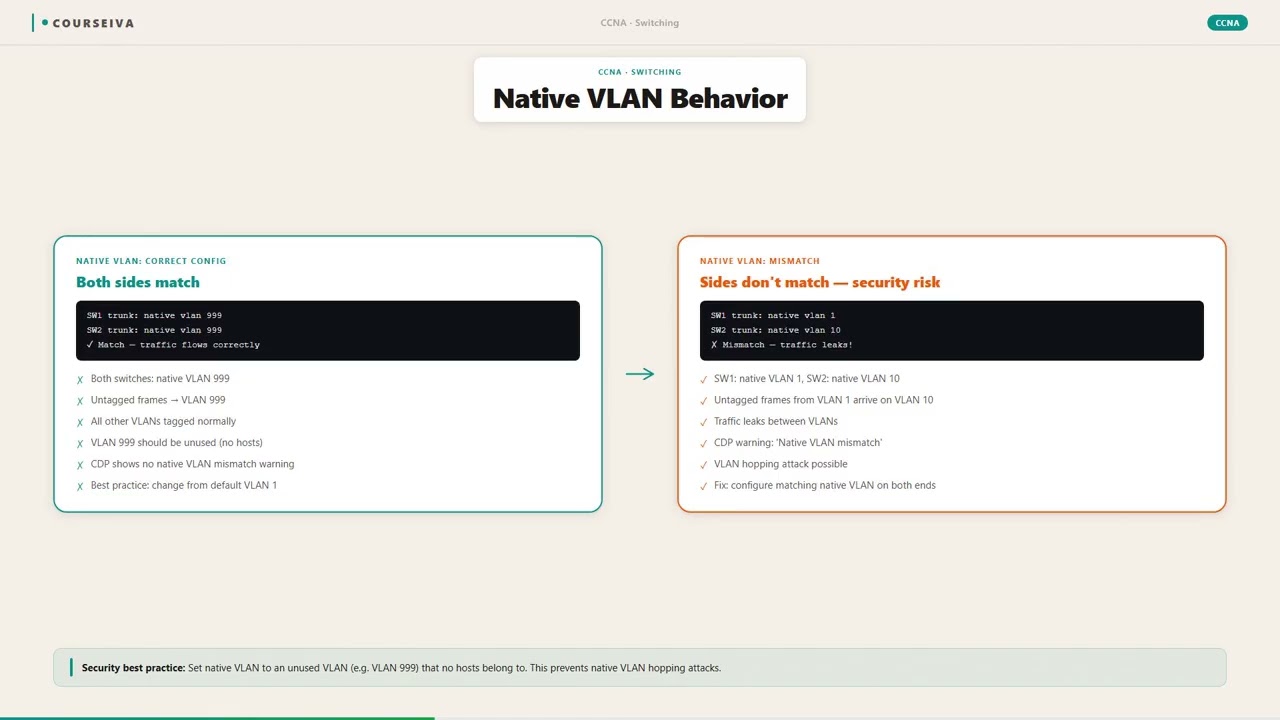
Example Scenario
You are the network administrator for a small company with two departments: Sales and Engineering. You have two Cisco switches connected by a trunk link. The Sales department is on VLAN 10, and Engineering is on VLAN 20.
You configure the trunk port on Switch A with a native VLAN of 99, but you forget to set the same native VLAN on Switch B. Switch B still has the default native VLAN of 1. The trunk comes up, but users start reporting that they cannot access the shared printer that is connected to Switch A.
You check the printer and see it is configured to use an IP address in VLAN 10 and is connected to an access port on Switch A. The printer sends untagged frames because it is a dumb device. Those untagged frames arrive at the trunk port of Switch A.
Switch A, expecting native VLAN 99, places those frames into VLAN 99. Switch A tags the frames and forwards them across the trunk to Switch B. On Switch B, the trunk port sees a tagged frame with VLAN ID 99.
Since Switch B does not have VLAN 99 configured, it drops the frame. The printer is never reached. Control traffic like CDP between the switches may generate error messages about native VLAN mismatch.
To fix this, you must configure both ends of the trunk with the same native VLAN, in this case setting Switch Bs trunk port to native VLAN 99 as well. Once you do, the printer works because the untagged frames are now correctly placed into VLAN 99 on both sides, and the appropriate VLAN mapping is established.
Common Mistakes
Assuming the native VLAN must always be VLAN 1
While VLAN 1 is the default native VLAN on most switches, it is not required. Best practice is to change it to a different, unused VLAN for security reasons.
Treat VLAN 1 as any other management VLAN and change the native VLAN to a non-default ID like 999 or 1002.
Configuring the native VLAN differently on the two ends of a trunk
A native VLAN mismatch causes untagged frames to be misinterpreted, leading to connectivity loss and STP issues.
Always verify that the native VLAN is identical on both sides of the trunk link.
Thinking that native VLAN means the VLAN that is native to the switch
The native VLAN is a property of a trunk port, not the switch itself. Each trunk port can have its own native VLAN.
Remember that native VLAN is configured per interface, not globally.
Believing that the native VLAN is always tagged
On the contrary, frames belonging to the native VLAN are typically sent untagged on a trunk port. Only non-native VLAN frames are tagged.
Untagged traffic on a trunk belongs to the native VLAN.
Forgetting that the native VLAN participates in VLAN hopping
An attacker can exploit the native VLAN by sending double-tagged frames. If the native VLAN is not properly secured, the attack can succeed.
Change the native VLAN to an unused VLAN and restrict trunk ports to only the VLANs that are needed.
Assuming that all traffic on a trunk is tagged
Traffic for the native VLAN is not tagged. This is a common misconception because trunks carry multiple VLANs, but the native VLAN is the exception.
Know that a trunk carries tagged traffic for all VLANs except the native VLAN.
Overlooking the native VLAN mismatch error message in CDP or LLDP
These protocols operate on the native VLAN, so a mismatch causes them to fail, and the error message is often ignored.
When you see a %CDP-4-NATIVE_VLAN_MISMATCH message, immediately correct the native VLAN configuration on both ends.
Exam Trap — Don't Get Fooled
{"trap":"The native VLAN must be the same as the management VLAN","why_learners_choose_it":"Many learners think that the native VLAN is used for management traffic and therefore should be the same as VLAN 1, which is often the default management VLAN.","how_to_avoid_it":"Understand that the native VLAN is not necessarily the management VLAN. The native VLAN is a function of a trunk port, not a management function.
The management VLAN is the VLAN that provides out-of-band management access to the switch. They can be the same, but best practice is to separate them for security."
Commonly Confused With
The default VLAN is the VLAN that all ports are assigned to by default on a switch, usually VLAN 1. The native VLAN is a property of a trunk port that specifies which VLAN untagged frames belong to. Not all ports are trunk ports, so not all ports have a native VLAN.
On a new switch, all ports are in the default VLAN 1. If you configure a trunk port, its native VLAN initially is also 1. But you can change the native VLAN while the default VLAN for access ports remains the same.
The management VLAN is the VLAN used for administrative access to the switch (e.g., SSH, SNMP). The native VLAN can be the same VLAN, but it is a separate concept. The management VLAN is for control, while the native VLAN is for handling untagged traffic.
If you set the management VLAN to 10 and the native VLAN to 99, then management traffic stays in VLAN 10, but untagged data frames on trunk ports go to VLAN 99.
The voice VLAN is a dedicated VLAN for IP phone traffic, often configured on an access port that also carries data. The native VLAN on a trunk carries untagged traffic, which may be data or voice depending on the configuration. They serve different purposes.
On a switch port connecting to an IP phone, the voice VLAN is VLAN 20, and the data VLAN is VLAN 10. If the port is also a trunk, the native VLAN could be set to 10 for untagged data frames, while voice frames are tagged with VLAN 20.
A data VLAN is any VLAN that carries user data traffic. The native VLAN is a specific VLAN that is designated as untagged on a trunk. It can be a data VLAN, but not all data VLANs are native.
If you have three data VLANs 10, 20, 30 on a trunk, the native VLAN is one of them, say 10. Frames for VLAN 10 are sent untagged, while frames for 20 and 30 are tagged.
Step-by-Step Breakdown
Frame arrives at a trunk port
A data frame from a connected device reaches the trunk interface on a switch. The switch hardware inspects the frame to see if it already contains an 802.1Q tag.
Check for 802.1Q tag
The switch checks the first two bytes of the Ethernet frame after the source MAC address. If the EtherType field is 0x8100, the frame is tagged with a VLAN ID. If not, the frame is considered untagged.
If untagged, assign to native VLAN
Untagged frames are automatically assigned to the VLAN that has been configured as the native VLAN on that trunk port. The switch does not add a tag; it internally marks the frame as belonging to that VLAN.
If tagged, validate VLAN ID
Tagged frames are examined for their 12-bit VLAN ID. If the VLAN ID is in the list of allowed VLANs on the trunk port, the frame is processed. If not, the frame is dropped.
Forwarding decision (switching)
The switch consults its MAC address table to determine which port or ports should receive the frame. The VLAN membership is used to restrict forwarding to only ports within the same VLAN.
Outgoing trunk port processing
When the frame is to be sent out of a trunk port, the switch checks whether the destination VLAN is the native VLAN. If it is, the frame is transmitted without an 802.1Q tag. If it is not, the switch adds the appropriate VLAN tag before sending.
Consistency check at the remote end
The receiving switch on the other end of the trunk performs the same steps. It interprets any untagged frames as belonging to its own native VLAN. If the native VLAN is mismatched, the frame ends up in the wrong VLAN, causing communication failures.
Practical Mini-Lesson
In a real-world production network, the native VLAN configuration is a critical detail that can make or break network stability. As a network engineer, you will encounter scenarios where legacy devices like older printers, IP cameras, or industrial controllers send data without VLAN tags. These devices rely on the native VLAN to remain connected when plugged into a trunk port. Therefore, you must decide which VLAN will serve as the native VLAN and ensure that it is consistent across the entire network.
The first step in practical configuration is to plan which VLAN ID to use for the native VLAN. Best practice is to not use VLAN 1, because it is the default and is often targeted by attackers. Instead, choose an unused VLAN ID that is not used for any user traffic, such as 999 or 1002. Then, on every trunk port, configure that VLAN as the native. On Cisco switches, the command is switchport trunk native vlan 999. You must also ensure that the same native VLAN is configured on the neighboring device, otherwise you will see CDP or LLDP mismatch alerts.
A common real-world issue is that during network migrations or upgrades, an engineer might forget to replicate the native VLAN configuration on new switches. This leads to mysterious intermittent failures. Troubleshooting such an issue involves checking the interface status with show interfaces trunk, which displays the native VLAN for each trunk. A mismatch will show different native VLAN values on each side. The command show cdp neighbors detail will also reveal a native VLAN mismatch if the devices are Cisco.
Another practical aspect is the interaction with spanning tree protocol. STP BPDUs are typically sent on the native VLAN. If the native VLAN is not configured identically, STP may fail to detect loops, causing broadcast storms. In a misconfigured scenario, a network could become completely unusable because of continuous broadcast frames.
From a cybersecurity perspective, the native VLAN is a weak point. An attacker who gains physical access to a trunk port can send double-tagged frames. The first tag is stripped by the switch, and the second tag causes the frame to be switched into a different VLAN. This is called VLAN hopping. The best defense is to change the native VLAN to an unused ID and to restrict the allowed VLANs on the trunk to only those that are necessary. Disabling unused trunk ports and using port security also helps.
Finally, in hybrid cloud environments, such as those tested in AWS SAA or AZ-104, on-premises switches may connect to cloud routers via VPN tunnels. The native VLAN configuration on the on-premises side must be correct to ensure that the cloud side can properly handle untagged traffic. While the cloud provider does not have a native VLAN per se, the on-premises switch must treat the uplink as a trunk port if multiple VLANs are extended to the cloud. Understanding native VLAN is therefore relevant in multi-site networking.
As a takeaway, always document your native VLAN choice and include it in your network change management process. Test your trunk configurations with tools like show interfaces trunk and be aware of mismatch warnings. This small configuration detail can prevent hours of troubleshooting and potential security breaches.
Native VLAN Fundamentals: Default Behavior and Security Implications
The Native VLAN is a fundamental concept in 802.1Q trunking that often confuses newcomers and appears frequently in certification exams like CCNA, Network+, and Security+. By default, every switch port participating in a trunk link is assigned a Native VLAN, typically VLAN 1 on Cisco equipment. The Native VLAN serves as the default VLAN for traffic that is not explicitly tagged with an 802.1Q header. When a trunk port receives an untagged frame, it automatically assumes that frame belongs to the Native VLAN. This behavior is critical because it allows legacy devices that do not support 802.1Q tagging to communicate across a trunk link. However, this convenience comes with severe security risks. If an attacker can inject untagged frames into a trunk link, they can potentially jump VLANs, a classic VLAN hopping attack.
To prevent such attacks, network administrators must change the Native VLAN on trunk ports from the default VLAN 1 to an unused, arbitrary VLAN number. They should explicitly tag all traffic on the trunk, even the Native VLAN, using the "native vlan tag" command on some switches. Misconfiguration of the Native VLAN is a common cause of connectivity issues. For example, if two switches have mismatched Native VLANs, control-plane traffic like CDP, VTP, and DTP may fail to communicate, and user traffic might be black-holed or misdirected. In exam scenarios, you might be asked to identify why devices on the same VLAN cannot ping each other across a trunk, and the answer often lies in a Native VLAN mismatch. Understanding the Native VLAN's role in both Layer 2 forwarding and security is essential for any network professional.
The Native VLAN also plays a role in the Spanning Tree Protocol. BPDUs are always sent untagged and belong to the Native VLAN. Therefore, if the Native VLAN is mismatched, STP convergence can be disrupted, leading to loops or blocked ports. Cisco switches send CDP and VTP advertisements untagged on the Native VLAN as well. This means that if you change the Native VLAN on one side but not the other, those protocols will not be exchanged, making troubleshooting difficult. Exam questions often combine these concepts, asking you to determine the effect of changing the Native VLAN on a trunk that carries multiple VLANs. The correct answer usually involves a loss of management connectivity or a VLAN hopping vulnerability. Always remember: the Native VLAN is not just a tagging preference; it is a security and protocol boundary.
the Native VLAN is the untagged VLAN on an 802.1Q trunk, defaulting to VLAN 1, and must be carefully configured to avoid both connectivity problems and security exploits. For exams, focus on the fact that mismatched Native VLANs break protocol exchanges, and that changing the Native VLAN away from VLAN 1 is a best practice. Also, know that on some switches like Juniper, the Native VLAN is called the "untagged VLAN," so be prepared for cross-vendor terminology. This section provides the foundation for understanding more advanced Native VLAN topics such as cost, tagging, and troubleshooting.
Native VLAN Mismatch: Symptoms, Causes, and Recovery
A Native VLAN mismatch occurs when the Native VLAN configured on one end of an 802.1Q trunk differs from the Native VLAN on the other end. This is one of the most common and exam-relevant issues in switched networks. The symptoms are often subtle. You might notice that some VLANs communicate fine across the trunk, while others do not. Specifically, traffic from the Native VLANs themselves may not pass because each switch expects untagged frames to belong to a different VLAN. For example, if Switch A has Native VLAN 10 and Switch B has Native VLAN 20, then an untagged frame from Switch A belonging to VLAN 10 will be received by Switch B and interpreted as belonging to VLAN 20, causing it to be dropped or forwarded incorrectly.
Beyond user data traffic, control-plane protocols like Cisco Discovery Protocol (CDP), VLAN Trunking Protocol (VTP), and Dynamic Trunking Protocol (DTP) are sent untagged on the Native VLAN. Therefore, a mismatch will prevent these protocols from working. You may see CDP error messages on both switches indicating a Native VLAN mismatch. The Cisco IOS automatically generates a syslog message: "%CDP-4-NATIVE_VLAN_MISMATCH: Native VLAN mismatch discovered on Port GigabitEthernet0/1 (10), with Switch B (20)." This is the most direct clue in a lab or exam. Spanning Tree Protocol BPDUs are also sent untagged, so a mismatch can cause STP to fail to converge, leading to loops or port blocking.
The root cause of a mismatch is usually human error during configuration. An administrator might change the Native VLAN on one switch but forget to apply the same change to the other. Another common scenario is when a switch port defaults to VLAN 1 as the Native VLAN, and someone mistakenly changes it on only one side. To recover, you must ensure both ends agree on the same Native VLAN number. The command to set the Native VLAN is "switchport trunk native vlan <vlan-id>" in Cisco IOS. After correcting the mismatch, use "show interfaces trunk" to verify that the Native VLAN is consistent.
In exam questions, a mismatch scenario is often presented as a troubleshooting item. You might be given a diagram where PCs in VLAN 10 can't ping each other, but show commands reveal a native VLAN mismatch. The correct answer will identify the mismatch and suggest setting both ends to the same VLAN. Alternatively, the exam might ask what happens to CDP or STP when the Native VLAN is mismatched. The answer is that CDP will report the error, and STP may cause a loop or fail to converge. Understanding the full impact of a mismatch-especially on control traffic-is key to passing your CCNA, Network+, or Security+ exam. This section prepares you to quickly diagnose and resolve this common issue.
Native VLAN Security: Preventing VLAN Hopping Attacks
VLAN hopping is a network attack that allows an attacker to send traffic across VLAN boundaries without authorization, and the Native VLAN is often the vector. The classic attack involves an attacker connected to a switch port that is configured as a trunk. If the attacker can negotiate trunking using DTP (Dynamic Trunking Protocol), they can send tagged frames for any VLAN. However, a simpler attack involves the Native VLAN. When a trunk port receives untagged frames, it assigns them to the Native VLAN. If an attacker sends frames with an 802.1Q tag on top of untagged traffic (double encapsulation), they can potentially reach a VLAN that the Native VLAN can access, effectively hopping VLANs. This double-tagging attack works because the first switch strips the outer tag when sending frames across the trunk, and the inner tag remains, causing the receiving switch to forward the frame into the attacker's desired VLAN.
To mitigate these attacks, Cisco recommends a series of best practices. First, disable DTP on all access ports using the command "switchport nonegotiate" or by setting the port to access mode explicitly. This prevents an attacker from enabling trunking. Second, change the Native VLAN on trunk ports from the default VLAN 1 to a dedicated, unused VLAN. This way, even if an attacker injects untagged frames, they will only reach a VLAN with no hosts, limiting the attack surface. Third, explicitly tag all traffic on the trunk, including the Native VLAN, using the "switchport trunk native vlan tag" command if supported. This forces all frames to be tagged, eliminating the untagged lane altogether. Fourth, configure the switchport as a trunk only on ports that truly need trunking, and set all other ports to access mode.
The exam relevance of these security measures is high. On the Security+ exam, you may be asked about VLAN hopping and how to prevent it. The correct answer often involves disabling trunk negotiation and changing the Native VLAN. On the CCNA, you might be asked to configure secure trunking by implementing these steps. On the Cisco-specific portions of Network+, you may see a scenario where an attacker bypasses VLAN segmentation, and you must identify the misconfiguration that allowed the attack-typically a trunk port set to allow DTP or Native VLAN left as VLAN 1.
Another subtle security point: the Native VLAN is sometimes used for management traffic. If the management VLAN is the same as the Native VLAN and is left as VLAN 1, an attacker who gains access to the untagged traffic can potentially sniff management frames. Therefore, it is wise to assign the management VLAN to a different, tagged VLAN. Native VLAN security is about denying attackers the ability to inject or manipulate untagged frames. Always set the Native VLAN to an unused, arbitrary VLAN, disable DTP, and if possible, tag the Native VLAN. This three-pronged approach is tested across multiple certifications, and understanding it will secure both your network and your exam score.
Native VLAN Troubleshooting: Diagnostic Commands and Common Pitfalls
Troubleshooting Native VLAN issues requires a systematic approach using show commands and understanding of Layer 2 protocols. The primary tool is "show interfaces trunk" in Cisco IOS. This command displays the trunk ports, the allowed VLAN list, and most importantly, the Native VLAN for each trunk. Look for discrepancies between the two ends. You can also use "show interfaces <interface> switchport" to see detailed port configuration including the Native VLAN. For a quick cross-check, use "show cdp neighbors <interface> detail" to see if a native VLAN mismatch is reported by CDP. CDP syslog messages are a direct indicator.
Another diagnostic command is "show vlan" which shows the VLAN database but does not directly show trunk port configurations. However, if a Native VLAN mismatch causes traffic disruption, you might see certain VLANs missing from the MAC address table for that port. Use "show mac address-table interface <interface>" to see if you are learning MAC addresses for the Native VLAN correctly. If you see MAC addresses from the wrong VLAN, it suggests a mismatch. A ping test across the trunk is also useful. If devices in the same VLAN cannot communicate, but devices in other VLANs can, suspect a Native VLAN issue.
Common pitfalls include forgetting that some switches (like old Cisco 2950s) have a default Native VLAN of 1, and changes require the "switchport trunk native vlan <vlan-id>" applied to both sides. Another pitfall is mixing vendors: on Juniper switches, the Native VLAN is configured as the "untagged VLAN" in the port configuration. If a Cisco and Juniper switch are trunked together, the Native VLAN must match or be set to something both agree on. Also, note that some manufacturers treat the Native VLAN as the default VLAN for the port, but on a trunk, it's specifically the untagged VLAN.
In exams, you might be given a series of show command outputs and asked to identify the root cause of a connectivity problem. For example, the output of "show interfaces trunk" shows Native VLAN 10 on one switch and Native VLAN 20 on the other. The question might ask: "What is the most likely cause of PCs in VLAN 10 being unable to ping each other across this trunk?" The answer is the Native VLAN mismatch. Another common exam question involves interpreting a CDP error message. The question might read: "You see syslog messages indicating a CDP Native VLAN mismatch. Immediately after, users report that the network is slow. What is happening?" The answer is that Spanning Tree Protocol is reconverging due to the mismatch, causing temporary loops or port blocking.
For the AWS-SAA, though not directly about switches, understanding network segmentation at Layer 2 is still beneficial, but the Native VLAN topic is more relevant to on-premises networking. However, for AZ-104 and Google ACE, you may not directly configure Native VLANs, but knowledge of VLAN hopping helps in designing secure virtual network architectures that mimic physical network segmentation. Mastering troubleshooting commands and understanding symptoms is crucial for exam success. This section equips you with the diagnostic steps and exam-specific interpretations needed to confidently handle Native VLAN questions.
Troubleshooting Clues
Native VLAN Mismatch
Symptom: CDP syslog message: %CDP-4-NATIVE_VLAN_MISMATCH; traffic in some VLANs works, others don't; ping fails within the Native VLAN.
The Native VLAN configured on each end of the trunk is different. Untagged frames from one switch are interpreted as belonging to a different VLAN on the other switch.
Exam clue: Exam questions often present a CDP error message and ask for the root cause. The correct answer is a Native VLAN mismatch.
VLAN Hopping via Double Tagging
Symptom: Unexpected inter-VLAN communication; an attacker from an access port can reach devices in a different VLAN.
An attacker sends double-tagged frames. The first switch strips the outer tag (Native VLAN), and the inner tag causes the frame to traverse to another VLAN.
Exam clue: This attack is classic for Security+ and CCNA. The fix involves changing the Native VLAN to an unused VLAN and disabling DTP.
Untagged Traffic Lost on Trunk
Symptom: Management traffic (CDP, VTP, STP) not exchanged across trunk; switch not learning neighbors.
Control-plane traffic is sent untagged and belongs to the Native VLAN. If the Native VLAN is filtered or not allowed on the trunk, these protocols fail.
Exam clue: You may be asked why CDP neighbors are not discovered. The answer often involves a misconfigured Native VLAN or allowed VLAN list.
Native VLAN Mismatch Causing STP Loop
Symptom: Redundant links cause broadcast storms; STP fails to converge; high CPU utilization on switches.
BPDUs are sent untagged on the Native VLAN. A mismatch causes STP to not receive BPDUs correctly, leading to loops.
Exam clue: In troubleshooting scenarios, a Native VLAN mismatch is a hidden cause of STP issues. Look for CDP mismatch errors first.
Native VLAN Set to VLAN 1 on Trunk
Symptom: Potential security vulnerability; high risk of VLAN hopping; easy for attackers to brute-force.
VLAN 1 is the default and often used for management. Leaving it as the Native VLAN simplifies attacks and should be changed.
Exam clue: Best practice questions ask which VLAN to avoid using as the Native VLAN. The answer is always VLAN 1.
Inconsistent Native VLAN Across VTP Domain
Symptom: VTP synchronization fails; VLAN database not updating across switches.
VTP advertisements are sent untagged on the Native VLAN. A mismatch prevents VTP from propagating VLAN information.
Exam clue: CCNA questions may combine VTP and Native VLAN mismatches as a cause of VLAN propagation failure.
Trunk Port in err-disable State
Symptom: Port goes into err-disable state due to Native VLAN mismatch loop detection.
Some switches detect a mismatch and err-disable the port to prevent loops or misforwarding.
Exam clue: You may be asked why a trunk port is err-disabled. The cause could be a Native VLAN mismatch detected by CDP or STP.
Memory Tip
Think NT: Native is Untagged. Native VLAN frames are the only ones sent without a tag on a trunk.
Learn This Topic Fully
This glossary page explains what Native VLAN means. For a complete lesson with labs and practice, see the topic guide.
Covered in These Exams
Current Exam Context
Current exam versions that test this topic — use these objectives when studying.
SY0-701CompTIA Security+ →AZ-104AZ-104 →200-301Cisco CCNA →N10-009CompTIA Network+ →ACEGoogle ACE →SAA-C03SAA-C03 →220-1201CompTIA A+ Core 1 →Legacy Exam Context
Older materials may mention these exam versions, but learners should use the current objectives for their target exam.
N10-008N10-009(current version)SY0-601SY0-701(current version)Related Glossary Terms
802.1Q is the networking standard that allows multiple virtual LANs (VLANs) to share a single physical network link by tagging Ethernet frames with VLAN identification information.
Two-factor authentication (2FA) is a security method that requires two different types of proof before granting access to an account or system.
802.1X is a network access control standard that authenticates devices before they are allowed to connect to a wired or wireless network.
AAA (Authentication, Authorization, and Accounting) is a security framework that controls who can access a network, what they are allowed to do, and tracks what they did.
An A record is a type of DNS resource record that maps a domain name to an IPv4 address.
An AAAA record is a DNS record that maps a domain name to an IPv6 address, allowing devices to find each other over the internet using the newer IP addressing system.
A/B testing is a controlled experiment that compares two versions of a single variable to determine which one performs better against a predefined metric.
A 2-in-1 laptop is a portable computer that can switch between a traditional laptop form and a tablet form, usually by detaching or rotating the keyboard.
Quick Knowledge Check
1.Which of the following is the primary security reason to change the default Native VLAN on a trunk port?
2.A network administrator sees the syslog message '%CDP-4-NATIVE_VLAN_MISMATCH' on a switch. What is the most likely cause?
3.Which command would you use to verify the Native VLAN on a Cisco switch trunk port?
4.An attacker successfully sends traffic from VLAN 10 to VLAN 20 across a trunk. Which misconfiguration likely allowed this?
5.What is the default Native VLAN on most Cisco switches?
6.After changing the Native VLAN on a trunk, which protocol will stop working if the other end is not updated?
Frequently Asked Questions
Can I have more than one native VLAN on a trunk port?
No, a trunk port can only have one native VLAN. All untagged frames are assigned to that single native VLAN.
What happens if I do not set a native VLAN?
Most switches use the default native VLAN, which is typically VLAN 1. It is recommended to explicitly configure it to an unused VLAN for security.
Does native VLAN affect access ports?
No, access ports do not have a native VLAN. The native VLAN concept only applies to trunk ports.
Is the native VLAN always the same as the management VLAN?
Not necessarily. They are often the same (VLAN 1) by default, but they can be configured separately.
How do I check the native VLAN on a Cisco switch?
Use the command show interfaces trunk on the switch. The output includes a line showing the native VLAN for each trunk.
What is the best practice for native VLAN in a production network?
Change the native VLAN to an unused VLAN ID, such as 999, and ensure it is consistent on both ends of every trunk.
Can the native VLAN be tagged?
By definition, frames in the native VLAN are sent untagged on a trunk. However, some vendors offer an option to tag the native VLAN, but this is rare and non-standard.
Summary
The native VLAN is a critical configuration element on trunk ports in Ethernet switching. It serves as a fallback VLAN for untagged frames, ensuring backward compatibility with devices that do not support IEEE 802.1Q tagging. While the default native VLAN is VLAN 1 on most switches, leaving it unchanged introduces significant security risks, including vulnerability to VLAN hopping attacks. Network professionals must understand not only how to configure the native VLAN, but also how to troubleshoot common issues like native VLAN mismatches, which can cause loss of connectivity, spanning tree instability, and control protocol failures.
In certification exams, the native VLAN is a frequent topic, especially in CCNA and Network+. It appears in configuration, troubleshooting, and security scenario questions. Learners must know the default value, the commands to change it, and the best practices for securing a network. A solid grasp of this concept reflects a deeper understanding of VLAN architecture, trunking, and network segmentation.
For anyone pursuing a career in networking, the native VLAN is not just a theory topic. It is a practical, day-to-day consideration when designing and maintaining switched networks. By mastering this term, you will be better prepared to build secure, stable, and efficient networks, and to answer exam questions with confidence.